You are here:
Rules Log
The Rules Log is a Lightning web component that shows the history of all the rules run that result in a state transition. These details help users understand how records have transitioned from one state to another.
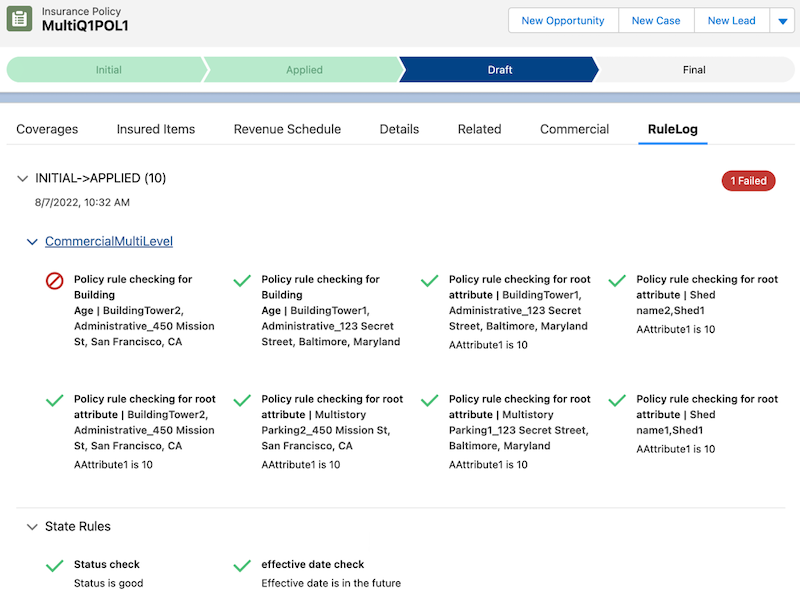
Rules Log Workflow
-
Add the Rules Log to a Record Page
Users and system admins can add the Rules Log Lightning web component to quotes, assets (policies), insurance policies, and claims.
-
The Rules Log shows a history of product underwriting (workflow) and state transition rule runs. For underwriting (workflow) rules, the log shows the history of rules run on a quote, policy, or claim. For state transition rules, the log shows the history of rules run on any object.
- Add the Rules Log to a Record Page
Salesforce admins can add the Rules Log Lightning web component to quotes, assets (policies), insurance policies, and claims. - View the Rules Log
The Rules Log shows a history of product underwriting (workflow) and state transition rule runs. For underwriting (workflow) rules, the log shows the history of rules run on a quote, policy, or claim. For state transition rules, the log shows the history of rules run on any object.
Did this article solve your issue?
Let us know so we can improve!
