Loading
Salesforce now sends email only from verified domains. Read More
Insurance
Table of Contents
Select Filters

          No results
          No results
          Here are some search tips

          Check the spelling of your keywords.
          Use more general search terms.
          Select fewer filters to broaden your search.

          Search all of Salesforce Help
          Save Your Experience Site Template

          Save Your Experience Site Template

          Save a template so that you can customize the Experience site for your users. This step is necessary so that you can uninstall the unmanaged package.

          The highlighted area in this flow shows where you are in the process of setting up your Experience site:

          Illustrates the Experience site workflow with the fifth step highlighted.
          1. On the Experience Builder page, open the Settings (gear) menu.
          2. Select Developer on the left side of the window.
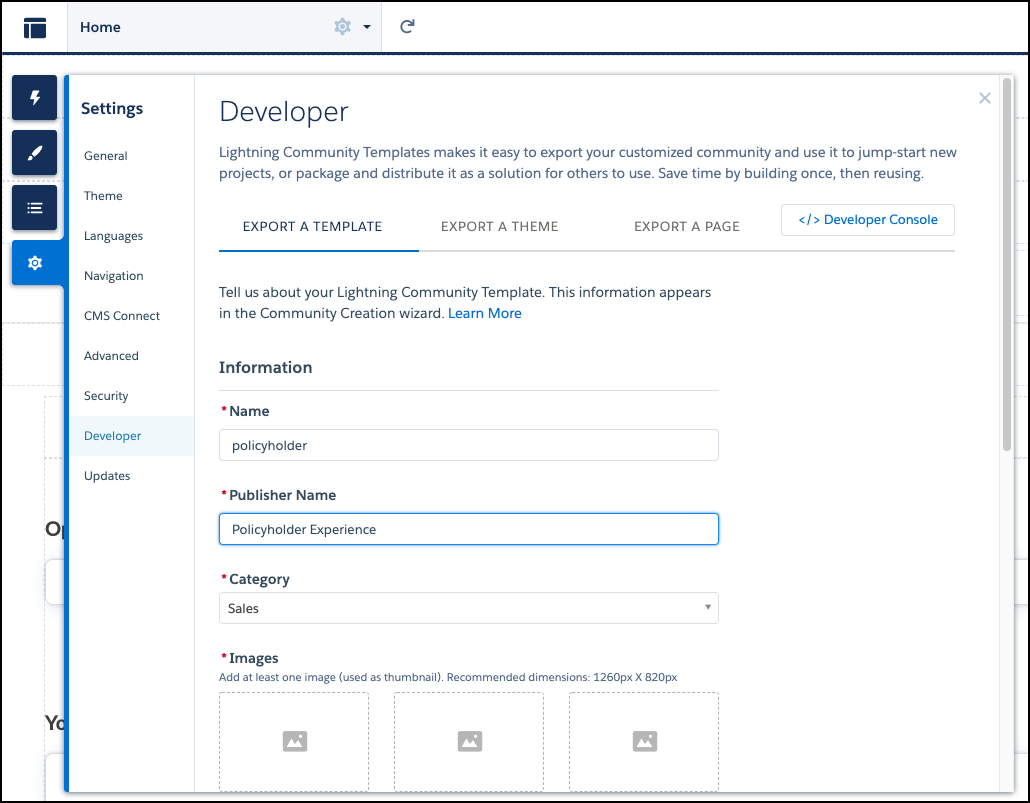
          3. On the Export a Template tab, enter the required information.
            Illustrates the Export a Template tab.
          4. Click Export.
           
          Loading
          Salesforce Help | Article