Loading
Salesforce now sends email only from verified domains. Read More
Help Agent Performance DegradationRead More
Insurance
Table of Contents
Select Filters

          No results
          No results
          Here are some search tips

          Check the spelling of your keywords.
          Use more general search terms.
          Select fewer filters to broaden your search.

          Search all of Salesforce Help
          insQuoteInsuredItems Lightning Web Component

          insQuoteInsuredItems Lightning Web Component

          The insQuoteInsuredItems component, called Vlocity Insurance Quote Insured Items in the Lightning App Builder, shows users all the insured items in a quote.
          This component works for desktop and is mobile responsive.

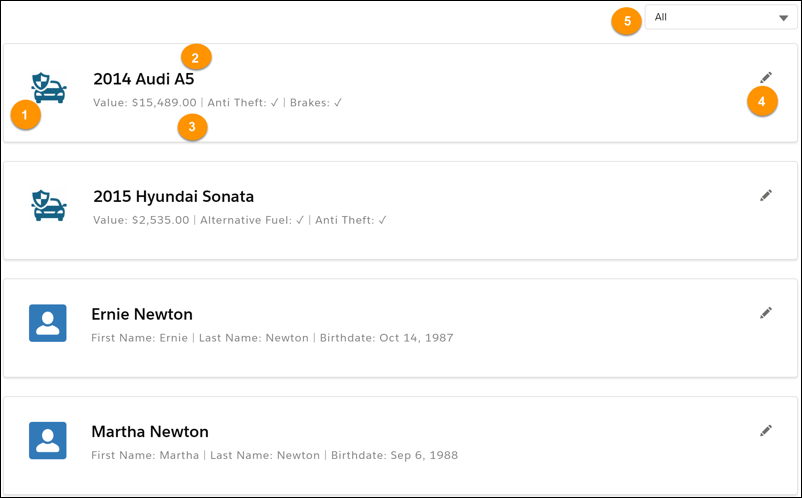
          Here's what it looks like in the user interface:

          insQuoteInsuredItems LWC elements highlighted

          The insQuoteInsuredItems LWC displays:

          1. An icon for the insured item type

          2. The name of the insured item

          3. Attributes of the insured item

          4. Option to edit the insured item

          5. A filter for insured items

          What Users Can Do on this LWC

          • See all insured items for a quote

          • See details of insured items

          • Edit insured item details

          • Filter insured items based on product type

          What this LWC Does

          • Updates the quote line item when a user changes an attribute value

          • Displays messages to re-rate the Quote when an insured item attribute has changed

          Services Called by this LWC

          insQuoteInsuredItems does not call any services.

          Other LWCs Used by this Component

          insQuoteInsuredItems uses these LWCs:

          • insUtility

          • insProductInstance

          • insRecordEditor

           
          Loading
          Salesforce Help | Article
