You are here:
Underwriting (Workflow) Rules
Underwriting (workflow) rules can help automate your business processes as quotes get issued as policies, when policies become eligible for mid-term adjustments (MTAs), when it's time to renew or cancel a policy, and for claims processing.
Although the UI calls them Underwriting Rules, in fact, this type of rule can be used in any scenario when a record advances from one state to another, such as from Draft to Underwriting Review, or from Draft to Adjuster Review, or from Review to Issued.
For example, you can create an underwriting rule that automatically declines quotes that meet specified criteria. If any rule evaluates to true, the record's state transitions to declined and the specified action runs.
Here are some examples of underwriting rules:
Scenario |
Applicable Type |
Transition Name |
True Action |
Rule Scope |
Expression |
|---|---|---|---|---|---|
Automatically decline a quote if the vessel is over 25 years old. |
Quote |
Submit > Decline |
Decline Quote |
Watercraft |
WC.wcAge > 25 |
Automatically decline a quote if the vessel is taken more than 100 miles off shore. |
Quote |
Submit > Decline |
Decline Quote |
Watercraft |
WC.wcDistance > 100 |
Refer to underwriting if an operator's licensing points is greater than or equal to five. |
Quote |
Submit > Underwriting |
Refer to Underwriting. |
Pilot |
wcOperator.opPoints >= 5 |
Refer to underwriting if the vessel is taken 50 or more miles off shore. |
Quote |
Submit > Underwriting |
Refer to Underwriting |
Watercraft |
WC.wcDistance >= 50 |
The system logs underwriting (workflow) rules after they're run, and displays them in the Rules Log.
Services and UIs that Run Underwriting Rules
Many Insurance and Vlocity Health services run underwriting rules. You can add these services to OmniScripts and Integration Procedures when you want the rules to run.
These are the invoke rules services:
These LWC-based UIs also call services that run underwriting (workflow) rules:
-
Quote
-
Claim
Limiting the Scope of Rules for Quotes and Insurance Policies
For quotes and insurance policies, use Rule Scope to apply an underwriting rule to a particular type of insured item or insured party. Your processes run more efficiently and accurately because each rule runs for exactly the right line items in a quote or insurance policy.
For example, if a root product includes Auto (1) and Driver (2) as insured items, underwriting rules for that product can have a rule scope of either Auto or Driver (3). If you add a rule that evaluates the monetary value of an automobile, define its Rule Scope as Auto so that it runs just for automobiles, not for drivers.
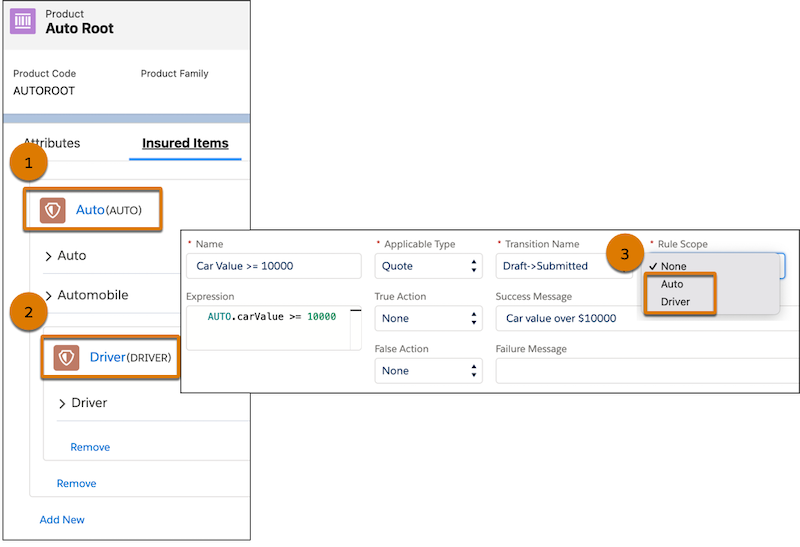
If Rule Scope is None, the default rule scope is the root product, and the rule behaves the same way as it did in Summer ‘22 and earlier.
If a quote or insurance policy includes multiple root products, rules defined for each root product run separately.
Underwriting Rules by Instance
For quotes and insurance policies, set up underwriting rules at the root product level. Specify Rule Scope to apply the rules to particular types of insured items or insured parties. By limiting the scope of the rule, you limit the number of times the rule runs, which improves performance.
For example, an auto insurance policy has two cars, a Toyota and a Honda. Kelly drives one of the cars, and the other car is kept in an insured garage.
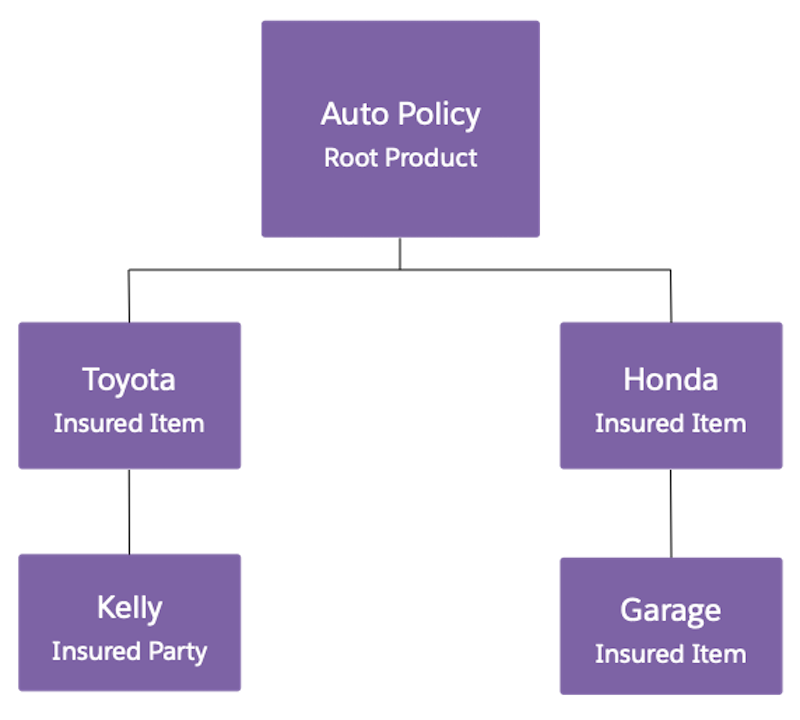
With Rule Scope defined as:
-
Driver, the rule runs for Kelly.
-
Car, the rule runs for the Toyota and the Honda.
-
None, the rule runs for Kelly and the Garage, taking into account additional attribute data from their parent instances.
For assets, contracts, insurance claims, and claim coverages, underwriting rules are invoked on a per-instance basis. You still set up underwriting rules at the root product level. For multi-instance scenarios, make sure the instance key is populated on the insured item or insured party.
- Create an Underwriting Rule
Use underwriting rules to automate quoting, policy, and claims management business processes.For quotes and policies, apply underwriting rules to specific types of insured items or parties, and trigger unique messaging and actions based on whether each rule passes or fails.
