You are here:
View the Rules Log
The Rules Log shows a history of product underwriting (workflow) and state transition rule runs. For underwriting (workflow) rules, the log shows the history of rules run on a quote, policy, or claim. For state transition rules, the log shows the history of rules run on any object.
To view the Rules Log on the quote, asset (policy), insurance policy, or claim record page, click Rules Log or whatever name was defined for the Rules Log on the record page.

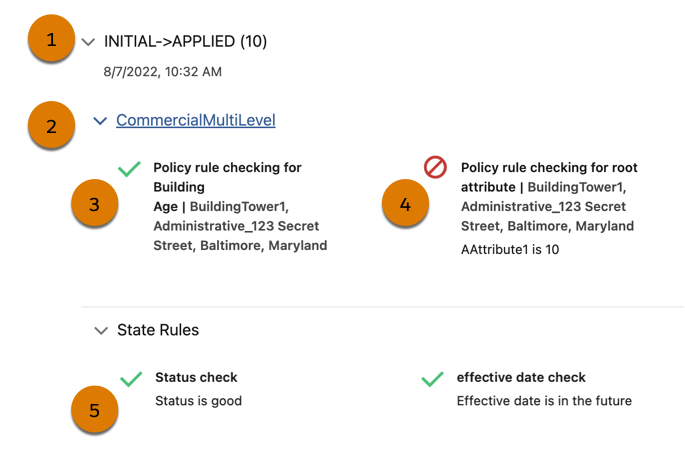
The Rules Log groups details by state transition (1). A count of rule runs appears next to transition names.
Expand a product name (2) to review:
-
The name of each rule run.
-
Whether each rule passed or failed. Rules that evaluate to true have a green checkmark (3) next to them. Rules that evaluate to false have a circle-backslash symbol (4) next to them.
-
The name of the instance for which the rule was run, for example, a quote line item.
-
The name of each state rule run.
-
Whether each rule passed or failed.
-
The success or failure message for each rule (5).
