You are here:
Insurance Quote Line Items
Quote line items are stored as separate objects that are associated with and linked to their associated quote object.
We store these as quote line items:
-
Insured items
-
Insured parties
-
Coverages
-
Root products
The Quote Line Item fields used by Vlocity are:
-
Product
The root product that this quote line item's quote is rating and quoting.
Every quote line item must have a value in Product.
-
Line Item Number
A unique number automatically assigned to each quote line item.
Vlocity uses the Line Item Number to create relationships between quote line items.
-
Parent Item Id
If this is not the root line item, this field's value is the Id of the root quote line item for this quote.
If this is the quote's root line item, this field is blank.
Vlocity uses the Parent Item Id to create relationships between quote line items.
-
Sub Parent Item Id
The quote line item Id of the subparent to this quote line item.
If this quote line item is a child (not a grandchild), this value is the same as the Parent Item Id.
If this quote line item is the root (parent), this field is blank.
Vlocity uses the Sub Parent Item Id to create relationships between quote line items.
-
Primary Child Line Item
Identifies a primary insured party if one has been set. For example, the primary driver in an auto policy gets an Id in this field.
-
Sales Price
The calculated premium for this quote line item.
-
Fee Amount
The calculated fee for this quote line item.
-
Tax Amount
The calculated tax for this quote line item.
-
Total Amount
Fee Amount + Tax Amount + Sales Price
-
Total Sum Insured
For insured items, this equals the formula you set to calculate the total insured amount for an insured item.
For the root product, this value = SUM of insured items.
-
Attribute Selected Values
Populated for any quote line item that has attributes. Not populated if a quote line item has no attributes. Shows the selected values for each attribute. If no value is selected, the attribute appears here with value = null.
-
CalculatedPriceJSON
Set on the top-level product quote line items for multi-root
Relationships Between Quote Line Items
When Vlocity creates a quote and its associated quote line items, it also creates relationships between those quote line items. Vlocity uses the Parent Id and Sub Parent Id values to create these relationships.
The relationships between coverages, insured items, and root products are determined by the root product model.
For example, an auto insurance root product named Collectors Auto has insured items, insured parties, and coverages tied to it.
The structure of the product model looks like this:
-
Collectors Auto (root product)
-
Auto (insured item)
-
Bodily Injury and Property Damage (coverage)
-
Comprehensive (coverage)
-
Collision (coverage)
-
Medical Payments (coverage)
-
Uninsured Motorist (coverage)
-
Rental Car (coverage)
-
-
Driver (insured party)
-
A customer creates a quote for Collectors Auto, with two cars and one driver. Here's what the quote line items and their relationships look like this:
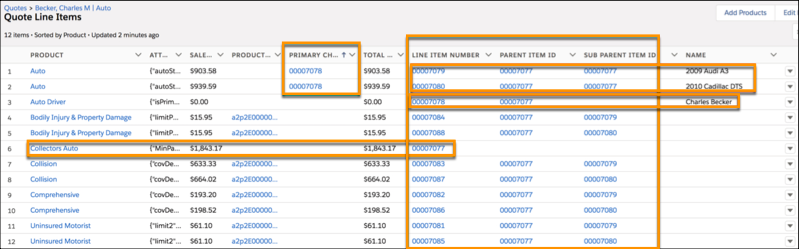
In this example, the relationships are:
-
Collectors Auto
The root product for this quote.
Has a unique Line Item Number.
Doesn’t have a Parent Id or Sub Parent Id.
-
Auto: 2009 Audi A3
One insured item on this quote.
Parent Id = The quote line item Id of Collectors Auto (the root product)
Sub Parent Id = The quote line item Id of Collectors Auto (the root product)
-
Auto: 2010 Cadillac DTS
Another insured item on this quote.
Parent Id = The quote line item Id of Collectors Auto (the root product)
Sub Parent Id = The quote line item Id of Collectors Auto (the root product)
-
Auto Driver: Charles Becker
The insured party on this quote.
Parent Id = The quote line item Id of Collectors Auto (the root product)
Sub Parent Id = null
-
Collision
A coverage on the 2009 Audi A3
-
Line Item Number = Unique value
-
Parent Id = The quote line item Id of Collectors Auto
-
Sub Parent Id = The quote line item Id of Auto: 2009 Audi A3
-
-
Collision
A coverage on the 2010 Cadillac DTS
-
Line Item Number = Unique value
-
Parent Id = The quote line item Id of Collectors Auto
-
Sub Parent Id = The quote line item Id of Auto: 2010 Cadillac DTS
-
All the other coverages in this example have the same relationship structure as Collision.
To get to the Quote Line Items, click the Related tab on the quote object, then click the name of the Quote Line Item you want to see.
