You are here:
Watercraft Rating
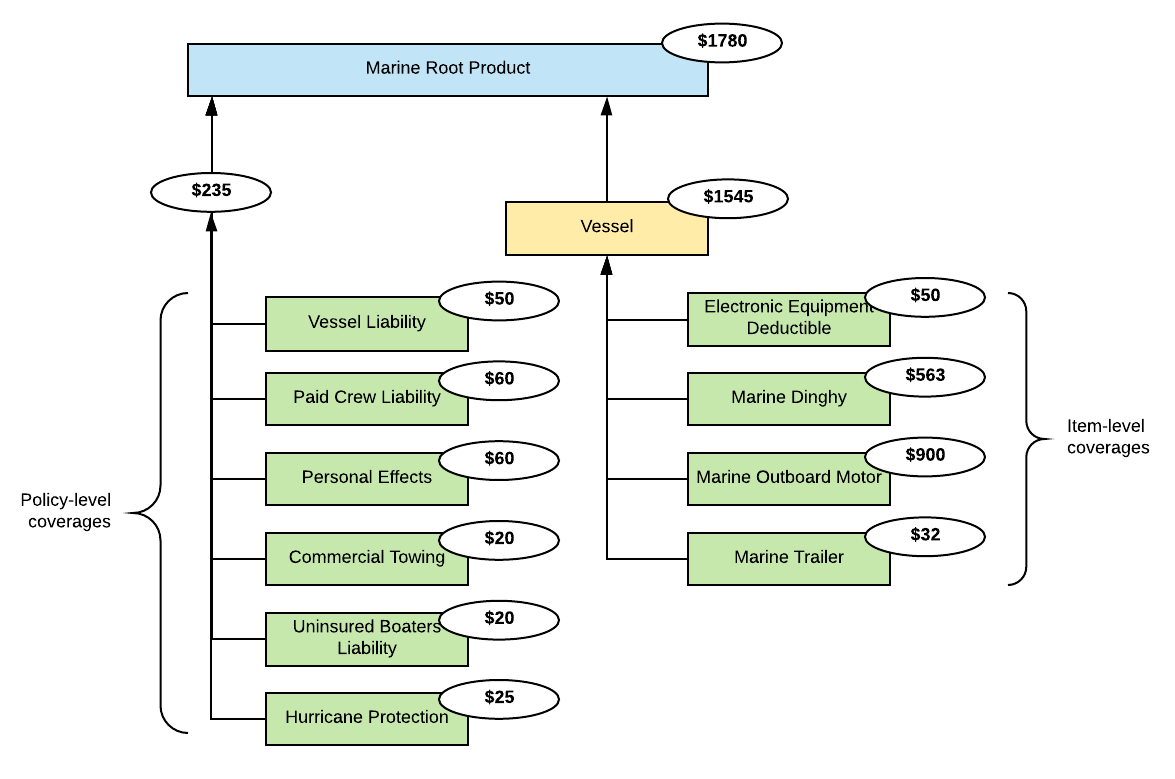
When we quote and endorse the Marine product, our pricing services use the product model data, product rating procedure, and pricing formulas. The services use these components to price the coverages, vessels, and total premium. The service does the following to price the product:
-
Pulls data from the user input to form the rating input data.
-
Calls the rating procedure and uses the rating input data to calculate the coverage prices.
-
Takes the coverage price data returned by the rating procedure, then inserts it into the product model.
-
Rolls up the coverage prices to the vessels using the vessels pricing formula.
-
Rolls up the coverage prices for the policy-level coverages calculated using the policy-level pricing formula.
-
Rolls up the vessel prices and the policy-level coverage prices to the total (quoted) premium price.
Here's what that looks like:
The rating procedure we use is the Marine_Rating Integration Procedure. It calculates the coverage prices for the Marine product. Any time a broker or customer service rep generates a quote for a potential customer, the quote business process calls this rating procedure to calculate the price for that quote.
Each insurer defines how they will calculate prices for their insurance products. You can use our example as a guide as you decide how to create your own insurance rating procedure.
To learn the basics about Vlocity Insurance rating procedures for pricing insurance products, see Rating Procedures.
Rating Input
To understand the construction of the rating procedure, you need to understand the form of the input data passed into the procedure. The Marine product includes a Vessel insured item spec as the primary multi-instance item that watercraft policies will insure. You can create quotes for multiple vessels.
Some of the coverages in the model are children of the Vessel insured item spec. This way, these coverages can be configured separately for each vessel.
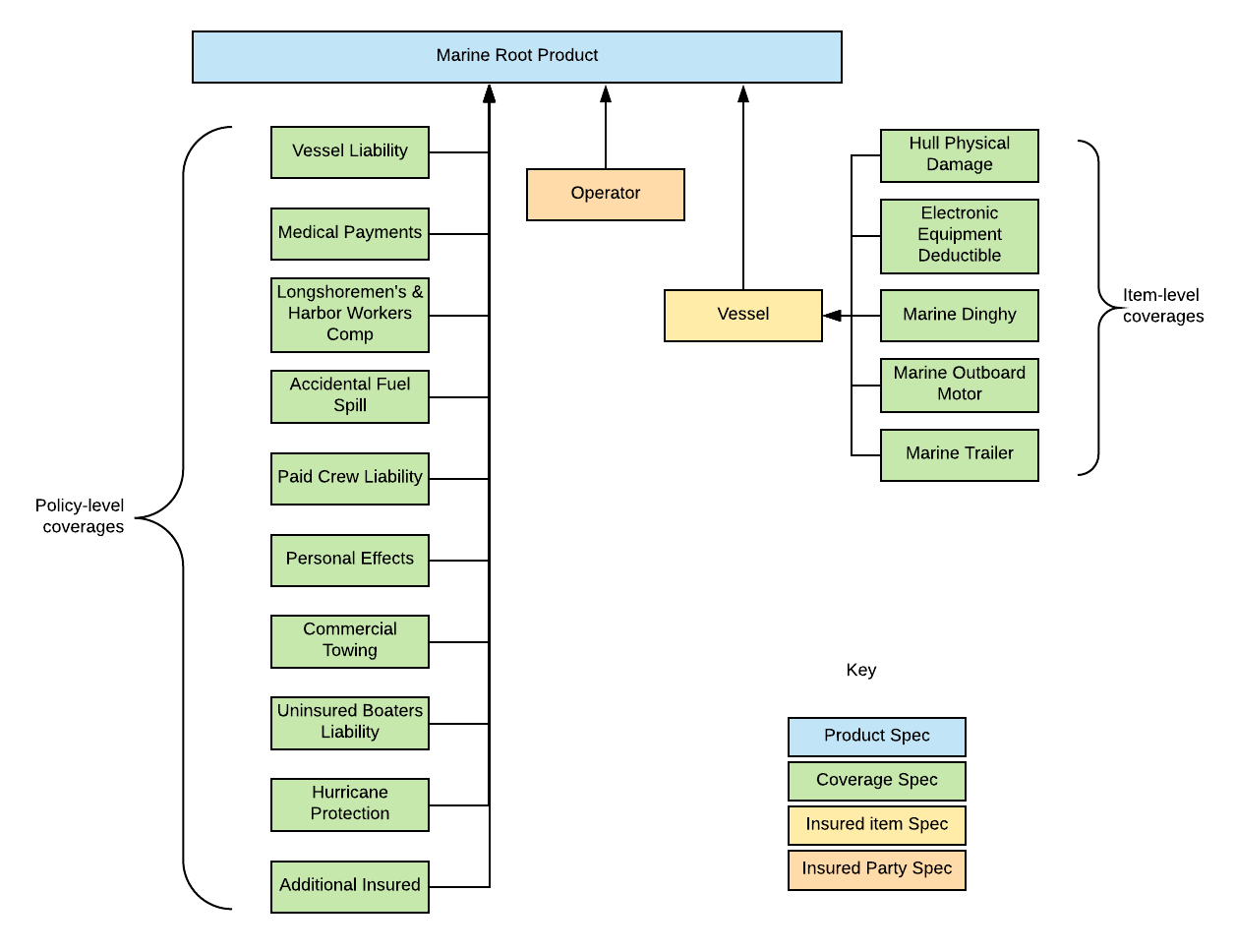
To learn more about this product model, see Watercraft Product Model.
Below is an example of the Marine product quoted for two vessels.
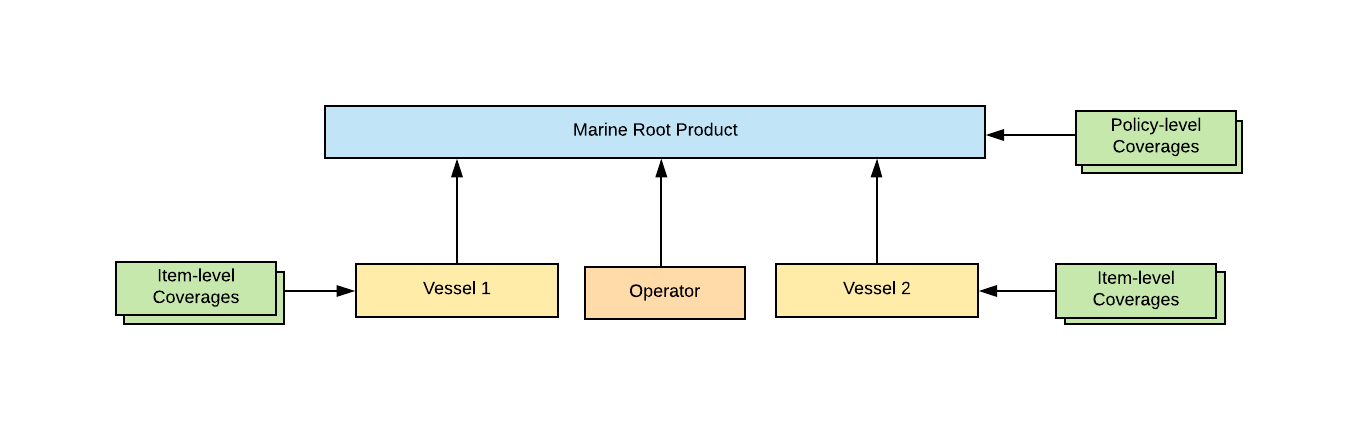
Here's what the high-level input JSON structure looks like for this example:
{
	"input_2": [{
			"ProductCode": "miMarine",
			"parentProdKey": "01t3i000000VRcPAAW",
			"ProductName": "Marine",

			-- --Vessel and operator details-- -- -- -- -

			"productKey": "01t3i000000VRcPAAW",
			"wiVessel.instanceKey": "1960 Century Resorter Fly-By"

		},
		{
			"ProductCode": "miMarine",
			"parentProdKey": "01t3i000000VRcPAAW",
			"ProductName": "Marine",
			"productKey": "01t3i000000VRcPAAW",

			-- --Vessel and operator details-- -- -- -- -

			"wiVessel.instanceKey": "1972 Chris-Craft Commander Rathskeller"
		}
	]
}
wc2-Watercraft
This calculation procedure rates the vessels to be insured. Here's how it works at a high level:

Here's what the calculation looks like in detail:
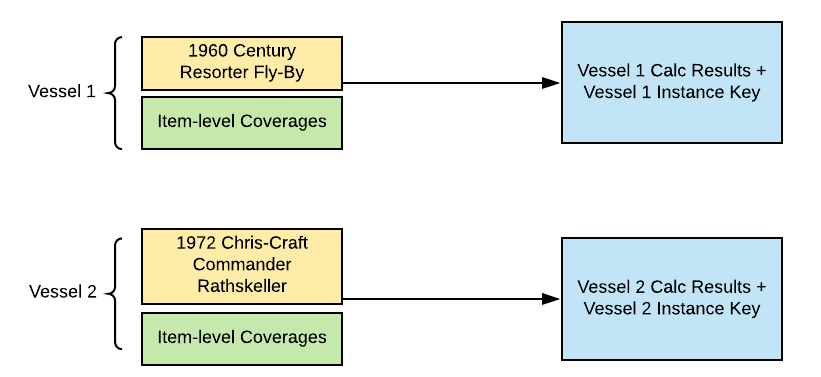
This calculation procedure includes variables, constants, and calculation steps. Some of those calculation steps are matrix lookups that call specific calculation matrices.
The meat of the calculation procedure is its calculation steps. Here's what each step of the wc2-Watercraft calculation procedure does:
-
Calculates the premium of the coverages for the vessel to be insured.
-
Does a matrix lookup to get the hull class, liability class, and minimum premium values based on the vessel's hull type.
-
Does a matrix lookup to get the hull premium deductible values based on the vessel's hull class and value.
-
Calculates the value of hull physical damage based on interpolation.
-
Calculates the premium for the hull physical damage.
-
Does a matrix lookup for the rate classification of a sail boat.
-
Does a matrix lookup for the rate classification of a cruiser.
-
Calculates the standard length for a cruiser based on inputs calculated in prior steps.
-
Calculates the standard length for a sailboat based on inputs calculated in prior steps.
-
Calculates devLength.
-
Calculates the adjusted premium for hull physical damage after taking into consideration the value of devLength where devLength is greater than zero.
-
Calculates the adjusted premium for hull physical damage after taking into consideration the value of devLength where devLength is less than or equal to zero.
-
Calculates the adjusted premium for hull physical damage where wc2-HullPremium is N.
-
Does a matrix lookup to get the value of deductible factors for the hull.
-
Calculates the net premium for hull physical damage based on the deductible factor, the adjusted premium for hull physical damage, and the minimum premium for the hull class, which were obtained in previous steps.
-
Does a matrix lookup for the rate factor for the marine outboard motor.
-
Calculates the premium for the outboard motor based on the value of the outboard motor and the rate factor for the outboard motor, which was obtained in a previous step.
-
Does a matrix lookup for the rate factor for the dinghy.
-
Calculates the premium for the dinghy based on the value of the dinghy and the rate factor for the dinghy, which was obtained in a previous step.
-
Does a matrix lookup for the rate factor for the trailer.
-
Calculates the premium for the trailer based on the value of the trailer and the rate factor for the trailer, which was obtained in a previous step.
-
Calculates the deductible value of the electronic equipment based on the hull class.
-
Does a matrix lookup for the deductible rate based on the deductible value of the electronic equipment, which was obtained in a previous step.
-
Calculates the premium for electronic equipment based on the deductible rate obtained in a previous step.
Calculation Matrices
The following calculation matrices are called by wc2-Watercraft:
Calculation Matrix Name |
Description |
|---|---|
wc2-HullClass |
Handles data about the hull type. Takes a text input. Returns text outputs for the hull class, liability class, and minimum premium. |
wc2-HullPremium |
Handles data about the hull type and value. Takes text and numeric range inputs. Returns text and numeric outputs. |
Sail-SLDF |
Determines the rate classification for vessels of type sail boat. Takes a numeric range input. Returns a numeric output. |
Cruiser-SLDF |
Determines the rate classification for vessels of type cruiser. Takes a numeric range input. Returns a numeric output. |
wc2-DeductibleFactors |
Handles the points on the driver's record, entered by a customer. Takes text and percentage inputs. Returns a numeric output. |
wc2-OutboardMotorRates |
Gives the rate for the outboard motor coverage based on the outboard motor deductible selected. Takes a numeric input. Returns a numeric output. |
wc2-DinghyRates |
Gives the rate for the marine dinghy coverage based on the dinghy deductible selected. Takes a numeric input. Returns a numeric output. |
wc2-TrailerRates |
Gives the rate for the trailer coverage based on the trailer deductible selected. Takes a numeric input. Returns a numeric output. |
wc2-EEDeductibleRates |
Gives the rate for the electronic equipment coverage based on the deductible selected and the cruiser classification of the vessel. Takes text and numeric inputs. Returns a numeric output. |
wc2-WatercraftPolicyLevel
This calculation procedure rates the policy-level coverages. Here's how it does that at a high level:
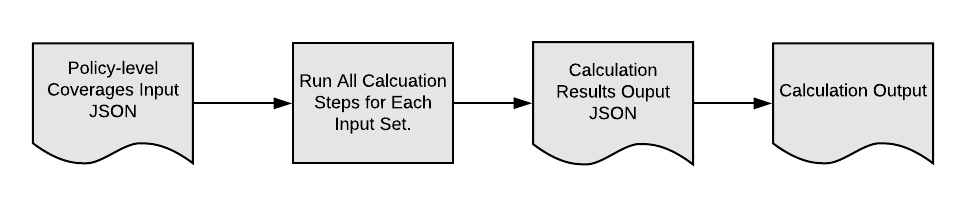
It includes variables, constants, and calculation steps. Some of those calculation steps are matrix lookups that call specific calculation matrices.
The meat of the calculation procedure is its calculation steps. Here's what each step of the wc2-WatercraftPolicyLevel calculation procedure does:
-
Does a matrix Lookup to get the hull class, liability class, and minimum premium values based on the vessel's hull type.
-
Calculates the liability rating type based on the liability class.
-
Calculates the liability rate based on the liability limit, the liability rating type, and the number of vessels.
-
Calculates the liability premium.
-
Calculates the premium for longshoremen's and harbor workers' compensation. Here, this is set to zero.
-
Calculates the premium for accidental fuel spill coverage. Here, this is set to zero.
-
Does a matrix lookup for the paid crew liability rate.
-
Calculates the premium for the paid crew liability coverage based on the paid crew liability rate.
-
Calculates the medical payment rating type based on the liability class.
-
Does a matrix lookup for the medical payment rate based on the medical payment rating type and the medical payment limit.
-
Calculates the medical payment premium based on the medical payment rate.
-
Does a matrix lookup for the uninsured boaters rate based on the uninsured boaters limit.
-
Calculates the premium for the uninsured boaters coverage based on the uninsured boaters rate.
-
Does a matrix lookup for the personal effects rate based on the personal effects limit.
-
Calculates the premium for the personal effects coverage based on the personal effects rate.
-
Does a matrix lookup for the commercial towing rate.
-
Calculates the premium for the commercial towing coverage based on the commercial towing rate.
-
Does a matrix lookup for the hurricane protection rate.
-
Calculates the premium for the hurricane protection coverage based on the hurricane protection rate.
-
Calculates the premium for additional insured items based on the number of additional insured items and the additional insured items rate.
-
Calculates the premium for NavTerrEndorsements. Here, this is set to zero.
-
Calculates the premium for port risks coverage. Here, this is set to zero.
Calculation Matrices
The calculation matrices called by wc2-WatercraftPolicyLevel are:
Calculation Matrix Name |
Description |
|---|---|
wc2-HullClass |
Handles data about the hull type. Takes a text input. Returns text outputs for the hull class, liability class, and minimum premium. |
wc2-WatercraftLiabilityRates |
Handles data about the number of vessels to be insured, the liability rating type and the liability limit. Takes a range, text, and numeric values as input. Returns a numeric output. |
wc2-PaidCrewLiabilityRates |
Handles data about the paid crew liability. Takes a numeric input. Returns a numeric output. |
wc2-MedPayRates |
Handles data about the medical payment limit. Takes text and numeric inputs. Returns a numeric output. |
wc2-UninsuredBoaterRates |
Handles data about the uninsured boater limit. Takes a numeric input. Returns a numeric output. |
wc2-PersonalEffectsRates |
Handles data about the personal effects limit. Takes a numeric input. Returns a numeric output. |
wc2-CommercialTowingRates |
Handles data about the commercial towing limit. Takes a numeric input. Returns a numeric output. |
wc2-HurricaneProtectionRates |
Handles data about the hurricane protection limit. Takes a numeric input. Returns a numeric output. |
You can (and probably will) make changes to these calculation matrices to reflect the ratings for your auto insurance products.
To learn how to work with calculation matrices, see https://help.salesforce.com/s/articleview?id=xcloud.os_calculation_matrices.htm&type=5.
Pricing Formulas
After the rating procedure returns the coverage prices, Vlocity uses the product model pricing formulas to roll up the prices. On the product model, the premium per vessel is calculated, the total premium for policy-level coverages is calculated, and then the total policy premium is calculated.
Here's what that looks like:

This happens on the Simulate tab of the product model. On the Watercraft product model's Simulate tab, you'll see the Rating Inputs and Rating Outputs mapped from the rating procedure. To learn how to do this, see Map Ratings to Product Specs.
Under the Rating Output section of the Simulate tab, the formula to calculate the per-vessel premium is in the Vessel > Total Pricing Formula field. The Vessel Total Pricing Formula is:
NetPremHullPD + premiumOutboardMotor + premiumDinghy + premiumTrailer + premiumEEDeductible
The formula total policy premium for this product is in the Marine > Total Pricing Formula field. The Marine Total Pricing Formula is:
SUM(NetPremHullPD + premiumOutboardMotor + premiumDinghy + premiumTrailer + premiumEEDeductible) + premiumWCLiability + premiumLHWComp + premiumSpillCoverage + premiumPaidCrewLiability + premiumMedPay + premiumUB + premiumPE + premiumCommercialTowing + premiumHurricanProtection + premiumAdditionalInsured + premiumNavTerrEndorsement + premiumPortRisks
Next Steps
After you've gotten a look at the rating procedure, go to the Marine product model and try simulating the rating procedure that's mapped to the product model.
Then you can go on to the quote flows to see how the Watercraft Application rates products for quotes.
- Calculation Procedures
The Marine rating procedure calls the following calculation procedures:
