You are here:
What's in Auto Quote OmniScript
The Auto Quote is LWC Enabled. It's built using LWCs you can learn about in.Insurance Lightning Web Component UI Development Kit
This is the complete structure of the Auto Quote OmniScript:
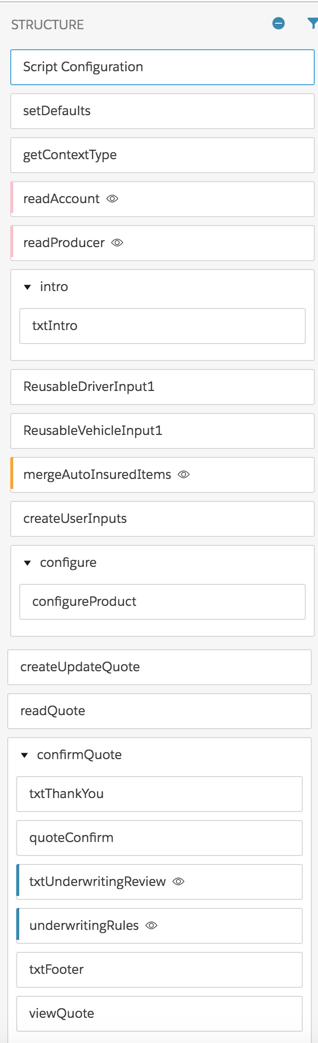
Here's a look at each component of the Auto Quote OmniScript, including the component type, the purpose of the component, and what the component calls:
-
Set Defaults
-
Component type: Set Values
-
What it does: Sets default values
-
Calls: None
-
-
getContextType
-
Component type: Omnistudio Data Mapper Extract Action
-
What it does: Extracts account Id, contact Id, and RecordType
-
Calls: auto_ExtRecordType Data Mapper
-
-
readAccount
-
Component type: Data Mapper Extract Action
-
What it does: Extracts an account Id
-
Calls: auto_ExtrPersAcctDetails_QuoteOS Data Mapper
-
-
readProducer
-
Component type: Data Mapper Extract Action
-
What it does: Extracts a producer Id
-
Calls: auto_ExtrProducer_QuoteOS
-
-
intro
-
Component type: Step > Text Block
-
What it does: Shows users intro text about auto insurance
-
Calls: None
-
-
ReusableDriverInput1
-
Component type: OmniScript
-
What it does: Gathers information about each driver to be insured
-
Calls: auto/ReusableDriverInput OmniScript
-
-
ReusableVehicleInputNoServiceIntegration1
-
Component type: OmniScript
-
What it does: Gathers information about each vehicle to be insured
-
Calls: auto/ReusableVehicleInput
-
-
AutoInsuredItems
-
Component type: Integration Procedure Action
-
What it does: Merges the data about the drivers and vehicles
-
Calls: Auto_MergeInsuredItems Integration Procedure
-
-
createUserInputs
-
Component type: Data Mapper Transform Action
-
What it does: Formats the data JSON so that the InsProductService:getRatedProducts service can take it as input and rate the insurance product(s)
-
Calls: auto_TransForGetRatedProducts_QuoteOS
-
-
configure > configureProduct
-
Component type: Step > Custom LWC
-
What it does: Provides a UI that lets the user configure the insured items, insured parties, and coverages on the rated product.
-
Calls: vlocity_ins__insOsMultiInstanceGrandchildren LWC
-
-
createUpdateQuote
-
Component type: Integration Procedure Action
-
What it does: Creates a quote record.
-
Calls: Auto_CreateUpdateQuote Integration Procedure
-
-
deCryptQuote
-
Component type: Remote Action
-
What it does: Decrypts the data, if necessary.
-
Calls: decryptIfNecessary
-
-
readQuote
-
Component type: Data Mapper Extract Action
-
What it does: Extracts data from the quote record just created.
-
Calls: auto_ReadQuote_QuoteOS Data Mapper
-
-
confirmQuote
-
Component type: Step, which contains six components
-
What it does: Several things, listed step-by-step below
-
Calls: None at the Step level
-
txtThankYou
-
Component type: Text Block
-
What it does: Posts text thanking the user for getting a quote
-
Calls: None
-
-
quoteConfirm
-
Component type: Custom LWC
-
What it does: Displays information about the quote to the user
-
Calls: vlocity_ins__insOsConfirmation LWC
-
-
txtUnderwritingReview
-
Component type: Text Block
-
What it does: Tells the user that an underwriter needs to review their information before a quote can be given.
-
Calls: None
-
-
underwritingRules
-
Component type: Custom LWC
-
What it does: Runs the underwriting rules on the quote data to determine whether this quote needs to be reviewed by an underwriter.
-
Calls: insOsProductRulesReviewExtended LWC
-
-
txtFooter
-
Component type: Text Block
-
What it does: Gives the user contact info for the insurer.
-
Calls: None
-
-
viewQuote
-
Component type: Navigate Action
-
What it does: Lets the user navigate to see the full details fo the quote.
-
Calls: None
-
-
