Loading
Connect in real time with the Trailblazer Community in Slack Open BetaRead More
Learn About Service Console for Manufacturing

Learn About Service Console for Manufacturing

The Service Console for Manufacturing is where your customer service representatives (CSRs) can view a timeline of interactions with the customer, get contextual alerts, review and create assets, orders, and cases, take relevant actions, and search for knowledge articles. Learn how the console is organized to help your CSRs manage the entire service lifecycle from one page.
Required Editions

Available in: Lightning Experience

Available in: Enterprise, Unlimited, and Developer Editions

Manufacturing Cloud provides a preconfigured console app that displays information about your contacts. The console is designed to help CSRs deliver excellent customer service. Here’s how everything comes together.

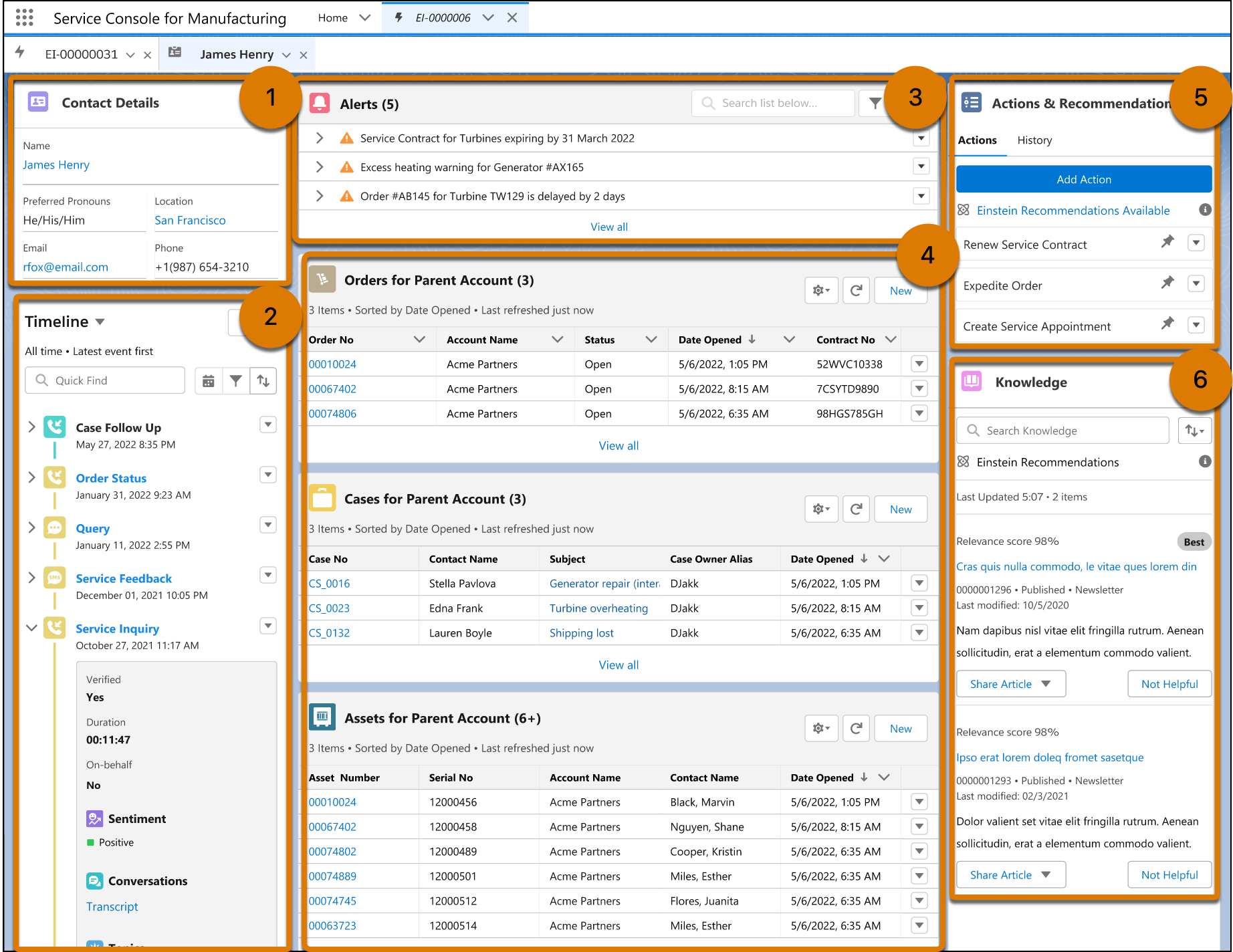
Service Console for Manufacturing with a Contact Details card, a Timeline card, an Alerts card, snapshots of order, case, and asset records, an Action and Recommendations card, and a Knowledge card.

View Customer Details

CSRs can see the contact details of the customer (1).

Track Interactions with Customers

CSRs can ensure continuity in engagements with the customer with a chronological, interactive timeline of all interactions with the customer (2). The timeline component is preconfigured to work with contact records and engagement interactions.

Get Contextual Alerts

CSRs can receive timely alerts on related activities like upcoming warranty renewals, asset performance issues, order delays, and open cases. These alerts can help them proactively address issues (3). You must set up alerts as per your business needs.

Manage Related Orders, Cases, and Assets

Get a snapshot of the customer’s assets, cases, and orders. CSRs can quickly create records or edit existing ones, with minimal clicks and scrolling (4).

Take Relevant Actions

CSRs can get recommendations and launch actions such as create a case, create a warranty claim, buy an extended warranty, and schedule a service appointment (5). You must configure flow-based actions according to your business needs.

Search for Knowledge Articles

CSRs can get quick access to relevant knowledge articles and answer customers’ questions (6).

 
Loading
Salesforce Help | Article
