View the Record Count of Data Processing Engine Definition Nodes
After you run a Data Processing Engine (DPE) definition, track the number of records
that go through the nodes. Each debug node in the DPE definition updates the record count in the
Data Processing Engine Node Metric object.
Required Editions
Available in: Enterprise, Unlimited, and Developer
Editions
User Permissions Needed
To create and save a Data Processing Engine definition:
Modify All Data
Customize Application
Data Pipelines Base User permission set
From the App Launcher, find and select Data Processing Engine Node
Metric.
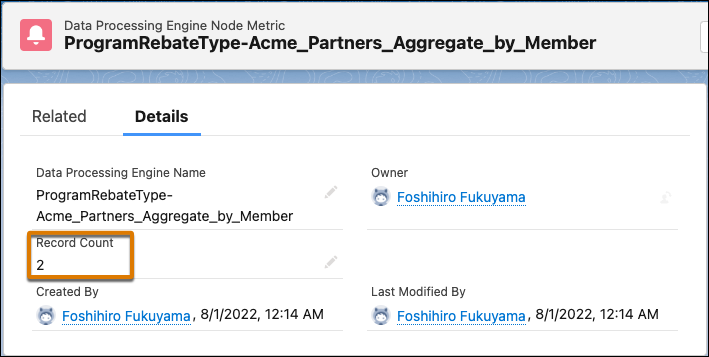
Open the record of the Data Processing Engine definition node that you want to see the
record count of.
Note The name of the node metric record is in this structure: <Name of the node>-<Name
of the DPE Definition>. For example, the name of a node metric record for the Program Rebate
Type node in the Acme Partners Aggregate by Member definition is
ProgramRebateType-Acme_Partners_Aggregate_by_Member.
Check the Record Count field.
Did this article solve your issue?
Let us know so we can improve!
Loading
Salesforce Help | Article
Cookie Consent Manager
Cookie Consent Manager
General Information
Required Cookies
Functional Cookies
Advertising Cookies
General Information
We use three kinds of cookies on our websites: required, functional, and advertising. You can choose whether functional and advertising cookies apply. Click on the different cookie categories to find out more about each category and to change the default settings.
Privacy Statement
Required Cookies
Always Active
Required cookies are necessary for basic website functionality. Some examples include: session cookies needed to transmit the website, authentication cookies, and security cookies.
Functional Cookies
Functional cookies enhance functions, performance, and services on the website. Some examples include: cookies used to analyze site traffic, cookies used for market research, and cookies used to display advertising that is not directed to a particular individual.
Advertising Cookies
Advertising cookies track activity across websites in order to understand a viewer’s interests, and direct them specific marketing. Some examples include: cookies used for remarketing, or interest-based advertising.