View a Contact’s Orders using the Order Visibility Prebuilt App
The Order Visibility prebuilt app helps sales and service representatives get visibility
into key details about a contact’s orders, order products, and cases - all in one place. They can
also quickly create cases associated with orders.
Required Editions
Available in: Enterprise, Unlimited, and Developer
Editions
Review the actions you can perform on the Order Visibility prebuilt that’s added on the Service
Console for Manufacturing page.
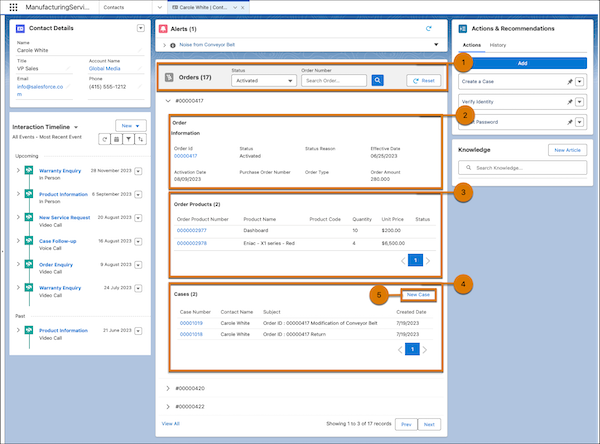
Search for orders associated with a contact (1). You can filter orders by status and order
number.
Review the key details of an order, including status reason, purchase order number, and order
amount (2). You can open the order record as a subtab by clicking the order ID.
Track order products associated with the order (3). You can view important details of an
order product like its quantity and unit price. You can open an order product record as a subtab
by clicking its order product number.
View cases associated with the order (4). You can check key details of a case like its
subject and created date. You can open a case record as a subtab by clicking its case
number.
Click the New Case button to launch a simple wizard to create a case associated with the
order (5).
Did this article solve your issue?
Let us know so we can improve!
Loading
Salesforce Help | Article
Cookie Consent Manager
Cookie Consent Manager
General Information
Required Cookies
Functional Cookies
Advertising Cookies
General Information
We use three kinds of cookies on our websites: required, functional, and advertising. You can choose whether functional and advertising cookies apply. Click on the different cookie categories to find out more about each category and to change the default settings.
Privacy Statement
Required Cookies
Always Active
Required cookies are necessary for basic website functionality. Some examples include: session cookies needed to transmit the website, authentication cookies, and security cookies.
Functional Cookies
Functional cookies enhance functions, performance, and services on the website. Some examples include: cookies used to analyze site traffic, cookies used for market research, and cookies used to display advertising that is not directed to a particular individual.
Advertising Cookies
Advertising cookies track activity across websites in order to understand a viewer’s interests, and direct them specific marketing. Some examples include: cookies used for remarketing, or interest-based advertising.