Loading
Connect in real time with the Trailblazer Community in Slack Open BetaRead More
Determine Tasks to Perform During a Distributor Visit

Determine Tasks to Perform During a Distributor Visit

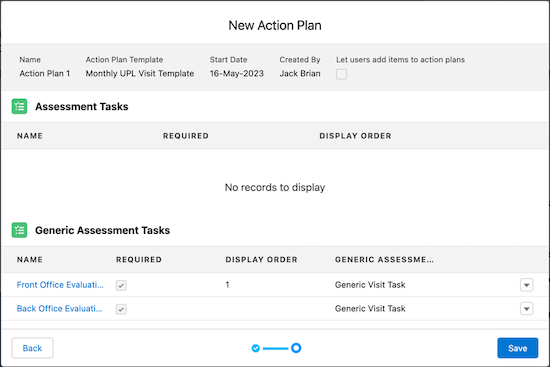
An action plan defines the tasks to be performed during a visit. Sales managers can create action plan templates to capture frequently performed tasks for specific types of visits. Then, they can create action plans for visits using an action plan template. After they create an action plan for a visit using an action plan template, the tasks in the action plan template are added to the action plan.
Required Editions

Available in: Enterprise, Unlimited, and Developer Editions
User Permissions Needed
To create action plans:
  • Partner Visit Management permission set
  • Create access on Visit and Action Plan Template
  1. From the App Launcher, find and select Visits.
  2. Open the visit record for which you want to create an action plan.
  3. On the Action Plans tab of the visit record page, click New Plan.
  4. Specify the action plan details.
    1. Enter a name for the action plan.
    2. Search for and select the action plan template that you want to use to create the action plan.
      The tasks in the action plan template are added to the action plan. You can only select published action plan templates.
    3. Enter a start date for the association of this template with the visit record.
    4. If needed, select Skip Nonwork Days for Tasks.
    5. Click Next.
  5. Review the tasks that are related to the template, and then save your changes.
    An action plan record
 
Loading
Salesforce Help | Article
