A task performed during a visit can have a specific context such as a distributor’s
account, a specific order, a product, or even a sales agreement. Sales mangers can associate
specific assessment indicators with a task to make it more meaningful. The context of a task makes
the job specific for the field rep.
Required Editions
Available in: Enterprise, Unlimited, and Developer
Editions.
User Permissions Needed
To create generic visit task contexts:
Partner Visit Management permission set
Create access on Generic Visit Task Context
A task can be associated with multiple context records. For example, a field rep is
assigned a task to follow up on a sales agreement with a distributor. You can associate this
task with a sales agreement record, the distributor’s account record, and the product records
that are part of the agreement.
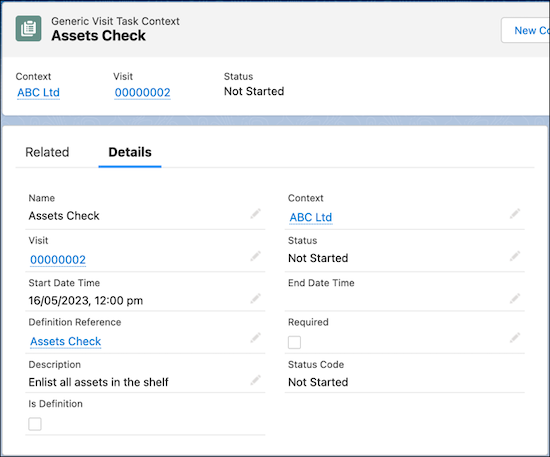
From the App Launcher, find and select Generic Visit Task Context,
and then click New.
Enter a name and description for the task.
Click the down arrow under Context, and select an object, then select the required
record.
To mark the task as a definition, for Status, select Is
Defined.
To mark the task as mandatory, select Required.
Select the start and end date and time.
Save your changes.
You can view the list of Generic Visit Task Context records associated with a task on the
Generic Visit Task Context Relations related list of a task.
Did this article solve your issue?
Let us know so we can improve!
Loading
Salesforce Help | Article
Cookie Consent Manager
Cookie Consent Manager
General Information
Required Cookies
Functional Cookies
Advertising Cookies
General Information
We use three kinds of cookies on our websites: required, functional, and advertising. You can choose whether functional and advertising cookies apply. Click on the different cookie categories to find out more about each category and to change the default settings.
Privacy Statement
Required Cookies
Always Active
Required cookies are necessary for basic website functionality. Some examples include: session cookies needed to transmit the website, authentication cookies, and security cookies.
Functional Cookies
Functional cookies enhance functions, performance, and services on the website. Some examples include: cookies used to analyze site traffic, cookies used for market research, and cookies used to display advertising that is not directed to a particular individual.
Advertising Cookies
Advertising cookies track activity across websites in order to understand a viewer’s interests, and direct them specific marketing. Some examples include: cookies used for remarketing, or interest-based advertising.