You are here:
Preconfigured Page Layout for Visit Planning
Sales managers can schedule visits, track visit details, and create tasks for field reps by using the preconfigured desktop Visit page and Generic Visit Task page layouts.
Required Editions
| Available in: Enterprise, Unlimited, and Developer Editions |
Visit Page Layout
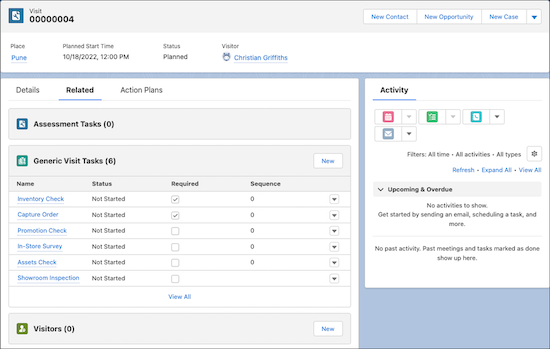
Sales managers can capture key visit information, assign field reps to visits, and provide special instructions by using the preconfigured Visit record page for desktop. The Visit page layout has these tabs:
- Details
- Capture key details, such as visit priority, account, location, planned start and end times, assigned user, and special instructions to the assignee. Closely track the status of planned and ongoing visits and set the context for the visit. Relate a visit to a specific work type, such as general inspection or quarterly audit.
- Related
- Assign a visitor to a visit. The Generic Visit Tasks related list on the Related tab shows the tasks related to a specific visit by sales managers that aren’t part of the related action plan. The Visited Parties related list shows specific persons, such as a warehouse supervisor at a distributor, that the sales managers want the rep to meet during the visit. If you relate files and attachments with a visit, on the Files related list, you can view the files and attachments, such as promotion banners to verify during supplier visits.
- Action Plans
- Relate an action plan template that has predefined tasks and metrics, to a visit by using the Action Plans related list. Review the mandatory and optional tasks related to the template and add the action plan.
Generic Visit Task Page Layout
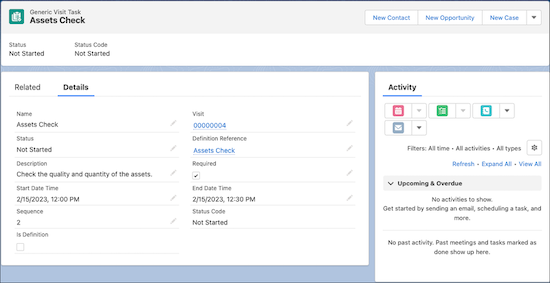
Sales managers can create tasks for a field rep by using the preconfigured Generic Visit Tasks record page for desktop. The Generic Visit Task page layout has these tabs:
- Details
- Capture key details, such as the related visit, reference task, description, and planned start and end times. Mark a task as a definition to create multiple tasks of the same type.
- Related
- On the Generic Visit Task Context Relations related list, view the relationships of a task and the task’s associated records, such as a sales agreement record, an asset warranty record, or a case record. View the files related to a task.
Did this article solve your issue?
Let us know so we can improve!
