Manufacturers often receive requests for modified formulations or prototypes that do
not exist in the current catalog. Use the Product Requirement Specification (PRS) workflow to
capture technical needs for these non-standard products. The PRS allows you to define
functional, compliance, and packaging requirements while maintaining version control over the
evaluation process.
Required Editions
Available in: Lightning Experience
Available in: Enterprise, Unlimited, and Developer
Editions
User Permissions
Needed
To create custom product requirements:
Manufacturing Sample Management User
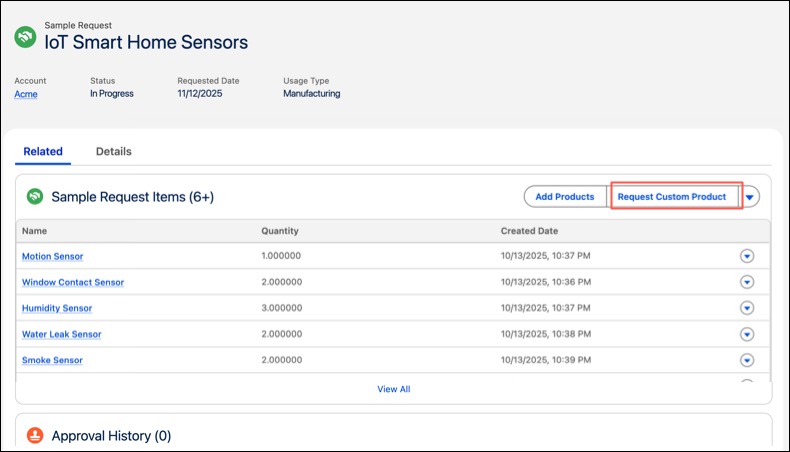
Open the Sample Request record and navigate to the Related tab.
In the Sample Request Item related list, click Request Custom
Product.
Enter the initial custom product requirement details.
(Optional) Upload a requirements document (PDF).
Extract or enter requirement specifications:
Automated Extraction: If Manufacturing Generative AI is enabled, click Get
Requirement Specifications. Einstein AI will automatically extract data from your file
to populate the following screens. See Use AI-Powered Document Reader.
Manual Entry: Click Next to navigate through dynamic screens (e.g., Functional,
Compliance, and Packaging) to define specifications manually.
The specific screens displayed (such as Functional or Compliance) are determined
by the categories defined by your administrator.
Click Next to review the extracted or manually entered details.
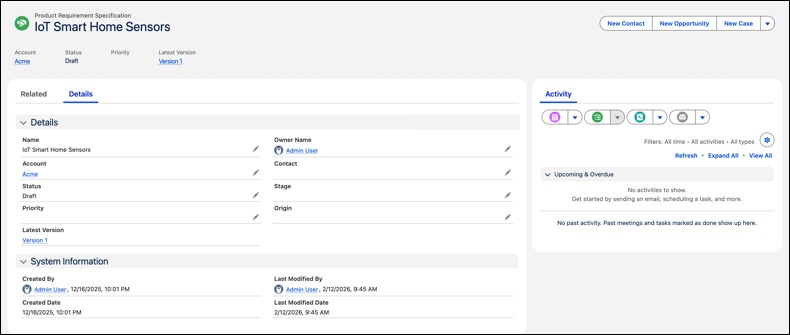
Click Finish. The system creates a new Product Requirement
Specification (PRS) record.
The Product Requirement Specification record also supports Stage Management. You can track the
progress of the request, view the current stage, and customize the stages based on your
business requirements.
For example, to track a specific product requirement specification as a separate R&D
project, use stage management to create a new stage, "R&D Phase". This provides the
sales team with real-time visibility into technical milestones and production status (even
if the manufacturing data resides in an external ERP) all without leaving the Salesforce
interface.
Create Versions for Custom Product Requirements You can maintain multiple versions of a requirement. All iterations are visible in the Product Requirement Specification Versions related list.
Use AI Powered Document Reader Sample Management includes an AI-driven document reader that uses prompt-based extraction to convert unstructured customer requirement documents into structured Product Requirement Specification (PRS) data. Generative AI-enabled fields powered by prompt templates can help users complete their work faster. With a click of a button, users can quickly populate the data from the uploaded document.
Customize Extraction Prompt Template Organizations can customize the default prompt to align with their industry terminology, compliance standards, or internal specification formats.
Did this article solve your issue?
Let us know so we can improve!
Loading
Salesforce Help | Article
Cookie Consent Manager
Cookie Consent Manager
General Information
Required Cookies
Functional Cookies
Advertising Cookies
General Information
We use three kinds of cookies on our websites: required, functional, and advertising. You can choose whether functional and advertising cookies apply. Click on the different cookie categories to find out more about each category and to change the default settings.
Privacy Statement
Required Cookies
Always Active
Required cookies are necessary for basic website functionality. Some examples include: session cookies needed to transmit the website, authentication cookies, and security cookies.
Functional Cookies
Functional cookies enhance functions, performance, and services on the website. Some examples include: cookies used to analyze site traffic, cookies used for market research, and cookies used to display advertising that is not directed to a particular individual.
Advertising Cookies
Advertising cookies track activity across websites in order to understand a viewer’s interests, and direct them specific marketing. Some examples include: cookies used for remarketing, or interest-based advertising.