You are here:
Manual Adjudication of Warranty Claims
Warranty claim adjudicators can adjudicate warranty claims by examining information on the defective assets, by checking asset warranties and warranty terms, and by tracking their causal parts on the preconfigured Claims record page. The Claims record page pulls relevant information from various sources to give warranty claim adjudicators a view of every aspect of the warranty claim. Warranty claim adjudicators can drill down to the required information by opening records as subtabs and can determine the approved amount for each claim coverage payment detail.
Required Editions
| Available in: Enterprise, Unlimited, and Developer Editions |
Warranty claim adjudicators can use these tabs on the Claims record page.
Details
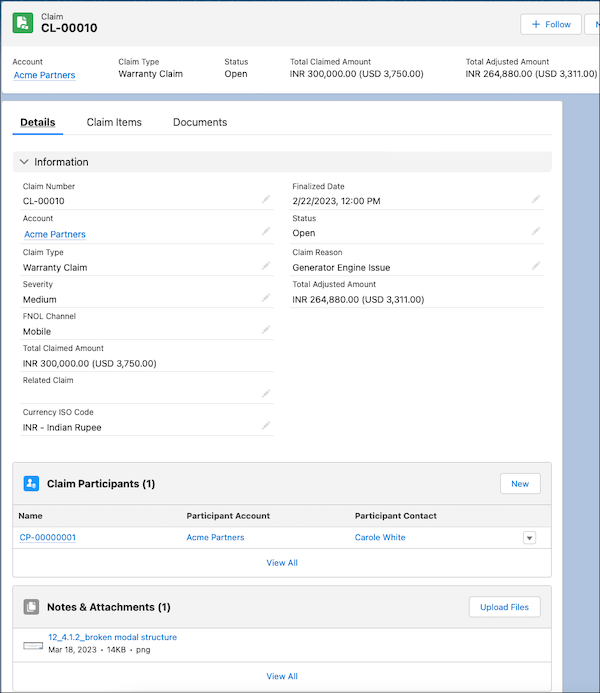
The Details tab on the Claim record page shows information about the warranty claim, including its reason, type, status, total claimed amount, and total adjusted amount.
Claim Items
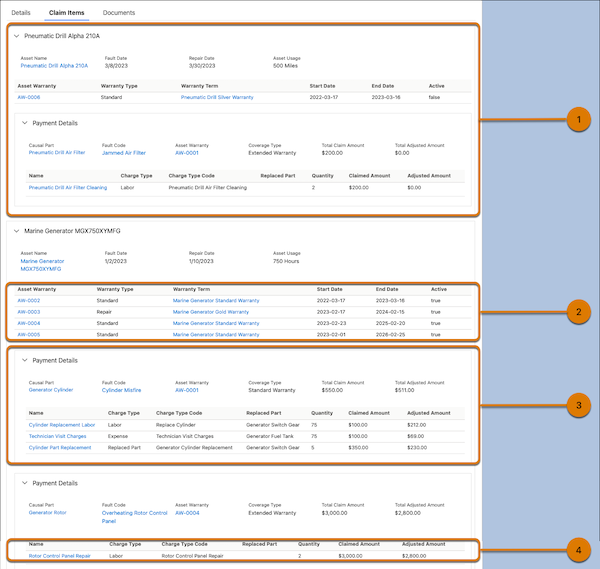
The Claim Items tab on the Claim record page shows information about the related claim item, asset warranties, claim coverages, and claim coverage payment details as different cards. Claim adjudicators can expand and collapse these cards and open a record as a subtab. They can determine the approved amount for the claim by editing the Adjusted Amount value. Claim adjudicators can view these cards on the Claim Items tab.
| Card | Usage | Information Shown | Information Source |
|---|---|---|---|
| Claim Item (1) | View details of the defective assets related to the warranty claim. | Asset Name | Asset field on the Claim Item record |
| Fault Date | Fault Date field on the Claim Item record | ||
| Repair Date | Repair Date field on the Claim Item record | ||
| Asset Usage | Asset Usage Value and Asset Usage Unit of Measure fields on the Claim Item record | ||
| Asset Warranty (2) | Examine the warranty terms associated with the defective asset. | Asset Warranty | Asset Warranty Number field on the Asset Warranty record |
| Warranty Type | Warranty Type field on the Asset Warranty record | ||
| Warranty Term | Warranty Term field on the Asset Warranty record | ||
| Start Date | Start Date field on the Asset Warranty record | ||
| End Date | End Date field on the Asset Warranty record | ||
| Active | Active field on the Warranty Term record associated with this Asset Warranty record | ||
| Claim Coverage (3) | Track each causal part in the defective asset, along with the total claimed and approved amount to rectify it. | Causal Part | Causal Part field on the Claim Coverage record |
| Fault Code | Fault Code field on the Claim Coverage record | ||
| Asset Warranty | Asset Warranty field on the Claim Coverage record | ||
| Coverage Type | Coverage Type field on the Claim Coverage record | ||
| Total Claim Amount | Total Claimed Amount field on the Claim Coverage record | ||
| Total Adjusted Amount | Total Adjusted Amount field on the Claim Coverage record | ||
| Claim Coverage Payment Detail (4) | Review each expense incurred, labor service performed, and part replaced to rectify a causal part. Determine the approved amount by editing the Adjusted Amount value. | Name | Name field on the Claim Coverage Payment Detail record |
| Charge Type | Charge Type field on the Claim Coverage Payment Detail record | ||
| Charge Type Code | Charge Type Code field on the Claim Coverage Payment Detail record | ||
| Replaced Part | Replacement Part field on the Claim Coverage Payment Detail record | ||
| Quantity | Quantity field on the Claim Coverage Payment Detail record | ||
| Claimed Amount | Claimed Amount field on the Claim Coverage Payment Detail record | ||
| Adjusted Amount | Adjusted field on the Claim Coverage Payment Detail record |
Documents
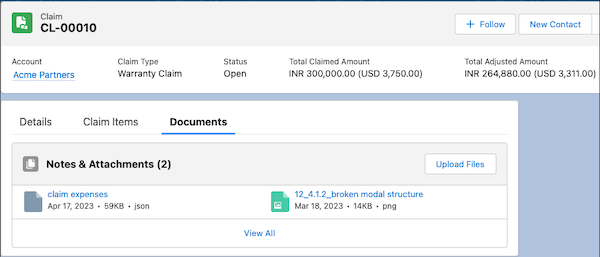
The Documents tab on the Claim record page helps claim adjudicators view and manage the supporting documents submitted by partners.

