Establish a robust set of service standards that can be accurately and consistently used
in various operations performed by your company. Define a code set to standardize the definition
of a situation or an activity, for example for code sets for labor activities, product defects,
and expenses.
Required Editions
Available in: Enterprise, Unlimited, and Developer
Editions
User Permissions Needed
To create and update Code Sets:
Warranty Lifecycle Management permission set
From the App Launcher, find and select Code Set.
Click New.
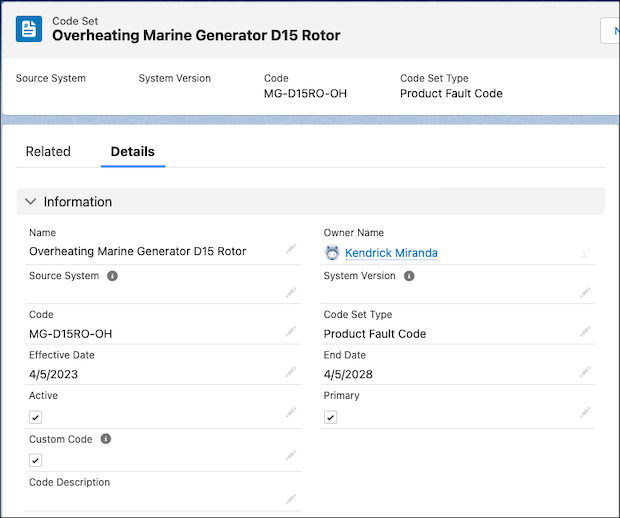
Provide these details.
Field
Description
Name
The name of the code.
Source System
The system that defines the context and the meaning for the code.
System Version
The version of the source system the code belongs to.
Code
The code that represents this code set.
Code Set Type
The type of the code set.
Effective Date
The start date of the code set’s effective period.
End Date
The end date of the code set’s effective period.
Active
Indicates whether the code set is active.
Primary
Indicates whether the code set is the primary code set for the concept. That is, it
was selected manually by a user instead of being selected by an automated process.
Custom Code
Indicates whether the code set is defined by a specific organization, as opposed to
being recognized across the industry.
Code Description
Description of the code set.
Save your changes.
Did this article solve your issue?
Let us know so we can improve!
Loading
Salesforce Help | Article
Cookie Consent Manager
Cookie Consent Manager
General Information
Required Cookies
Functional Cookies
Advertising Cookies
General Information
We use three kinds of cookies on our websites: required, functional, and advertising. You can choose whether functional and advertising cookies apply. Click on the different cookie categories to find out more about each category and to change the default settings.
Privacy Statement
Required Cookies
Always Active
Required cookies are necessary for basic website functionality. Some examples include: session cookies needed to transmit the website, authentication cookies, and security cookies.
Functional Cookies
Functional cookies enhance functions, performance, and services on the website. Some examples include: cookies used to analyze site traffic, cookies used for market research, and cookies used to display advertising that is not directed to a particular individual.
Advertising Cookies
Advertising cookies track activity across websites in order to understand a viewer’s interests, and direct them specific marketing. Some examples include: cookies used for remarketing, or interest-based advertising.