You are here:
Add Up Values in a Column
Use the sum element to add the numeric values in a table column.
Required Editions
| Available in Lightning Experience in Enterprise and Unlimited Editions that have Consumer Goods Cloud enabled. |
To define a sum element, specify a table from the list object and the columns to be summed.
Only the values specified in the body of the table are summed. Use numberFormat to specify the
format to show the total value. For example, if numberFormat="8.2", the total value is shown in decimal format allowing 8 digits
before the decimal and 2 digits after the decimal.
The print engine sums only the actual values in the main table. The total value is rounded if numberFormat is specified for that column. The sum process ignores correlated data or any rounded values created by the numberFormat attribute.
In this example, 273.06 is the rounded value of the actual total value 273.0581.
| Product | Net Amount (actual value calculated from the order by Pricing Engine) | Net Amount (rounded values using numberFormat) |
|---|---|---|
| AA | 119.8744 | 119.88 |
| BB | 119.8832 | 119.88 |
| CC | 27.9594 | 27.96 |
| DD | 5.3411 | 5.3 |
| Total | 273.0581 | 273.06 |
Creating a sum of sums isn’t supported. It’s the pricing engine that calculates the column values and populates the calculated data in the list object of an order. To create a sum of sums, define that behavior for the pricing engine in the appropriate business logic contract.
Make sure to review the number of columns in the table. If you specify a column value greater than or lower than the actual number of columns in the table, the sum is always 0. For example, if a table contains 6 columns and you specified col=”8” or col=”-2” (negative 2), then the sum is 0.
| Attribute | Description | Data Type | Required |
|---|---|---|---|
| table | Name of the table containing the columns to sum. | String | Yes |
| col | Column of the table to sum. | String | Yes |
| numberFormat | Format of a number. If this attribute is not specified, the actual sum value is shown. For example, |
Number | No |
Sample Code
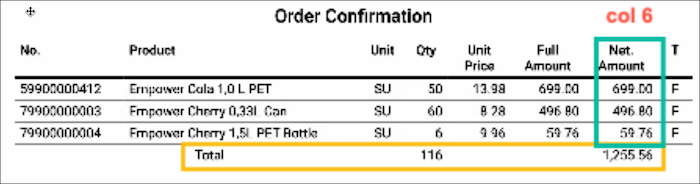
In this example, the print engine sums the values in columns 3 and 6 of the Order Items table and shows the individual total value in the Total table row. Based on the number format specified for column 6, its total value shows only two digits after the decimal.
<tr>
          <td colSpan="3" alignment="center">{{Labels::TotalId; defaultLabel=Total}}</td>
          <td alignment="right">
            <sum table="OrderItemsTable" col="3" />
          </td>
          <td colSpan="2" />
          <td alignment="right">
            <sum table="OrderItemsTable" col="6" numberFormat="8.2" />
          </td>
          <td />
</tr>
Sums all values in column 6 of the Order Items table:
<td alignment="right">
<sum table="OrderItemsTable" col="6" numberFormat="8.2" />
</td>