
You are here:
BannerFilter Component
Use the BannerFilter UI component to filter the list of options in the order banner.
Required Editions
| Available in: Lightning Experience in Professional, Unlimited, and Enterprise Editions that have Consumer Goods Cloud enabled |
Component name: bannerfilter
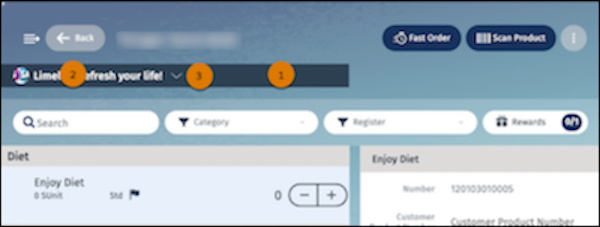
In the BannerFilter component, you can configure:
- Background and flyout background color and transparency (1)
- Font, flyout font, and selected item color (2)
- Icon image and color (3)
The table lists the images that are available for the BannerFilter component.
| Image Name | Description |
|---|---|
| Icon_Dropdown.svg | Icon to expand the banner filter list. |
| Icon_NoImage.png | Icon that indicates that no image is provided for the banner filter control item in the dropdown list. |
| Icon_BrokenImage.png | Icon that indicates that the image provided for the banner filter control item in the dropdown list isn’t supported. |
| Icon_Filter.png | Filter icon for the banner filter control. |
| Icon_ClearFilter.png | Icon to clear the banner filter list. |
| Banner_BrokenImage.png | Image that shows in the banner control when the banner image is missing or incompatible. |
Did this article solve your issue?
Let us know so we can improve!
