
You are here:
Color and Button Macros
Learn about color and button macros that are used with the UI components in the Consumer Goods Offline mobile app. Standard colors and buttons use macros that define color values by using the RGBA color model.
Required Editions
| Available in: Lightning Experience in Professional, Unlimited, and Enterprise Editions that have Consumer Goods Cloud enabled |
Color Macros
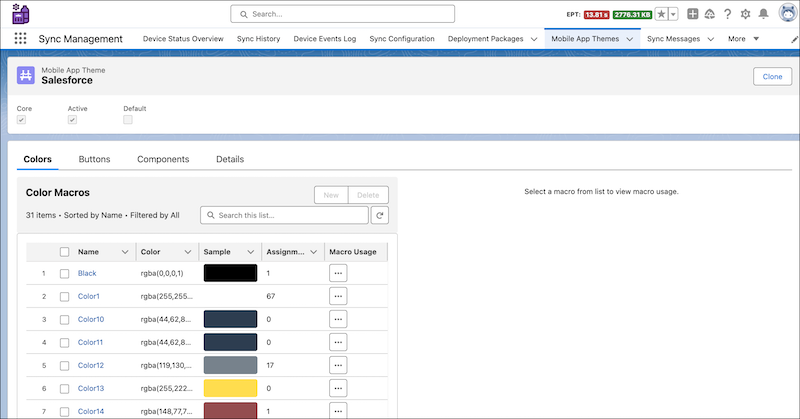
Color macros define the standard colors used in the Consumer Goods Cloud Offline mobile app. They
use the RGBA color model to specify red, green, blue, and alpha channels for a color. The
alpha channel specifies the level of opacity, or transparency, of the color. For example,
the color macro named Color1 defines white as rgba(255,255,255,1), and the color macro named Black defines the values rgba(0,0,0,1).
Customize existing color macros or create new ones for the Consumer Goods Cloud Offline mobile app by going to the Colors subtab of the Mobile App Themes tab in the Sync Management app.
Button Macros
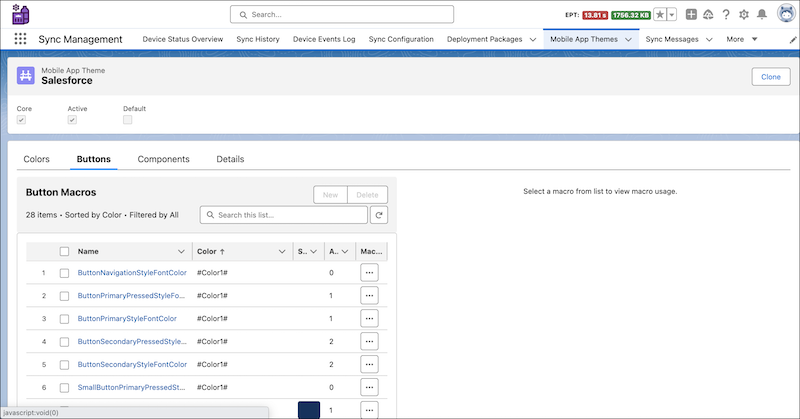
Button macros define the background, border, and font colors for various primary and secondary buttons types in the Consumer Goods Cloud Offline mobile app. Button macros define colors with RGB or RGBA values, or they can use a color macro. For example, have the default background color of all primary buttons use the Color1 color macro to define white.
Customize existing button macros or create new ones for the Consumer Goods Cloud Offline mobile app by going to the Buttons subtab of the Mobile App Themes tab in the Sync Management app.
Keep these considerations in mind when you configure color and button macros.
Macro Name
- A color or button macro name begins with an uppercase letter. For example,
Color31. - A color or button macro name uses the camel-case format when it has more than one word.
- Every color and button macro name must be unique.
Colors or Values
- A color starts and ends with a hashtag (#).
- Colors in button macros can contain only alphanumeric characters, leading and trailing
hashtags, and parentheses around alpha channel values. For example,
#Color31#. - To add transparency to a color macro in a button macro, append an alpha channel value,
in parentheses, to the color macro name. For example,
#Color31(0.5)#is the Color31 macro with an alpha channel set to 0.5. - Color values are strings that can’t exceed 63 characters.
- A button macro can refer to up to five color macros. If you define a macro with references to more than five other macros, an error occurs.
- Valid alpha channel values range from 0.000 to 1. The alpha channel value is ignored when:
- alpha channel value is less than 0.
- alpha channel value is greater than 1.
- alpha channel value isn’t a number.
- alpha channel fraction value is greater than 999.
- Button Types
Learn about the standard types of buttons in the Consumer Goods Cloud Offline mobile app.
