
Consumer Goods
(CG) Cloud
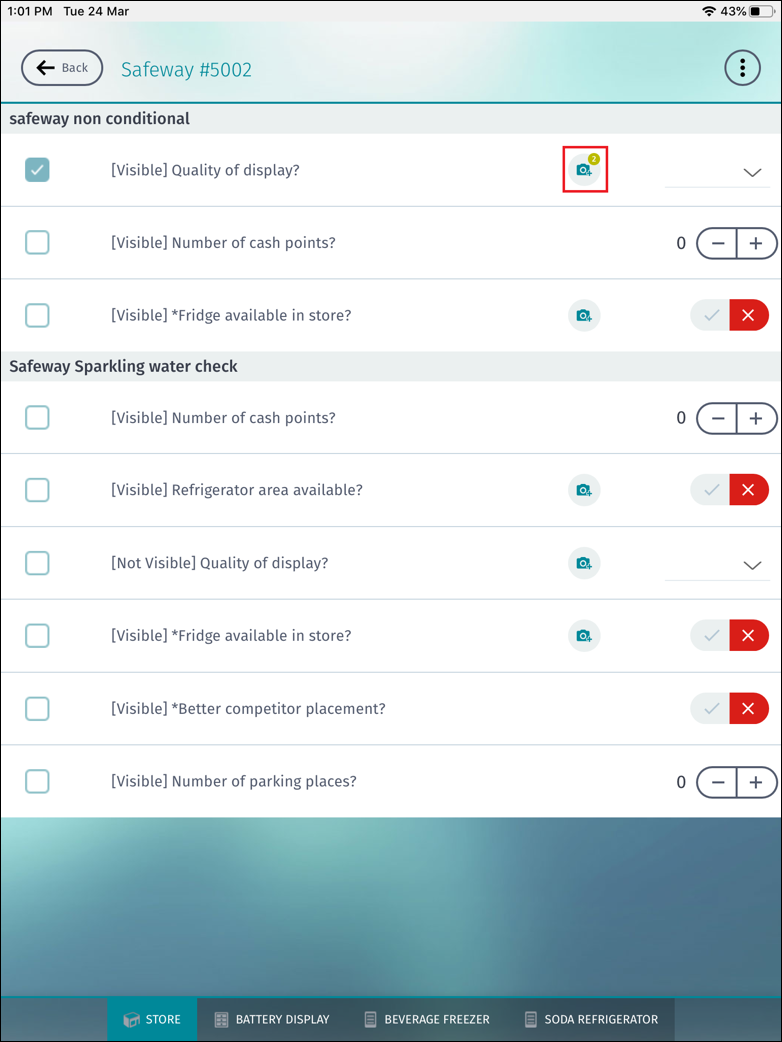
Mobile App Framework supports the display of number badge for buttons in lists. This feature
enables CG
Cloud Offline Mobile App users to track facts such as number of images captured and attached to
the current list item task. This is possible by using an additional attribute, badgeText, in the
binding element of the Button type and the Dynamic type in UI controls.
Required Editions
Available in: Lightning Experience in Professional, Unlimited, and
Enterprise Editions that have Consumer Goods Cloud enabled.
The additional attribute is used in these UI controls:
GroupedList
EmbeddedList
BreadCrumbControl
MultiSelectionGroupedList
MultiSelectionBreadCrumbControl
The number badge is displayed for buttons in lists only if the following conditions are
true:
The badgeText attribute is present in the binding element of the Button type and the
Dynamic type.
The badgeText attribute contains a valid value.
The badgeText attribute value must be prefixed with a dot (.) and must be followed by
alphanumeric characters. For example, if the badgeText attribute value refers to a simple
property of the bound list, the simple property value must be a single number or a single
character. The value, #, is displayed on the number badge for buttons in lists if the length
of the simple property value exceeds one number or one character. If the value is longer than
500 characters or is a string, the value is rejected and an error isn’t logged.
The badge doesn’t change on the pressed state of the corresponding button.
Example
<GroupedList name="myList" searchable="true" dataSource="ProcessContext::OverviewList.Items[]">
<Items name="Items" itemPattern="myItemPattern">
<ItemListLayout>
<Default>
<Col width="10em">
<Row layoutType="ItemSecondary" bindingId="Button1" />
</Col>
</Default>
</ItemListLayout>
<Bindings>
<!-- needs to be a Binding per list item not a Resource to allow for EA rights via ACL on the list -->
<Binding target="Button1" type="Button" binding=".displayedImageId" bindingMode="ONE_WAY" imageType=".svg" longPressMenuId="longPressMenu1" badgeText =".badgeText"/>
<Binding target="Button2" type="Button" binding=".displayedImageId2" bindingMode="ONE_WAY" imageType=".svg" longPressMenuId="longPressMenu2" badgeText =".badgeText"/>
</Bindings>
<!-- left out other details for brevity -->
</GroupedList>
<GroupedList name="myList" searchable="true" dataSource="ProcessContext::OverviewList.Items[]">
<Items name="Items" itemPattern="myItemPattern">
<ItemListLayout>
<Default>
<Col width="10em">
<Row layoutType="ItemSecondary" bindingId="Button1" />
</Col>
</Default>
</ItemListLayout>
<Bindings>
<!-- needs to be a Binding per list item not a Resource to allow for EA rights via ACL on the list -->
<Binding target="buttonImageIcon" type="Dynamic" typeField="variantType" binding=".buttonImageIcon" bindingMode="ONE_WAY" imageType=".svg" longPressMenuId="longPressMenu1" badgeText =".badgeText"/>
</Bindings>
<!-- left out other details for brevity -->
</GroupedList>
Did this article solve your issue?
Let us know so we can improve!
Loading
Salesforce Help | Article
Cookie Consent Manager
General Information
Required Cookies
Functional Cookies
Advertising Cookies
General Information
We use three kinds of cookies on our websites: required, functional, and advertising. You can choose whether functional and advertising cookies apply. Click on the different cookie categories to find out more about each category and to change the default settings.
Privacy Statement
Required Cookies
Always Active
Required cookies are necessary for basic website functionality. Some examples include: session cookies needed to transmit the website, authentication cookies, and security cookies.
Functional Cookies
Functional cookies enhance functions, performance, and services on the website. Some examples include: cookies used to analyze site traffic, cookies used for market research, and cookies used to display advertising that is not directed to a particular individual.
Advertising Cookies
Advertising cookies track activity across websites in order to understand a viewer’s interests, and direct them specific marketing. Some examples include: cookies used for remarketing, or interest-based advertising.