
Loading
Feature Disruption - Service Cloud VoiceRead More
Feature degradation | Gmail Email delivery failureRead More
Visual Studio Code Based Modeler for Consumer Goods Cloud
Table of Contents
Select Filters

          No results
          No results
          Here are some search tips

          Check the spelling of your keywords.
          Use more general search terms.
          Select fewer filters to broaden your search.

          Search all of Salesforce Help
          Set Up and Deploy Patch Release Version

          Set Up and Deploy Patch Release Version

          When we release a patch version of the contracts, download and extract the patch contents into a branch off the appropriate release core branch. You can test the patch version from that branch, and then merge into the core branch. You can then pull the changes from the core branch into your working branches as needed. Example of patch release - update from 246.0 to 246.1, or from 246.1 to 246.2.
          Required Editions

          Available in: Lightning Experience

          Available in: Enterprise and Unlimited Editions that have Consumer Goods Cloud enabled

          User Permissions Needed
          To set up Git repo: Customizer, Admin

          Follow this workflow to set up, deploy, and use the updated contracts in your Git repository.

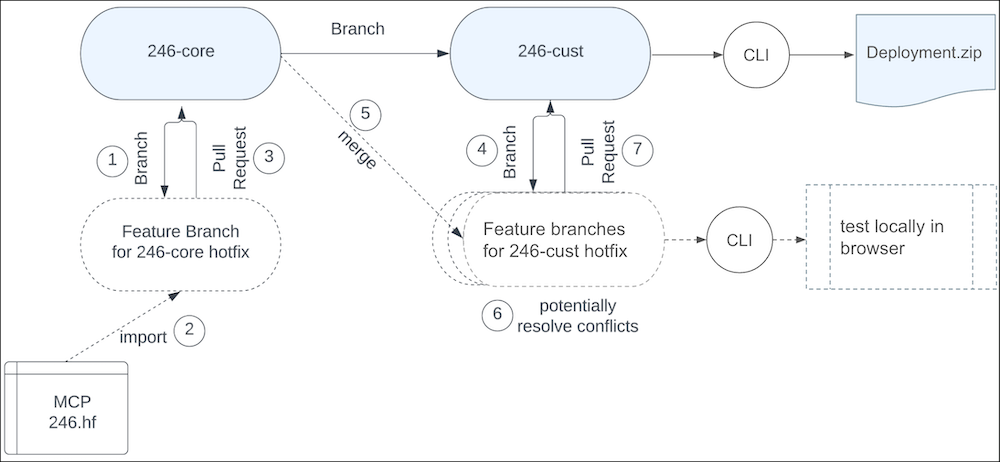
          Git setup for patch release.
          1. Create a feature branch off the core branch to update the core contracts.
          2. Delete the src folder in the workspace. Then, import the core design contracts of the target patch release to the feature branch, by running this command from the src folder of your workspace: sf modeler workspace utils importContracts -i DesignContracts.zip
          3. Run a pull request against the 246-core branch.
          4. Create a feature branch from the customizer branch to update the contracts on your customization branch.
          5. Merge the 246-core branch into the 246-cust hotfix branch.
          6. Resolve merge conflicts locally, if any. You can test the changes made as part of merge resolution in the feature branch.
          7. When the merge is successful, run the necessary tests and pull the changes against the 246-cust branch.
           
          Loading
          Salesforce Help | Article