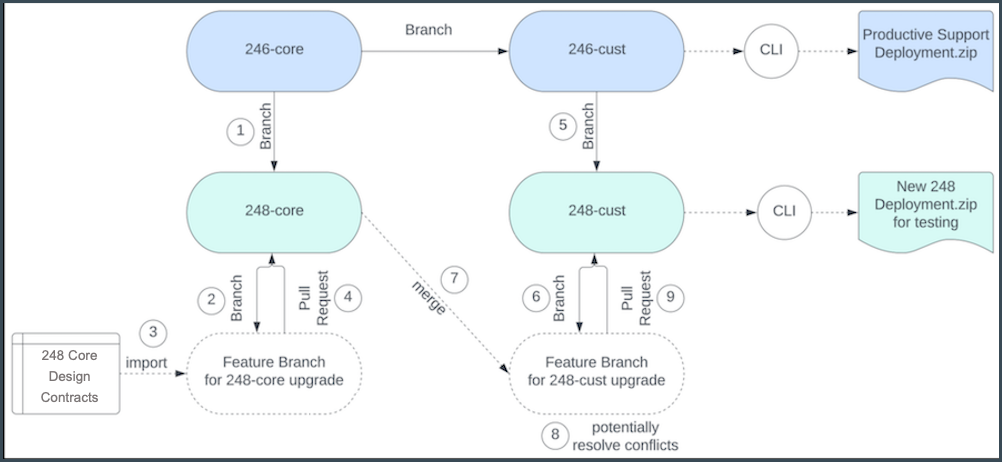
Create branches for the target upgrade release, for example, 248-core and 248-cust.
Retain the source release branches (246-core and 246-cust) for existing users running the
application on version 246.
Required Editions
Available in: Enterprise and Unlimited Editions where Consumer
Goods Cloud is enabled.
User Permissions
Needed
To set up Git repo:
Customizer, Admin
When an upgraded version of design contracts is available from a subsequent major release,
set up your Git repository and branches as shown in this workflow. For example, upgrade from
Winter’24 to Spring’24 (246.4 → 248.0)
Important Follow the guideline for your git branches and have dedicated branches
for Salesforce core contracts and you customizing contracts. In case you have not segregated
core and cust branches there are risks to override your customization parts.
On the new branches, you can integrate the new features, and implement and test the new
custom features without affecting the support lines. After all work on the 248-cust branch
is complete, create a Deployment.zip of that branch and upload to the production Salesforce
org to distribute the changes to all users.
Create a branch for the target version (248-core) based on the existing source version
branch (246-core).
Create a feature branch based on the target version branch (248-core) to update the
core contracts.
Delete the src folder of the workspace. Then, import the core design contracts into the feature
branch by running this command: sf modeler workspace utils importContracts -i
DesignContracts.zip
Create a pull request against the 248-core branch.
Create a branch for 248-cust based on the existing 246-cust branch.
Create a feature branch to update the contracts in your customizing branch.
Merge the 248-core branch into 248-cust-update-248-0.
Resolve merge conflicts locally, if any. You can test the changes made as part of the
merge resolution in the feature branch.
When the merge is successful, run the necessary tests and pull the changes from the
248-cust branch.
Did this article solve your issue?
Let us know so we can improve!
Loading
Salesforce Help | Article
Cookie Consent Manager
General Information
Required Cookies
Functional Cookies
Advertising Cookies
General Information
We use three kinds of cookies on our websites: required, functional, and advertising. You can choose whether functional and advertising cookies apply. Click on the different cookie categories to find out more about each category and to change the default settings.
Privacy Statement
Required Cookies
Always Active
Required cookies are necessary for basic website functionality. Some examples include: session cookies needed to transmit the website, authentication cookies, and security cookies.
Functional Cookies
Functional cookies enhance functions, performance, and services on the website. Some examples include: cookies used to analyze site traffic, cookies used for market research, and cookies used to display advertising that is not directed to a particular individual.
Advertising Cookies
Advertising cookies track activity across websites in order to understand a viewer’s interests, and direct them specific marketing. Some examples include: cookies used for remarketing, or interest-based advertising.