
You are here:
Add Search and Index to Display List
Configure search settings for the master list and add an index bar to the UI contract for quick navigation through the list.
Required Editions
| Available in: Enterprise and Unlimited Editions where Consumer Goods Cloud is enabled |
| User Permissions Needed | |
|---|---|
| To configure a detail page | Customizer, Developer |
Add UI controls to the detail section and bind the controls to the new business object
properties. The process listens for the itemSelected event and uses the
master detail handler action to load the business object. The business object represents one
display record and the data source loads the record by using its primary key (pKey) or
ID.
-
In Visual Studio Code based Modeler, open
MyDisplay_DisplayDetailsUI.userinterface.xml and locate
displayListin theGroupedListcontrol. -
In the
GroupedListcontrol, addsearchableandindexparameters and set them totrue. -
Define a
SearchAttributesnode in the grouped list. - Save your changes.
-
To test the changes, build the contracts by running this command.
sf modeler
            workspace build
. - Restart the simulator app and verify the changes.
A search bar is added to the Display master list, where you can type to filter the list.

Example Here’s a sample code for 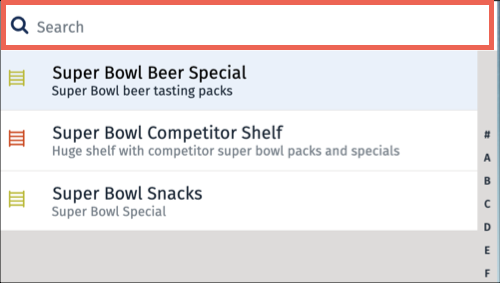
displayList in the
GroupedList section. It’s the master component and gets its data from
displayList in the process context. There’s an index bar for easy navigation and a search
feature to find specific items. There’s also a list of items in the
displayDetailsDisplayListItems pattern. The GroupedList
section includes a search attribute for the Name
field.<GroupedList name="displayList" master="true" dataSource="ProcessContext::DisplayList.items[]" indexBar="true" searchable="true">
<Items name="Items" itemPattern="displayDetailsDisplayListItems">
</Items>
<Events>
</Events>
<SearchAttributes>
<SearchAttribute name="Name"/>
</SearchAttributes>
</GroupedList>The offline mobile app screen image shows the search bar and the index letters on the display list page.
Did this article solve your issue?
Let us know so we can improve!
