
You are here:
Set Edit Restrictions to Competitor Displays
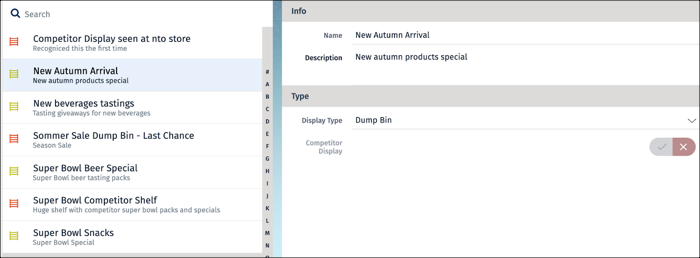
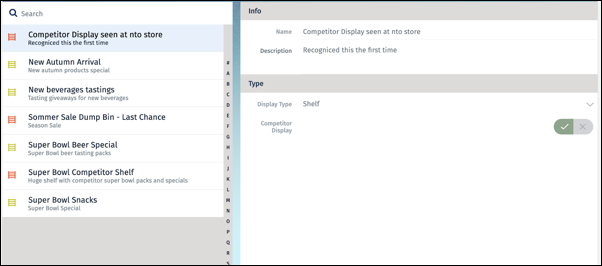
You can set the Competitor Display control as read-only on the mobile app if you don’t want the sales reps to modify the competitor flag setting in display records. Add a SetEARights method to the Display business object and call it in the afterLoadAsync method.
Required Editions
| Available in: Enterprise and Unlimited Editions where Consumer Goods Cloud is enabled |
| User Permissions Needed | |
|---|---|
| To configure a detail page | Customizer, Developer |
Manage edit and visibility rights for objects and their properties in business logic with Access Control Language (ACL). In business logic, you can set or remove these rights for all objects or only for specific objects or properties. To add or remove rights, use these methods:
acl.addRight(AclObjectType, ElementName, AclPermission)acl.removeRight(AclObjectType, ElementName, AclPermission)
The parameters for the methods are:
type: UseAclObjectType.OBJECTfor BO, LO, LU, and LI objects. UseAclObjectType.PROPERTYfor simple properties or nested objects.elementName: The name of the simple property or object.permission: Choose fromAclPermission.EDIT,AclPermission.VISIBLE, orAclPermission.ALL.
-
To disable the competitor display control:
-
In Visual Studio Code terminal, to add a mySetEARights method to the Display
module, run
sf mdl add, and enter these details.? Select the resource you want to add. businesslogic ? Specify a name for the businesslogic: SetEARights ? Select the module to which businesslogic 'SetEARights' should be added. MyDisplay ? Select a suitable option for businesslogic 'SetEARights'. method ? Select the reference object to which you want to add the businesslogic method. BoMyDisplay ? Do you really want to create the businesslogic 'SetEARights'? Yes Successfully created businesslogic 'SetEARights'.The CLI creates the BoMyDisplay.MySetEARights.bl.js contract and adds a reference to the new method in the BoMyDisplay.businessobject.xml contract. -
Add this snippet to BoMyDisplay.MySetEARights.bl.js:
var acl = me.getACL(); acl.removeRight(AclObjectType.PROPERTY, "competitorDisplay", AclPermission.EDIT); - Save your changes.
-
To test the changes, build the contracts by running this command.
sf
                modeler workspace build
. - Restart the simulator app and verify the changes.
-
In Visual Studio Code terminal, to add a mySetEARights method to the Display
module, run
-
To set competitor display records entirely to read-only, disable the display
object:
-
Add this snippet to BoMyDisplay.MySetEARights.bl.js:
if (Utils.isTrue(me.getCompetitorDisplay())) { acl.setAce({ "objectType" : AclObjectType.OBJECT, "objectName" : "BoMyDisplay", "rights" : AclPermission.EDIT, "grant" : false }); } - Restart the simulator app and verify that the competitor display item is read-only.
- Save your changes.
-
To test the changes, build the contracts by running this command:
sf modeler workspace build - Restart the simulator app and verify the changes.
-
Add this snippet to BoMyDisplay.MySetEARights.bl.js:
Did this article solve your issue?
Let us know so we can improve!
