
You are here:
Migrate Windows Server Based Modeler Contracts to Visual Studio Code Based Modeler
Migrate contracts from an existing project in Windows Server based Modeler to the latest version of VS Code based Modeler.
Required Editions
| Available in: Enterprise and Unlimited Editions that have Consumer Goods Cloud enabled. |
| User Permissions Needed | |
|---|---|
| To migrate to VS Code Modeler | Customizer, Admin |
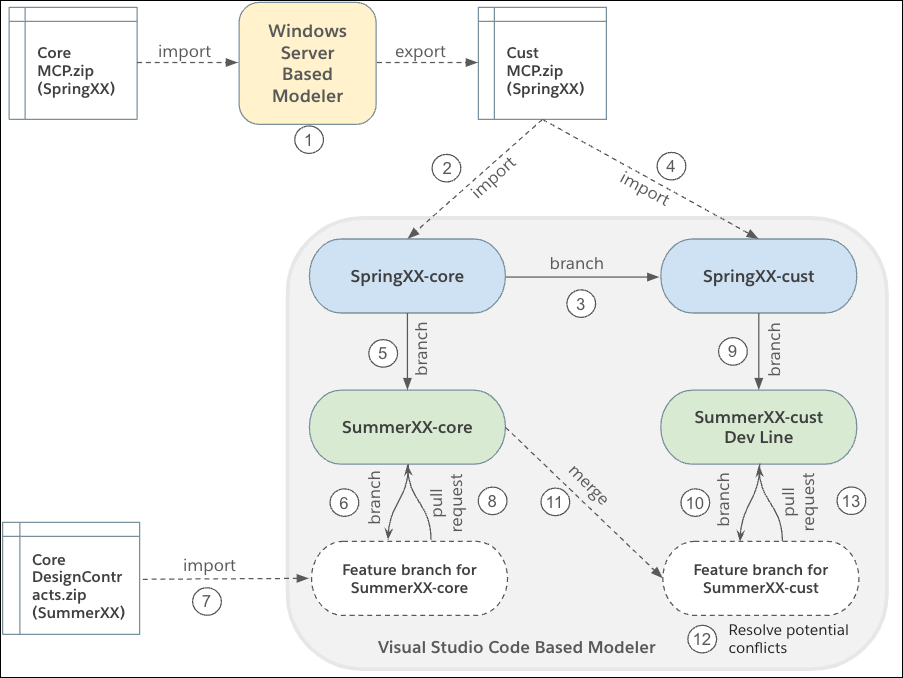
Use this workflow to set up your Git repo and migrate the contracts of your project from Windows Server based Modeler to a latest version of VS Code based Modeler. For example, migrate from Spring’XX version of Windows Server based Modeler to Summer’XX version of VS Code based Modeler.
-
Update your customizer branch in Windows Server based Modeler with the latest core
Modeler Content Package (MCP.zip) of SpringXX.
- Download the SpringXX core MCP zip from the Custom - Managed section of the Lightning App Builder and import it to the customizer branch in the Windows Server based Modeler.
- Resolve merge conflicts, if any.
- Export all the contracts of the project from the SpringXX customizer branch. From the Repository menu, select Export Contracts | Snapshot Version (Complete) and save the custom MCP locally.
-
Create a Spring’XX-core branch in your Git repo, and then perform these steps in this
branch:
-
Create a workspace in this branch. Run
sf modeler
                workspace create
. -
Import the core contracts from the ‘contracts’ folder of the SpringXX Cust_MCP.zip
to $workspace/src in the SpringXX-core branch. The custom
contracts zip package includes the core contracts. Run
sf modeler workspace
                utils importContracts -i <SpringXX-Cust_MCP.zip_filepath> -c
This action transforms .core.xml files to .xml files. This action also transforms the XML business logic files to JavaScript (bl.js) files.
-
Create a workspace in this branch. Run
- Create a SpringXX-cust branch based on the SpringXX-core branch.
-
In the SpringXX-cust branch, import the custom contracts to VS Code based Modeler
syntax. Run
sf modeler workspace utils importContracts -i
            <SpringXX-Cust_MCP.zip_filepath>
This action transforms the XML business logic files to JavaScript (bl.js) files. - Create a branch for the SummerXX-core based on the existing SpringXX-core branch.
- Create a feature branch based on the SummerXX-core to update the core contracts.
-
Import the core design contract into the feature branch. Run
sf modeler workspace utils importContracts -i <DesignContracts.zip_filepath> - Create a pull request against SummerXX-core branch
- Create a branch for SummerXX-cust based on the existing SpringXX-cust branch.
- Create a feature branch to update the contracts in your customizing branch.
- Merge the SummerXX-core branch to SummerXX-cust upgrade branch.
- Resolve merge conflicts locally, if any. You can test the changes made as part of merge resolution in the feature branch.
- After the merge is successful, run the necessary tests and pull changes to the SummerXX-cust branch.
Did this article solve your issue?
Let us know so we can improve!
