
You are here:
Configure the Number of Visible Records in a List
Limit the number of visible list items to show and sort the items in alphabetical order on the card.
Required Editions
| User Permissions Needed | |
|---|---|
| To customize CG Cloud offline mobile app: | Customizer, Developer |
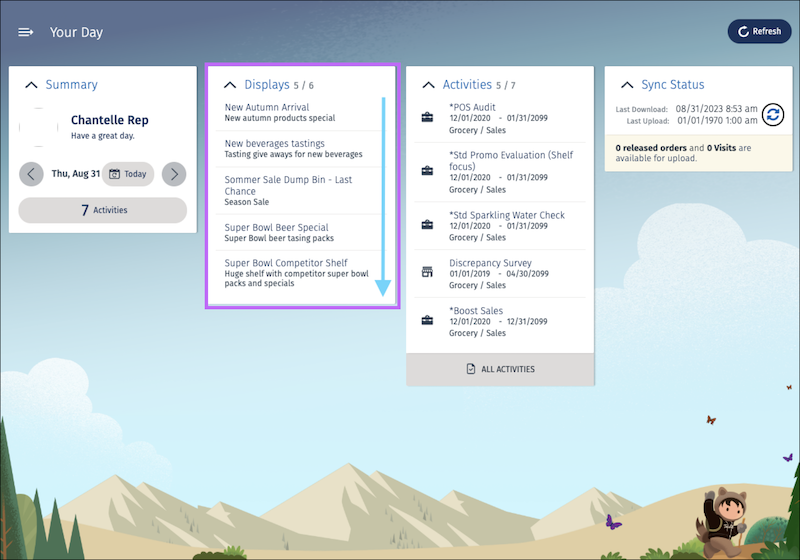
To optimize app performance and usability, limit the number of visible list items in the card to 5 in tablet mode and 3 in phone mode in a card. The framework supports a maximum of 20 list items to show on a card in the CG Cloud offline mobile app.
-
To sort the display list in alphabetical order and show the first five display records,
add an order criteria to the
DsLoMyDisplaysdata source contract.<DataSource name="DsLoMyDisplays" backendSystem="sf" businessObjectClass="LoMyDisplays" external="false" editableEntity="Display__c" schemaVersion="2.0"> <Attributes> <Attribute name="id" table="Display__c" column="Id" /> <Attribute name="name" table="Display__c" column="Name" /> <Attribute name="description" table="Display__c" column="Description_c" /> <Attribute name="competitorDisplay" table="Display__c" column="Competitor_Display_c" /> </Attributes> <Entities> <Entity name="Display__c" alias="" idAttribute="Id" /> </Entities> <QueryCondition/> <OrderCriteria> <OrderCriterion entity="Display__c" attribute="Name" direction="ASC" /> </OrderCriteria> <Parameters/> </DataSource> -
Create the
ReduceNumberOfListItemsbusiness logic function inLoMyDisplaysby using thesf modeler workspace addCLI command.? Select the resource you want to add. businesslogic ? Specify a name for the businesslogic: ReduceNumberOfListItems ? Select the module to which businesslogic 'ReduceNumberOfListItems' should be added. MyDisplay ? Select a suitable option for businesslogic 'ReduceNumberOfListItems'. method ? Select the reference object to which you want to add the businesslogic method. LoMyDisplays ? Do you really want to create the businesslogic 'ReduceNumberOfListItems'? Yes Successfully created businesslogic 'LoMyDisplays.MyReduceNumberOfListItems' -
Use these functions to determine and show the number of display records.
Utils.isPhone()- Returns true in phone mode<List>.getAllItems()- Returns an array with all list items<List>.removeAllItems()- Removes all items from the list object<List>.addItems(itemArray)- Adds the given item array to the list object
* @function myReduceNumber0fListItems
  * @this LoMyDisplays
  * @kind listobject
  * @namespace CUSTOM
  */
 function myReduceNumber0fListItems(){
       var me = this;

//////////////////////////////////////////////////////////////
//        Add your customizing javaScript code below..      //
//////////////////////////////////////////////////////////////
// determine the max number of list items to show in card (depending on form factor)
       var limitDueToFormFactor = Utils.isPhone() ? 3 : 5;

       // get all items as array
       var displayItems = me.getAllItems();

       // reduce items
       displayItems.splice(limitDueToFormFactor);

       //clear list
       me. removeAllItems ();

       // add reduced items
       me.addItems (displayItems) ;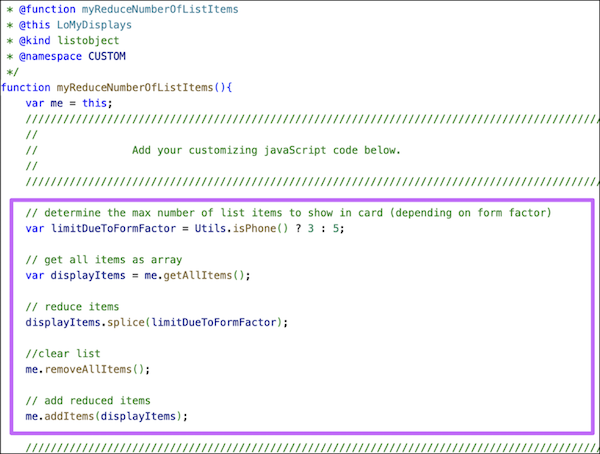
-
To call the
ReduceNumberOfListItemsfunction, modify the action flow in Application_CockpitProcess.processflow.xml.<!-- Card: Display START--> <Action name="CardDisplay_loadData" actionType="LOAD" type="LoMyDisplays" > <Return name="ProcessContext::CardDisplay_DisplayList" /> <TransitionTo action="CardDisplay_loadInformationText"/> </Action> <Action name="CardDisplay_loadInformationText" actionType="LOGIC" call="ProcessContext::CardDisplay_DisplayList.myGetInfoForDisplayCard"> <Parameters> <Input name="loItems" value="ProcessContext::CardDisplay_DisplayList"/> <Input name="type" value="Display" type="Literal" /> </Parameters> <Return name="ProcessContext::CardDisplay_InformationText" /> <TransitionTo action="CardDisplay_reduceListItems"/> </Action> <Action name="CardDisplay_reduceListItems" actionType="LOGIC" call="ProcessContext::CardDisplay_DisplayList.myReduceNumberOfListItems"> <TransitionTo action="CardDisplay_setSubcomponentName" /> </Action> -
Build the contracts by running the command
sf modeler
            workspace build
or the alias commandsf mdl ws buildin your workspace. - To test the changes, restart the simulator app.
Did this article solve your issue?
Let us know so we can improve!
