
You are here:
PivotItems
PivotItems in a datasource contract cover the differences between schemas.
Required Editions
| Available in: Enterprise, Performance, and Unlimited Editions |
Let’s understand PivotItems with an example. BpaCustomer
and BpaAddress are two separate entities in Consumer
Goods Cloud Modeler. BpaAddress stores the addresses of a
customer as a list object (one address per record). Each PivotItem creates one list item in the list object. PivotItem defines a mapping between the record columns and the property names of
the list item.
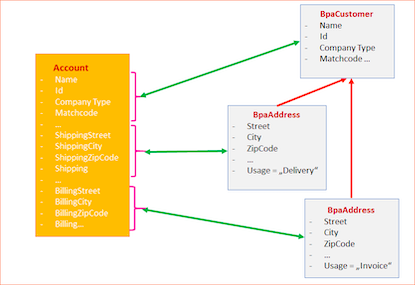
Datasource runs a query on the Account entity and selects both addresses, resulting in a single row in the JSON representation. To reuse this result, it’s transformed into two JSON objects to be instantiated as list items of the existing LoBpaAddress (list object in BpaAddress). The transformation occurs at the data access layer of the CG Cloud offline mobile app.
To enable this process, use these functions:
Normalize()- to transform the data from database items to list items.Denormalize()- to transform list items back to a representation that can be stored in the database.
PivotItems must contain at least two PivotItem sub nodes
with unique IDs. You can use these properties in PivotItem.
| Property | Description | Supported Attributes |
|---|---|---|
Attribute
|
Loads data from a Salesforce database table. | |
PivotConstant
|
PivotConstant delivers a constant value. | |
PivotDerivedAttribute
|
Specifies derived attributes like a composition of string values and table
content. For example,<PivotDerivedAttribute
name="address" pivotName="ShippingAddress" value="Account.ShippingStreet || ', ' ||
Account.ShippingPostalCode " /> |
|
DateTimeAttribute
|
Stores date and time-related data. You can use this property multiple times
identified by Datename and TimeName attributes. |
|
This source code illustrates a sample PivotItems
node:
<PivotItems>
      <PivotItem id="Delivery">
        <Attribute name="validFrom" table="Product2" column="Delivery_Valid_From__c" />
        <Attribute name="validThru" table="Product2" column="Delivery_Valid_Thru__c" />
        <PivotConstant name="prdStateType" value="DLV" />
        <PivotDerivedAttribute name="state" pivotName="Delivery_State" value="CASE WHEN #compareAsDate('Delivery_Valid_From__c', 'Date', 'le', #TodayAsDate#, 'Date')# AND #compareAsDate('Delivery_Valid_Thru__c', 'Date', 'ge', #TodayAsDate#, 'Date')# THEN 'Available' ELSE 'NotAvailable' END" />
      </PivotItem>
      <PivotItem id="Field">
        <Attribute name="validFrom" table="Product2" column="Field_Valid_From__c" />
        <Attribute name="validThru" table="Product2" column="Field_Valid_Thru__c" />
        <PivotConstant name="prdStateType" value="FLD" />
        <PivotDerivedAttribute name="state" pivotName="Field_State" value="CASE WHEN #compareAsDate('Field_Valid_From__c', 'Date','le', #TodayAsDate#, 'Date')# AND #compareAsDate('Field_Valid_Thru__c', 'Date', 'ge', #TodayAsDate#, 'Date')# THEN 'Available' ELSE 'NotAvailable' END" />
      </PivotItem>
      <PivotItem id="KAM">
        <Attribute name="validFrom" table="Product2" column="KAM_Valid_From__c" />
        <Attribute name="validThru" table="Product2" column="KAM_Valid_Thru__c" />
        <PivotConstant name="prdStateType" value="KAM" />
        <PivotDerivedAttribute name="state" pivotName="KAM_State" value="CASE WHEN #compareAsDate('KAM_Valid_From__c', 'Date', 'le', #TodayAsDate#, 'Date')# AND #compareAsDate('KAM_Valid_Thru__c', 'Date', 'ge', #TodayAsDate#, 'Date')# THEN 'Available' ELSE 'NotAvailable' END" />
      </PivotItem>
      <PivotItem id="NewItem">
        <Attribute name="validFrom" table="Product2" column="New_Item_Valid_From__c" />
        <Attribute name="validThru" table="Product2" column="New_Item_Valid_Thru__c" />
        <PivotConstant name="prdStateType" value="New" />
        <PivotDerivedAttribute name="state" pivotName="New_State" value="CASE WHEN #compareAsDate('New_Item_Valid_From__c', 'Date', 'le', #TodayAsDate#, 'Date')# AND #compareAsDate('New_Item_Valid_Thru__c', 'Date', 'ge', #TodayAsDate#, 'Date')# THEN 'Available' ELSE 'NotAvailable' END" />
      </PivotItem>
    </PivotItems>