Example: Allocating Carbon Credits
Let’s see how to allocate carbon credits to offset unavoidable emissions.
Required Editions
| Available in: Lightning Experience |
| Available in: Enterprise, Performance, Unlimited, and Developer Editions |
| Permission Set Needed | |
|---|---|
| To enter and modify data: | Net Zero Cloud Manager OR Net Zero Cloud Admin |
As a Net Zero Cloud Manager:
-
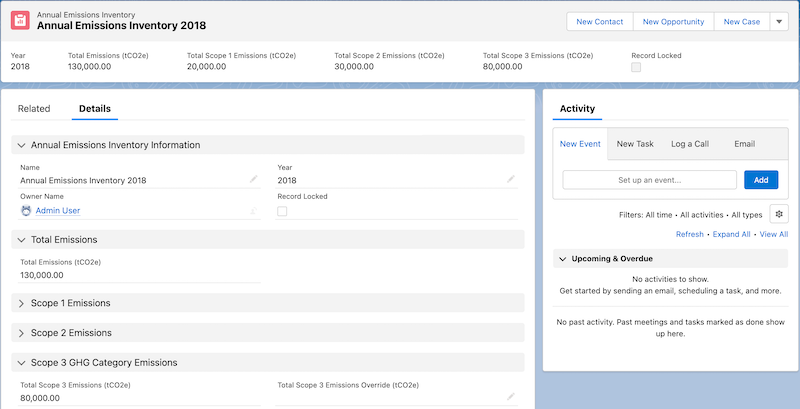
Select an annual emissions inventory that aggregates emissions across your
company’s assets and procurement activities for a year. You can map your
company’s emissions generating activities to the greenhouse gas categories. For
example, Annual Emissions Inventory 2018 record indicates the emissions recorded
for these emissions activities:
- Scope 1 Emissions from Commercial Buildings (tCO2e) = 20,000.00
- Scope 2 Location-Based Emissions from Data Centers (tCO2e) = 30,000.00
- Scope 3 Emissions from Business Travel (tCO2e) = 60,000.00
- Scope 3 Emissions from Upstream Transportation and Distribution (tCO2e) = 20,000.00
-
Create carbon credit project records for projects you would like to support.
For example,
- Green Arizona plants trees that remove carbon from the atmosphere as the trees grow.
- Global Wind builds a wind farm to lower reliance on fossil fuels.
-
Create sustainability purchase records of type Carbon Credits for these carbon
credit projects. For example:
- Purchase record 1 for Green Arizona
- Purchase record 2 for Global Wind
-
Create sustainability credit records for the credits purchased. Only
sustainability credits in Retired status can be allocated. For example:
- Carbon credits purchased from Green Arizona = 70,000
- Carbon credits purchased from Global Wind = 100,000
-
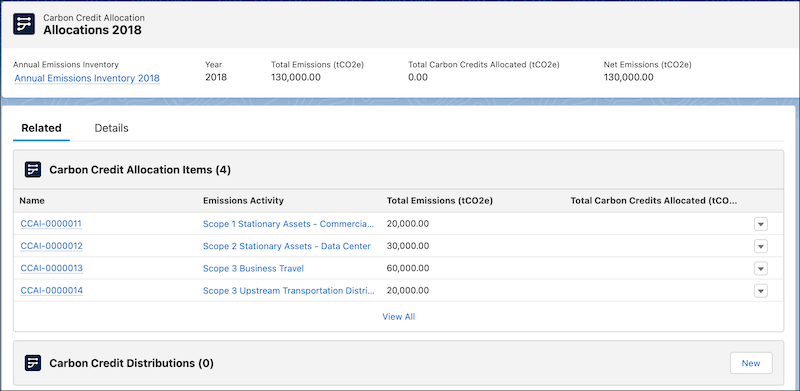
Create a carbon credit allocation record for the annual emissions
inventory.
Carbon credit allocation item records are automatically created for each emissions activity in the annual emissions inventory. For example, for Allocations 2018 associated with Annual Emissions Inventory 2018, carbon credit allocation item records are created for these emissions activities:
- Scope 1 Emissions from Commercial Buildings (tCO2e) = 20,000.00
- Scope 2 Location-Based Emissions from Data Centers (tCO2e) = 30,000.00
- Scope 3 Emissions from Business Travel (tCO2e) = 60,000.00
- Scope 3 Emissions from Upstream Transportation and Distribution (tCO2e) = 20,000.00
- From the actions menu, click Allocate.
-
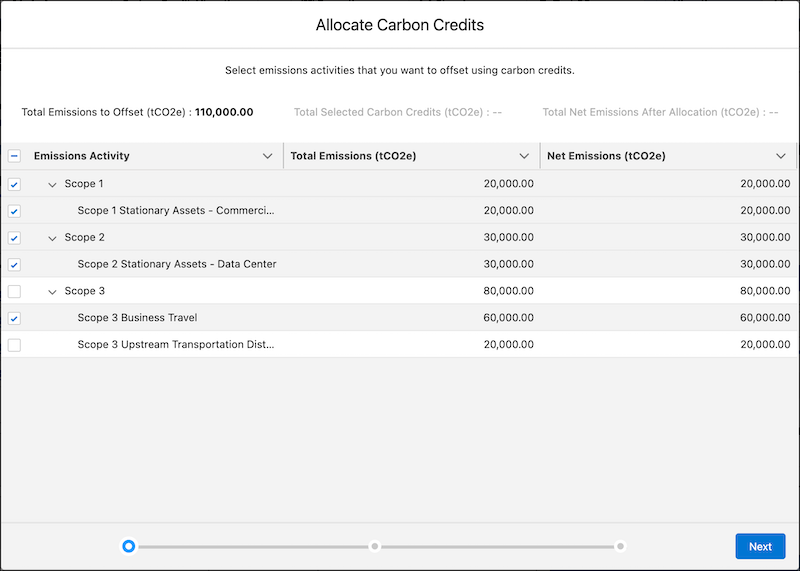
Select the emissions activities that you want to offset and click
Next. For example, only these emissions activities
are selected to be offset:
- Scope 1 Emissions from Commercial Buildings (tCO2e) = 20,000.00
- Scope 2 Location-Based Emissions from Data Centers (tCO2e) = 30,000.00
- Scope 3 Emissions from Business Travel (tCO2e) = 60,000.00
-
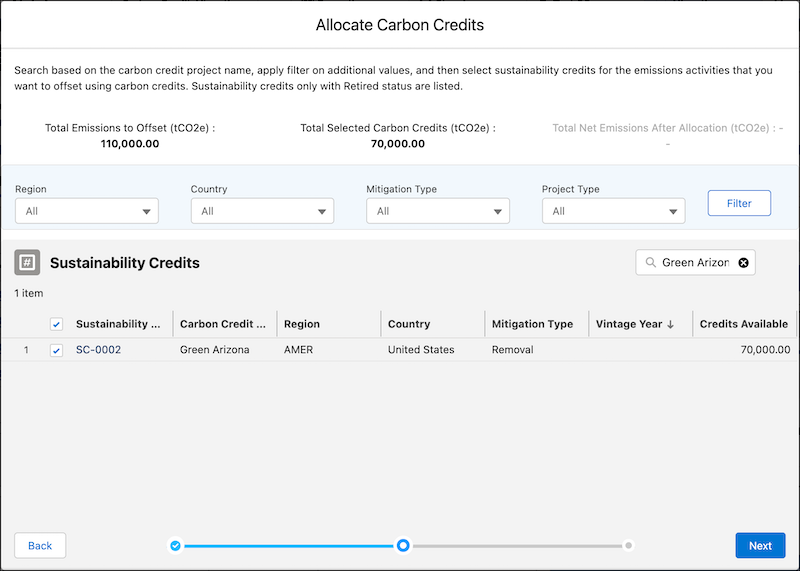
Search for the carbon credit project from which the carbon credits to be
allocated were purchased and click Next.
-
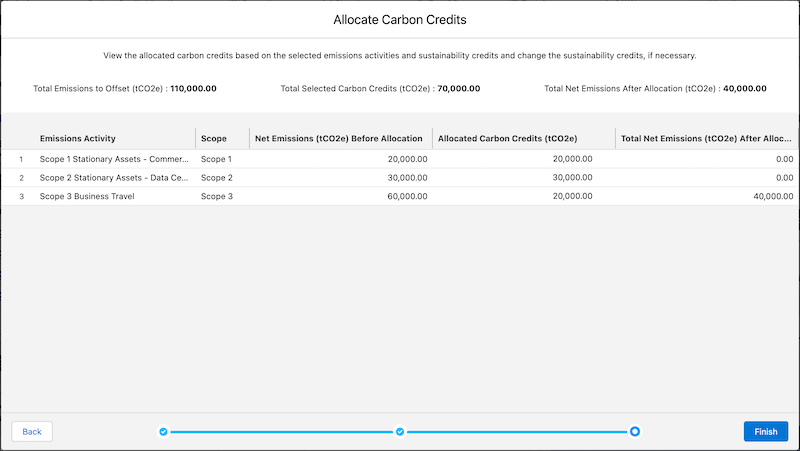
Review the carbon credits that are automatically allocated to the selected
emissions activities, and, if necessary, update the automatically allocated
carbon credits, and then click Finish. For example, carbon credits are allocated
for these selected emissions activities:
- Scope 1 Emissions from Commercial Buildings (tCO2e) = 20,000.00
Allocated carbon credits = 20,000
- Scope 2 Location-Based Emissions from Data Centers (tCO2e) = 30,000.00
Allocated carbon credits = 30,000
- Scope 3 Emissions from Business Travel (tCO2e) = 60,000.00
Allocated carbon credits = 20,000
- Scope 1 Emissions from Commercial Buildings (tCO2e) = 20,000.00
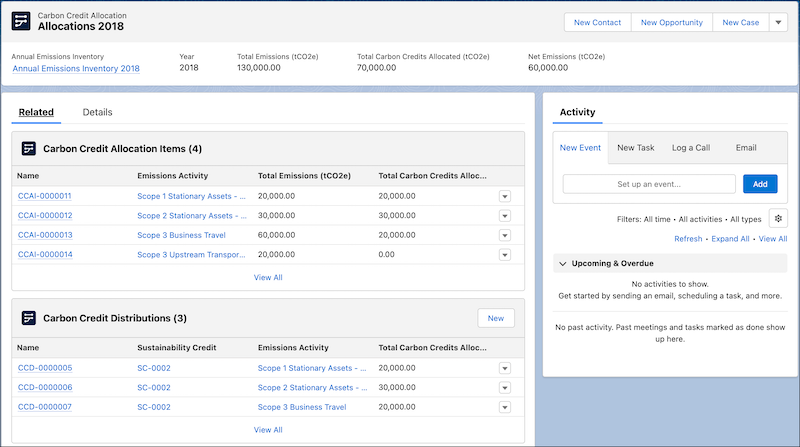
- The carbon credit allocation item records are automatically updated with the total carbon credits allocated.
-
For carbon credits allocation related to each emissions activity, carbon credit
distribution records are automatically created.
-
The net emissions are calculated as the difference between the total emissions
and the total carbon credits allocated. For example:
Net Emissions (tCO2e) = Total Emissions (tCO2e) - Total Carbon Credits Allocated (tCO2e)
Net Emissions (tCO2e) = 130000 - 70000 = 60000
Scope 1 Emissions from Commercial Buildings (tCO2e) 20,000 Scope 2 Location-Based Emissions from Data Centers (tCO2e) 30,000 Scope 3 Emissions from Business Travel (tCO2e) 60,000 Scope 3 Emissions from Upstream Transportation and Distribution (tCO2e) 20,000 Total Emissions (tCO2e) 130000 Total Carbon Credits Allocated (tCO2e) -70000 Net Emissions (tCO2e) 60000
Did this article solve your issue?
Let us know so we can improve!
