Generate Emissions Forecasts
Generate forecasts for your emissions based on the current energy consumption data and emissions for an asset source.
Required Editions
| Available in: Lightning Experience |
| Available in: Enterprise, Performance, Unlimited, and Developer Editions |
| Permission Set Needed | |
|---|---|
| To enter and modify data: | Net Zero Cloud Manager OR Net Zero Cloud Admin |
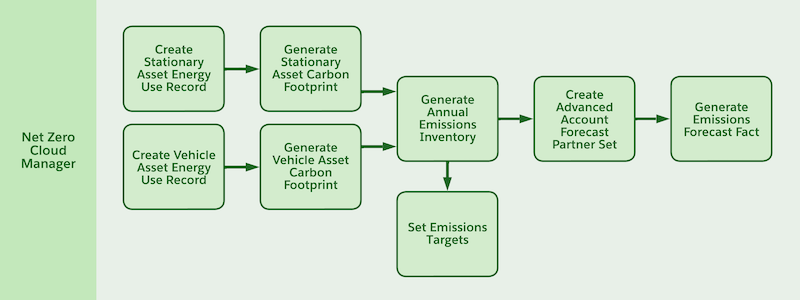
Here's an image that shows the high-level steps to generate forecasts for your emissions.
-
Create energy use records that capture the energy consumption data for an asset source
and emissions from the source.
For more information, see Create a Stationary Asset Energy Use Record and Create a Vehicle Asset Energy Use Record.
- Based on automation preferences the carbon footprint records are automatically generated or you can create the footprint records related to the emissions based on the energy use records.
-
Generate an annual emissions inventory record based on the carbon footprint records
across scopes for a year.
The record contains emissions data for each emissions activity. For more information, see Set Emissions Inventory.
-
Set quantitative targets that align with SBTi's science-based criteria to reduce your
company's emissions and get closer to a net zero future.
The target measures from the science-based target records along with the actual emissions data are used to forecast emissions.For more information, see Set Emissions Reduction Targets.
-
Populate forecast and carbon credit-related measures, which are available in the
forecast fact records.
For more information, see Generate Emissions Forecasts for the First Time. Create an advanced account forecast partner set record that serves as the entry point to the forecasting grid.
Did this article solve your issue?
Let us know so we can improve!
