
Set Up Disclosure Document Generation
Use Omnistudio Document Generation to generate disclosures using the client-side or server-side Omniscripts.
Required Editions
| Available in: Lightning Experience |
| Available in: Enterprise, Performance, Unlimited, and Developer Editions |
| Permission Set Needed | |
|---|---|
| To develop document template: | Omnistudio Admin AND DocGen Designer |
To use Omnistudio Document Generation with Disclosure and Compliance Hub, see Post-Install Steps for Foundation Document Generation.
A document template defines the structure, content, and format of generated disclosure documents. You can generate documents based on a document template as part of an Omniscript-based guided interaction flow. Make sure that tokens you use in the Microsoft Word or Microsoft PowerPoint document template are for the assessment objects, such as Assessment Question and Assessment Question Response. During document generation, tokens are replaced with actual data in the generated document.

Here's an image that shows a sample document template with tokens for assessment objects.
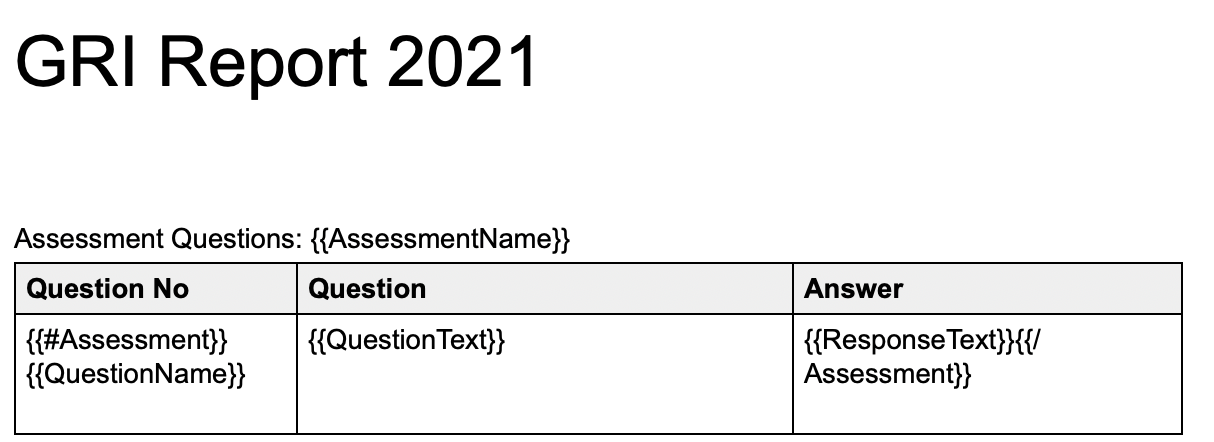
For more information, see Foundation Document Templates.
Retrieve a Document Template Global Key
Use the sample code to get the global key for the document template that you created.
Required Editions
| User Permissions Needed | |
|---|---|
| To run a query in the developer console: | View All Data |
- From the Setup menu, select Developer Console.
-
Click Query Editor and enter this query.
SELECT Id, IsActive, Name, Type, VersionNumber, GlobalKey from DocumentTemplate WHERE IsActive = true - Click Execute.
