You are here:
Configure a Forecast Set for Program Based Business
Define forecast fact object field mappings, forecast frequencies, and data processing engine definitions for the forecast set. Also define adjustment periods to provide different stakeholders an option to modify forecast data based on their insights into market conditions, growth in either a specific product or industry segment, and any other trends.
Required Editions
| Available in: Lightning Experience |
| Available in: Enterprise, Unlimited, and Developer Editions |
| User Permissions Needed | |
|---|---|
| To create forecast sets: | Manufacturing Advanced Account Forecast permission set |
- From Setup, in the Quick Find box, enter Manufacturing, and then select Advanced Account Forecasting.
- Navigate to the Forecast Sets tab.
- Click Edit next to your forecast set name.
- Expand the Building Blocks section.
-
Enter forecast period and fact object details.
Field Value Period Group Period group of the forecast set. For example, if you create a forecast set for program forecasts, select the period group that you created for program forecasts. Forecast Fact Object Forecast fact object of forecasts. For example, if want to create a forecast set for program forecasts, select Manufacturing Program Forecast Fact. 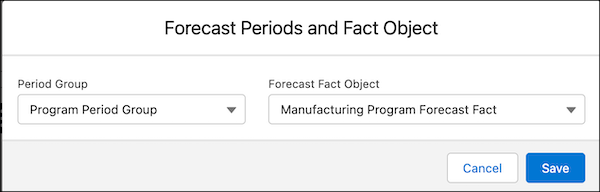
-
Enter forecast fact field mapping details.
Field Value Account Name of the manufacturing program lookup field in the fact record. Period Name of the period lookup field in the fact record. Forecast Quantity Name of the forecast quantity field in the fact record. Forecast Revenue Name of the forecast revenue field in the fact record. Forecast Status Name of the status field in the fact record. Forecast Set Name of the account forecast set use lookup field in the fact record. 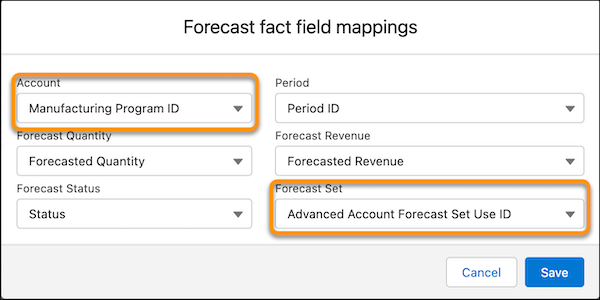
 Note Before activating the forecast set, ensure that you specify the forecast fact field mappings.
-
Enter forecast frequency details.
Field Value Calculation Frequency Frequency at which forecasts are calculated for the forecast set. Select either Monthly, Quarterly, or Yearly. Rollover Frequency Frequency at which forecasts for new periods are generated. -
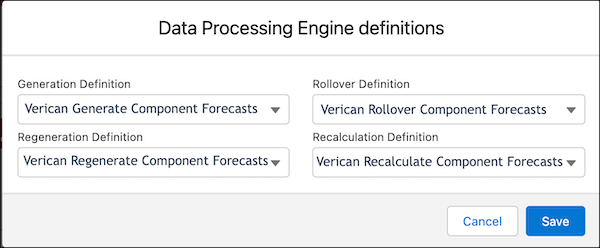
f you're creating a forecast set for component forecasts, select the Data Processing Engine
definitions for generation, regeneration, rollover, and recalculation.
-
Expand the Forecast Dimensions section and enter details.
Field Description Name Name of the dimension. Forecast Fact Dimension Field Name of the forecast fact dimension field in the associated forecast fact object. Display Order Position (from left to right) of this dimension as a column in the forecast table. Measure values are grouped by the first dimension, then by the next dimension, and so on. For example, when you enter 1 for the product dimension and 2 for the location dimension, measure values are grouped by product and then by location. -
Enter the required details for these fields.
Field Description Name Name of the dimension. Forecast Fact Dimension Field Name of the forecast fact dimension field in the associated forecast fact object. For more information on the dimensions associated with the out-of-the-box forecast fact objects, see Forecast Fact Objects with Program Based Business. Display Order Position (from left to right) of this dimension as a column in the forecast table. Measure values are grouped by dimensions. For example, when you enter 1 for the product dimension and 2 for the location dimension, measure values are grouped by product and then by location. 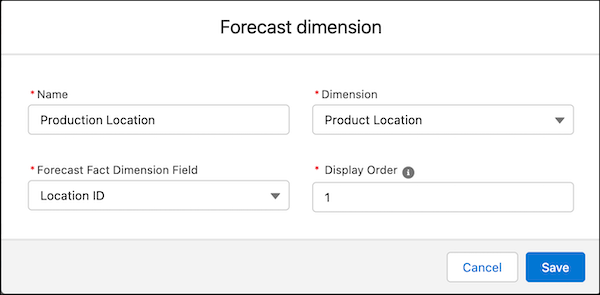
-
Expand the Forecast Measures section and enter details.
Field Description Name Name of the measure. For example, Forecasted Revenue. Forecast Fact Measure Field Name of the forecast fact measure field in the associated forecast fact object. For more information on the measures associated with the out-of-the-box forecast fact objects, see Forecast Fact Objects with Program Based Business. Measure Type Type of measure. For example, Quantity. Aggregation Type Aggregation type to use for the measure. For example, Sum, Avg, and so on. Calculation Method Method to calculate the measure. Select from these values.
- Batch Process: A batch process, such as Data Processing Engine definitions, to calculate measure values.
- User-Editable: Users can edit forecast values.
- Forecast Formula: Forecast values are calculated using the forecast formula.
Track Adjustments This option is not available for Program Based Business forecast sets. -
Specify the required details for these fields.
Field Description Name Name of the measure. For example, Forecasted Revenue. Forecast Fact Measure Field Name of the forecast fact measure field in the associated forecast fact object. Measure Type Type of measure. For example, Quantity. Aggregation Type Aggregation type to use for the measure. For example, Sum, Avg, and so on. Calculation Method Method for calculating the measure. Options include:
- Batch Process: A batch process, such as Data Processing Engine definitions, to calculate measure values.
- User-Editable: Users can edit forecast values.
- Forecast Formula: Forecast values are calculated using the forecast formula.
Track Adjustments Indicates whether the adjustments made to the advanced account forecast values for this measure are tracked. This option is not available for Program Based Business forecast sets. -
Expand the Forecast Adjustment Periods section and enter details.
Field Description User Profile Profile of the user who makes the adjustment. Frequency Frequency at which you can make adjustments. Period Start Day Number of days from the beginning of the specified frequency during which you can adjust forecast values. For example, to start the adjustment period from the fifth day of the month or quarter, enter 5. Duration Days Number of days for which the adjustment period remains open. For example, to specify an adjustment duration of 10 days beginning on the provided period start day, enter 10. 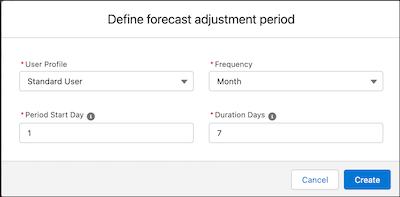
Did this article solve your issue?
Let us know so we can improve!
