Loading
The Trailblazer Community is now read-only Read More
Create an Advanced Account Forecast Set Use

Create an Advanced Account Forecast Set Use

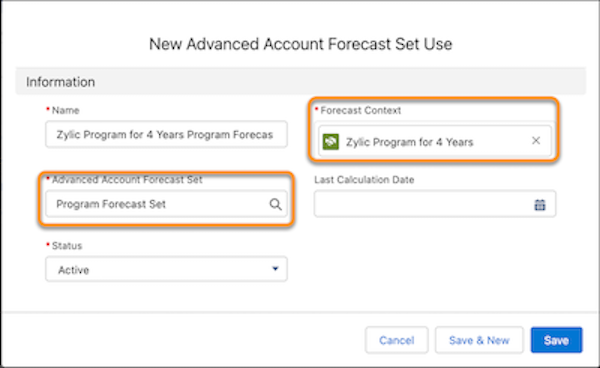
Use the Advanced Account Forecast Set Use object to associate the program forecast set with an object record whose data is used when generating forecasts. For example, select a manufacturing program as the Forecast Context to base forecasts on those records. Create two forecast set uses, one for the manufacturing program and one for the program variant. The forecast set use for manufacturing program components is created when your admin runs the Data Processing Engine definitions.
Required Editions

Available in: Lightning Experience
Available in: Enterprise, Unlimited, and Developer Editions
User Permissions Needed
To create an advanced account forecast set use: Program Based Business permission set
  1. From the App Launcher, find and select Advanced Account Forecast Set Uses.
  2. Click New.
  3. Specify these values:
    Field Description
    Name Name of the advanced account forecast set use.
    Forecast Context Object record used as the context for generating forecasts.
    Advanced Account Forecast Set The advanced account forecast set to use for creating the forecast data.
    Last Calculation Date Date when the forecast values were last calculated for the associated manufacturing program and forecast set.
    Status Status of the advanced account forecast set use.
    Create a forecast set use
  4. Save your work.
 
Loading
Salesforce Help | Article
