Loading
 Experience Cloud – Feature Degradation on Lightning Web Runtime SitesRead More
The Trailblazer Community is now read-only Read More
Create a Program Template

Create a Program Template

Create program templates to define a structure for your manufacturing programs. Then your account managers can quickly and easily set up customer-specific programs using those templates. Define the template sections with associated forecast sets that contain configuration details for the manufacturing program, the program variants, and related components. Also map the forecast fact object that stores the data for the program, variants, or components to the respective forecast sets. For example, you can create a template called Auto Program Template to generate forecasts for parts and accessories associated with a vehicle manufacturer program.
Required Editions

Available in: Lightning Experience
Available in: Enterprise, Unlimited, and Developer Editions
User Permissions Needed
To create program templates Program Based Business permission set
  1. From Setup, in the Quick Find box, enter Program Based Business, and then select Program Based Business.
  2. Click New.
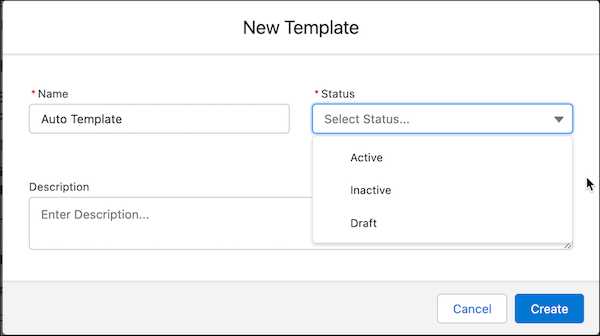
  3. Specify these values:
    Field Description
    Name Unique name for the program template.
    Status

    Options include:

    • Active
    • Inactive
    • Draft

    A template is created in Draft status. To use the template to create programs, set the status to Active.

    Description Description for the program template.
    Create new template
  4. Save your work.
  1. Create a Template Section
    Template sections define the structure of a program template. The associated forecast set contains configuration details for the manufacturing program, the program variants, and related components.
 
Loading
Salesforce Help | Article
