You are here:
Create Object Hierarchy Relationship Mappings for Program Based Business Transformations
Create a mapping definition record in the ObjectHierarchyRelationship object for the source to target mapping at each level in the hierarchy.
Required Editions
| Available in: Lightning Experience |
| Available in: Enterprise, Unlimited, and Developer Editions |
| User Permissions Needed | |
|---|---|
| To create object hierarchy relationship mappings: | System Administrator |
For example, for converting fact to opportunity, create mappings for opportunity header, opportunity line item, and opportunity line item schedule. After you create the mappings, use an API tool, such as Postman, to deploy them.
-
Create a mapping file for some or all of these sources to target object field
mappings depending on your business case.
- Parent to Parent Mapping: To transform the header of the source object
to the header of the target object. For example, Manufacturing Program
Component Forecast Fact to Opportunity or Quote to Sales
Agreement.
MfgProgramCpntFrcstFact to Opportunity mapping
<?xml version="1.0" encoding="UTF-8"?>
                                    <ObjectHierarchyRelationship xmlns="http://soap.sforce.com/2006/04/metadata">
                                    <parentObjectMapping>
                                    <inputObject>MfgProgramCpntFrcstFact</inputObject>
                                    <outputObject>Opportunity</outputObject>
                                    </parentObjectMapping>
                                    <outputPntRelationshipFieldName/>
                                    <inputObjRecordsGrpFieldName>ManufacturingProgram</inputObjRecordsGrpFieldName>
                                    <parentRecord/>
                                    <mappingType>ParentToParent</mappingType>
                                    <usageType>TransformationMapping</usageType>
                                    </ObjectHierarchyRelationship>
Quote to SalesAgreement mapping
<?xml version="1.0" encoding="UTF-8"?> <ObjectHierarchyRelationship xmlns="http://soap.sforce.com/2006/04/metadata"> <parentObjectMapping> <inputObject>Quote</inputObject> <outputObject>SalesAgreement</outputObject> <mappingFields> <inputField>AccountId</inputField> <outputField>AccountId</outputField> </mappingFields> <mappingFields> <inputField>Name</inputField> <outputField>Name</outputField> </mappingFields> <mappingFields> <inputField>ExpirationDate</inputField> <outputField>StartDate</outputField> </mappingFields> <mappingFields> <inputField>Pricebook2Id</inputField> <outputField>PricebookId</outputField> </mappingFields> </parentObjectMapping> <outputPntRelationshipFieldName/> <inputObjRecordsGrpFieldName>Account</inputObjRecordsGrpFieldName> <parentRecord/> <mappingType>ParentToParent</mappingType> <usageType>TransformationMapping</usageType> </ObjectHierarchyRelationship> - Parent to Child Mapping: To transform the header of the source object to
the child in a target object. For example, Manufacturing Program
Component Forecast Fact to Opportunity Line Item or Manufacturing
Program Component Forecast Fact to Opportunity Line Item
Schedule.
MfgProgramCpntFrcstFact to OpportunityLineItem mapping
<?xml version="1.0" encoding="UTF-8"?>
                                    <ObjectHierarchyRelationship xmlns="http://soap.sforce.com/2006/04/metadata">
                                    <parentObjectMapping>
                                    <inputObject>MfgProgramCpntFrcstFact</inputObject>
                                    <outputObject>OpportunityLineItem</outputObject>
                                    <mappingFields>
                                    <inputField>SellingPricePerUnit</inputField>
                                    <outputField>UnitPrice</outputField>
                                    </mappingFields>
                                    </parentObjectMapping>
                                    <outputPntRelationshipFieldName>Opportunity</outputPntRelationshipFieldName>
                                    <inputObjRecordsGrpFieldName>ProductComponent</inputObjRecordsGrpFieldName>
                                    <parentRecord>CmpForecastFactToOpportunity1</parentRecord>
                                    <mappingType>ParentToChild</mappingType>
                                    <usageType>TransformationMapping</usageType>
                                    </ObjectHierarchyRelationship>
MfgProgramCpntFrcstFact to OpportunityLineItemSchedule mapping
<?xml version="1.0" encoding="UTF-8"?>
                                            <ObjectHierarchyRelationship xmlns="http://soap.sforce.com/2006/04/metadata">
                                            <parentObjectMapping>
                                            <inputObject>MfgProgramCpntFrcstFact</inputObject>
                                            <outputObject>OpportunityLineItemSchedule</outputObject>

                                            <mappingFields>
                                            <inputField>ForecastedRevenue</inputField>
                                            <outputField>Revenue</outputField>
                                            </mappingFields>

                                            <mappingFields>
                                            <inputField>ForecastedQuantity</inputField>
                                            <outputField>Quantity</outputField>
                                            </mappingFields>

                                            </parentObjectMapping>
                                            <outputPntRelationshipFieldName>OpportunityLineItem</outputPntRelationshipFieldName>
                                            <parentRecord>CmpForecastFactToOpportunityItem1</parentRecord>
                                            <mappingType>ParentToChild</mappingType>
                                            <usageType>TransformationMapping</usageType>
                                            </ObjectHierarchyRelationship>
Period to OpportunityLineItemSchedule Mappings
<?xml version="1.0" encoding="UTF-8"?> <ObjectHierarchyRelationship xmlns="http://soap.sforce.com/2006/04/metadata"> <parentObjectMapping> <inputObject>Period</inputObject> <outputObject>OpportunityLineItemSchedule</outputObject> <mappingFields> <inputField>startDate</inputField> <outputField>ScheduleDate</outputField> </mappingFields> </parentObjectMapping> <outputPntRelationshipFieldName/> <inputObjRecordsGrpFieldName/> <parentRecord>CmpForecastFactToOpportunityItemSchedule</parentRecord> <mappingType>Support</mappingType> <usageType>TransformationMapping</usageType> <sourceReferenceRelaFieldName>Period</sourceReferenceRelaFieldName> </ObjectHierarchyRelationship> - Child to Child Mapping: To transform the child in a source object to a
child in the target object. For example, Quote Line Item to Sales
Agreement Product.
QuoteLineItem to SalesAgreementProduct
<?xml version="1.0" encoding="UTF-8"?> <ObjectHierarchyRelationship xmlns="http://soap.sforce.com/2006/04/metadata"> <parentObjectMapping> <inputObject>QuoteLineItem</inputObject> <outputObject>SalesAgreementProduct</outputObject> <mappingFields> <inputField>Description</inputField> <outputField>Name</outputField> </mappingFields> <mappingFields> <inputField>PricebookEntryId</inputField> <outputField>PricebookEntryId</outputField> </mappingFields> </parentObjectMapping> <outputPntRelationshipFieldName>SalesAgreement</outputPntRelationshipFieldName> <parentRelationshipFieldName>Quote</parentRelationshipFieldName> <parentRecord>QuoteToSA</parentRecord> <mappingType>ChildToChild</mappingType> <usageType>TransformationMapping</usageType> </ObjectHierarchyRelationship> - Support Mapping: To derive the field values from a source field lookup
object. This mapping is used along with other mappings. For example, to
create an opportunity, you require account ID, but the account ID isn’t
available directly on the Manufacturing Program Component Forecast Fact.
The account ID can be derived from the manufacturing program ID because
the Manufacturing Program object has an Account field. In this case, we
can derive the account ID from the Manufacturing Program using support
mapping.
ManufacturingProgram to Opportunity mapping
<?xml version="1.0" encoding="UTF-8"?>
                                    <ObjectHierarchyRelationship xmlns="http://soap.sforce.com/2006/04/metadata">
                                    <parentObjectMapping>
                                    <inputObject>ManufacturingProgram</inputObject>
                                    <outputObject>Opportunity</outputObject>
                                    <mappingFields>
                                    <inputField>AccountId</inputField>
                                    <outputField>AccountId</outputField>
                                    </mappingFields>
                                    </parentObjectMapping>
                                    <outputPntRelationshipFieldName/>
                                    <inputObjRecordsGrpFieldName/>
                                    <parentRecord>CmpForecastFactToOpportunity1</parentRecord>
                                    <mappingType>Support</mappingType>
                                    <usageType>TransformationMapping</usageType>
                                    <sourceReferenceRelaFieldName>ManufacturingProgram</sourceReferenceRelaFieldName>
                                    </ObjectHierarchyRelationship>
- Parent to Parent Mapping: To transform the header of the source object
to the header of the target object. For example, Manufacturing Program
Component Forecast Fact to Opportunity or Quote to Sales
Agreement.
-
Package each mapping file as a zip file in the following format. Note that the
.settings file contains the mappings.
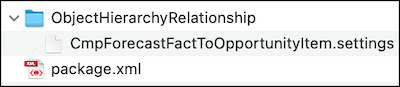
The
package.xmlfile looks like this:<?xml version="1.0" encoding="UTF-8"?> <Package xmlns="http://soap.sforce.com/2006/04/metadata"> <types> <members>*</members> <name>ObjectHierarchyRelationship</name> </types> <version>55</version> </Package> - Deploy the mappings using an API tool such as Postman.
Here's a sample request to transform MfgProgramCpntFrcstFact to an Opportunity.
{
                "inputObjectIds": [
                "0sTxx000000003FEAQ",
                "0sTxx000000004rEAA",
                "0sTxx0000000001EAA",
                "0sTxx000000001dEAA"
                ],
                "inputObjectName": "MfgProgramCpntFrcstFact",
                "usageType": "TransformationMapping",
                "outputObjectName": "Opportunity",
                "outputObjectDefaultValues": {
                "Opportunity": {
                "Pricebook2Id": "PriceBookID",
                "StageName": "Prospecting",
                "Probability": "20",
                "Name": "SampleFactToOpp",
                "CloseDate" : "2022-12-31"
                },
                "OpportunityLineItemSchedule": {
                "Type": "Both" // It's based on the product schedule enabled on setup.
                }
                }
                }
Here's a sample response that transforms MfgProgramCpntFrcstFact to an Opportunity.
[{
                "inputIds": ["0sTxx000000003FEAQ", "0sTxx000000004rEAA"],
                "outputId": "006xx000000003F123"
                "errorReason": null,
                "isSuccess": true
                },
                {
                "inputIds": ["0sTxx0000000001EAA", "0sTxx000000001dEAA"],
                "outputId": "006xx000000003F124"
                "errorReason": null,
                "isSuccess": true
                }
                ]