You are here:
Manually Discount Product Prices
Manual discounts, also known as discretionary discounts, can be applied to products to provide additional price reductions.
Required Editions
| Available in: Lightning Experience |
| Available in: Enterprise, Unlimited, and Developer Editions of Revenue Management (formerly Revenue Cloud) with the Revenue Cloud Growth license or the Revenue Cloud Advanced license. |
| User Permissions Needed | |
|---|---|
| To create, update, and delete pricing procedures: | Salesforce Pricing Design Time User |
Sales reps can be agile and adjust prices themselves to help their customers close strategic deals. They can also tailor pricing for unique deals, especially when situations become more complex. Manual discounts are not associated with decision tables, which makes it easy to integrate them into a pricing procedure and generate a custom discount within minutes.
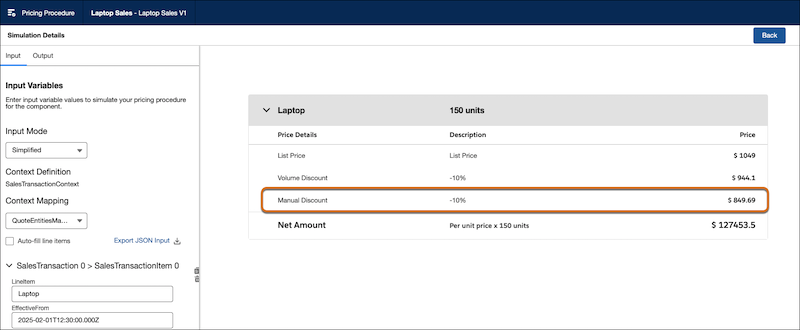
For example, you could create pricing rules for a long-term user to receive an additional 10% discount on their frequent laptop purchases. Let's assume your customer has purchased over 150 laptops, and as a loyalty incentive, you want to offer them an extra 10% discount on every laptop.
- Create a pricing procedure to calculate volume discounts.
-
Search for and add the Manual Discount element and map these variables.
- Adjustment Type: AdjustmentType
- Adjustment Value: AdjustmentValue
- Quantity: LineItemQuantity
- Input Unit Price: NetUnitPrice
-
Click
 and select Include in Output.
- Finally, set your preferences to view pricing information, profile access, and rank information.
- Save your procedure.
-
Click Simulate to test your procedure. Enter the input values
for your laptop product and click Simulate again.
The price waterfall shows the manual discounts used to calculate the final price of the laptops, confirming that your procedure is working as expected.