
You are here:
Configure Proration Settings
Set custom pricing term values to calculate product prices based on your customer's subscription length.
Required Editions
| Available in: Lightning Experience |
| Available in: Enterprise, Unlimited, and Developer Editions of Revenue Management (formerly Revenue Cloud) with the Revenue Cloud Growth license or the Revenue Cloud Advanced license. |
| User Permissions Needed | |
|---|---|
| To configure proration settings: | Salesforce Pricing Design Time |
The pricing term count determines how many billing periods are used to calculate a product's subscription price. When you use the Proration or Subscription element in a pricing procedure, the selling model type variable is automatically populated with the values you configure here. Configure default pricing term count values for two selling model types: Evergreen and One Time.
If you leave a field blank, the pricing term count is calculated dynamically from the subscription start and end dates during pricing procedure execution.
- From Setup, in the Quick Find box, enter Salesforce Pricing, and then select Salesforce Pricing Setup.
-
Enter values for Evergreen and One Time fields and save your changes.
Field Description Example Evergreen The default pricing term count for subscriptions with no end date. Because evergreen subscriptions recur indefinitely, this value represents how many billing periods to include in the subscription price calculation. A value of 1means the subscription price equals one billing period. For a monthly subscription priced at $50/month, the Subscription element calculates a total price of $50.One Time The default pricing term count for one-time purchases. This value determines how many billing periods the one-time price covers. A value of 1means the price covers a single billing period. A value of12means the one-time price covers 12 periods. Note You can only enter numeric values. Leave a field blank to calculate the pricing term count dynamically from the subscription start and end dates during pricing procedure execution.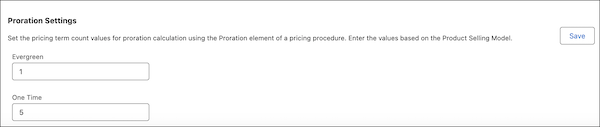
Did this article solve your issue?
Let us know so we can improve!
