
You are here:
Configure Pricing Resolution Strategies
To set a pricing resolution strategy, create a procedure output resolution record.
Required Editions
| Available in: Lightning Experience |
| Available in: Enterprise, Unlimited, and Developer Editions of Revenue Management (formerly Revenue Cloud) with the Revenue Cloud Growth license or the Revenue Cloud Advanced license. |
| User Permissions Needed | |
|---|---|
| To create procedure output resolution records: | Salesforce Pricing Design Time |
The main goal of creating a strategy is to define a formula to calculate the highest and lowest prices. The resources in the Formula section are based on the pricing element you’ve selected. If you specify a comma-separated list, the variables or resources are used as tiebreakers.
For example, if you define a formula as Min(List price, Priority), and two price books return the same list price, the price book with the priority tag value of lower numerical value is selected.
- From the App Launcher, find and select Price Management.
- From the app navigation menu, select Procedure Output Resolutions.
- Click New.
-
Specify these details.
- Give your procedure output resolution record a name.
-
Select your pricing element.
You can select only the List Price, Price Tracking, and Price Adjustment Matrix elements.
-
To define your pricing resolution strategy, enter a formula.
To define your pricing resolution strategy, enter a formula. To define a formula, follow the steps below.
- Select a function in the Search Function field.
- Highlight the value within the brackets and delete it.
- Place your cursor in the brackets and then, select a resource from the
Select a resource field.
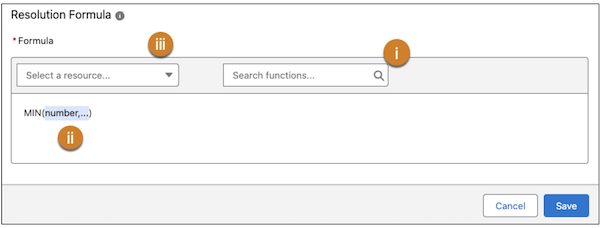
 Note The Stack and Sequence formula options appear only when you select the Price Adjustment Matrix element.
 - Save your changes.
Did this article solve your issue?
Let us know so we can improve!
