Prerequisites to Build Discovery and Derived Price Pricing Procedures
Before you begin creating discovery procedures to locate pricing data for your products
and assets, or to calculate a product’s derived price, ensure you have completed the following
prerequisites. A fundamental understanding of these concepts is crucial for the successful
implementation and operation of your pricing strategies.
Since you're gathering data from pricing sources (products, assets, quotes), it's
necessary to designate your products as both source products and derived products.
A source product is the product from which the price is
derived. This product must be added as a price book entry with a list price to a price
book.
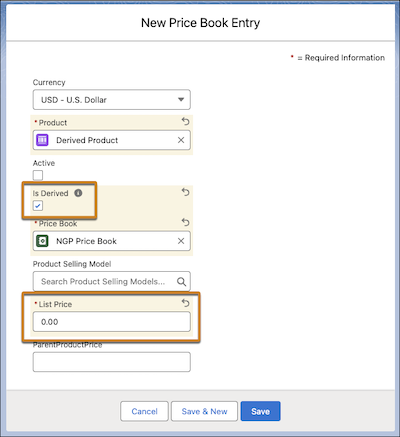
A derived product is the product for which the price is being
calculated. This product must also be added as a price book entry, but its list price
must be set to 0. The Derived Price feature will then determine its actual price.
You must create a derived price record where you set up the rules and formulas for
calculating a product's price. Think of it as the master plan for figuring out a derived
price.
When creating a discovery procedure, the Usage Type must be set to Pricing
Discovery. Pricing Discovery identifies and writes pricing data into a context
definition using context nodes populated by the pricing discovery function.
Ensure that the same context definition is used in both your discovery procedure and the
pricing procedure to calculate a product’s derived price.
If you're locating products in a discovery procedure, use the Derived Price
Entries decision table within the Fetch Pricing Rules element in the discovery
procedure.
If you’re locating assets, use the Asset Action Source Entries V2
decision table within the Asset Discovery element in the discovery procedure.
When you
clone or modify the Default Discovery Procedure for use, you’ll need to ensure that you
change the decision table to Asset Action Source Entries V2 and map
the new variables.
You can also clone a pricing discovery procedure from the
Salesforce Pricing Discovery Procedure expression set
template.
When you use the List Price element in a pricing procedure to fetch your products, you
must use the Price Book Entries V2 decision table or your custom
decision table. This decision table was built primarily for derived pricing scenarios.
When you use both discovery procedures and a pricing procedure to calculate the derived
price of a product, you must add the Assetize Order permission set to
refresh all the decision tables used.
The Derived Price element can't be used in a pricing procedure that includes the Promotion
Execution, Price Propagation, or the Discount Distribution Service elements.
Did this article solve your issue?
Let us know so we can improve!
Loading
Salesforce Help | Article
Cookie Consent Manager
Cookie Consent Manager
General Information
Required Cookies
Functional Cookies
Advertising Cookies
General Information
We use three kinds of cookies on our websites: required, functional, and advertising. You can choose whether functional and advertising cookies apply. Click on the different cookie categories to find out more about each category and to change the default settings.
Privacy Statement
Required Cookies
Always Active
Required cookies are necessary for basic website functionality. Some examples include: session cookies needed to transmit the website, authentication cookies, and security cookies.
Functional Cookies
Functional cookies enhance functions, performance, and services on the website. Some examples include: cookies used to analyze site traffic, cookies used for market research, and cookies used to display advertising that is not directed to a particular individual.
Advertising Cookies
Advertising cookies track activity across websites in order to understand a viewer’s interests, and direct them specific marketing. Some examples include: cookies used for remarketing, or interest-based advertising.