Loading
Upcoming Mandatory Changes to Public Key Infrastructure (PKI)Read More
Salesforce Enforces New Security Requirements in Summer 2026Read More
Table of Contents
Select Filters

          No results
          No results
          Here are some search tips

          Check the spelling of your keywords.
          Use more general search terms.
          Select fewer filters to broaden your search.

          Search all of Salesforce Help
          Override Local Cardinality

          Override Local Cardinality

          You can override the cardinality of product components and product classification components that are at the second level and beyond in the product hierarchy. When you override the local cardinality, you update the product component or product classification component cardinality while maintaining a record of the original local cardinality. You can revert to the original cardinality by restoring the default cardinality.

          Required Editions

          User Permissions Needed
          To override cardinality: Manage Product Catalog
          To use the structure tab: ARC Access permission set
          Note
          Note Overriding the cardinality overrides the cardinality for the product component or product classification component in the context of the root product bundle. The cardinality of the product component or product classification component remains the same in the context of other product bundles.
          Warning
          Warning Overriding the local cardinality for a product that’s been added multiple times in a bundle, overrides the local cardinality for every instance of the product throughout the bundle.
          1. From the Product Catalog Management app’s home page, click Products.
          2. From the Product list view page, click the bundled product that contains the product component or product classification component whose cardinality you want to override.
          3. Navigate to the Structure tab.
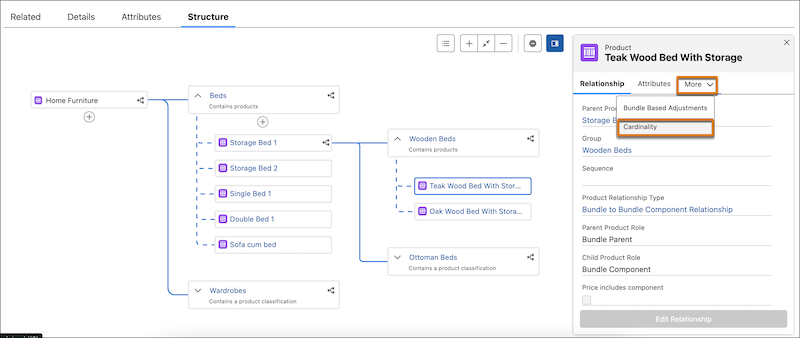
          4. To override the product cardinality, click the product tile for a product at the second level in the product hierarchy. To override the product classification cardinality, click the product classification tile under a group at the second level in the product hierarchy
            The first product in the bundle hierarchy is the root product. The products, groups, and product classifications at the first level are the immediate child components of the root product. You can edit the cardinality of products, groups, and product classifications only at the first level. You can override the cardinality of products, groups, and product classifications only at the second level and beyond.
          5. In the right pane, click The down arrow next to More, and click Cardinality.
            Override cardinality for products and groups at the second level
          6. Click Override.
            Overriding the cardinality overrides the cardinality for the product component or product classification component in the context of the product bundle. The original product component or product classification component cardinality is retained and can be reverted to if necessary.
          7. Override the cardinality as necessary.
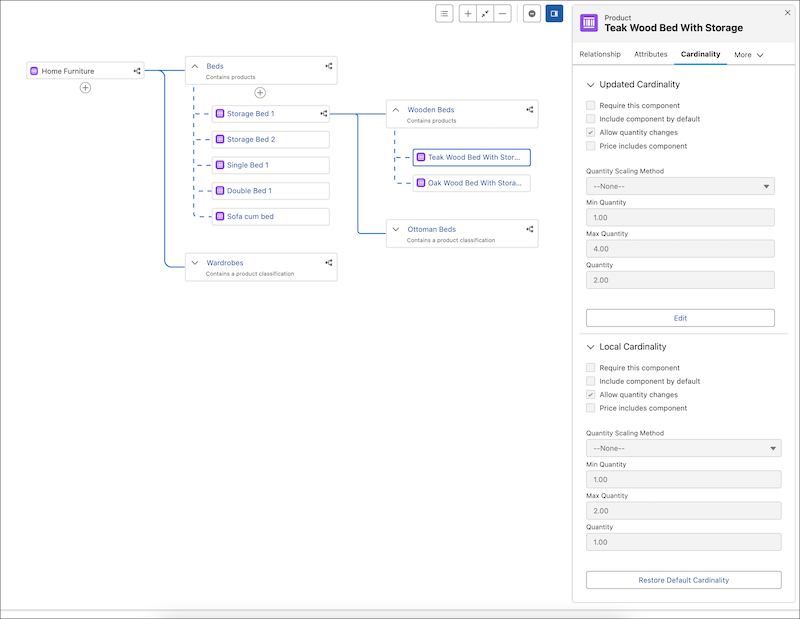
            This example illustrates the local and updated cardinality for the product Teak Wood Beds with Storage at the second level. The local cardinality was minimum quantity 1, maximum quantity 2, and default quantity 1. The updated cardinality is minimum quantity 1, maximum quantity 4, and the default quantity 2.
            The local and updated product cardinality for a product at the second level
          8. Save your changes.
            The overridden cardinality appears in the right pane. You can edit the overridden cardinality as necessary.

          If you want to revert to the original product component or product classification component cardinality, click Restore Default Cardinality. Restoring the default cardinality deletes the overridden cardinality and restores the original product component or product classification component cardinality.

           
          Loading
          Salesforce Help | Article