Create complex product configurations with ease by using Product Configurator. Define
attributes, variants, and metadata. Test and verify your product configurations with the
built-in run-time experience. Your users can use the Product Configurator to easily configure
the product options during the purchase process and view the relevant pricing.
Products are all the items and services that you sell to customers. There are two types of
products: simple products and bundled products. Simple products don’t have an associated
product hierarchy while bundled products generally have one.
Bundled products are a group of products that are sold together as one unit. A bundled
product consists of a parent product and child products. The child products are listed as
options in the Product Configurator. The product bundle definition determines the option group
that is shown during product configuration.
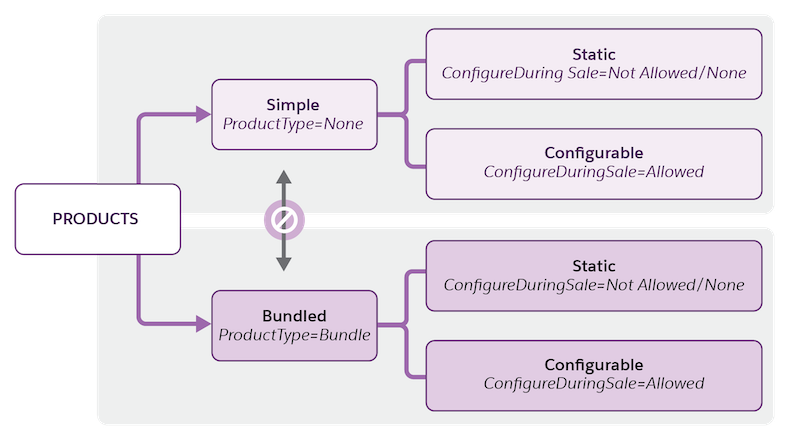
Simple and bundled products are further classified into static or configurable products,
depending on whether the products can be configured at run time.
The Type and Configure During Sale fields are available during the creation of product
records.
The Product Type field determines whether the product is a simple product or a bundled
product.
The Configure During Sale field determines whether the product is static or
configurable.
Example
Static Simple Product: A 10 GBPS SFP+ transceiver is a single, standalone component with
one specification. A customer buys it as-is to plug into a switch.
Simple Configurable Product: A fiber optic patch cable is a single product. However,
customers must select a specific length and connector type before adding it to the cart.
Static Product Bundle: A quick-start rack mounting kit is a bundle that always contains the
same fixed items: two steel rails, a bag of M6 screws, a cable management arm, and a
physical installation guide. There are no choices for the buyer. It’s a pre-packaged set of
items sold under one SKU.
Configurable Product Bundle: A next-gen rack server has a chassis comes with a pre-selected
motherboard and a base cooling system. Customers must choose the CPU and RAM capacity. They
can also add redundant power supplies, an enterprise RAID controller, or an extended 3-year
Mission-Critical support tier.
Configure Simple Products Configure a simple product to update its quantity and default attribute values.
Configure Bundled Products Configure a bundled product to update the quantity of products, and view the default options within option groups and the default values of attributes. You can select attributes for the parent bundle and child products.
Get the Latest Pricing Use Instant Pricing to control the pricing calls made for each configuration change. When you change product selections, the prices shown in the summary component change immediately.
Validate Product Configuration Product validation rules enhance the performance and address potential errors before saving a configuration.
Save and Reuse Configurations After you configure simple and bundled products, you can save the configurations and reuse them. You can also edit and delete saved configurations.
Did this article solve your issue?
Let us know so we can improve!
Loading
Salesforce Help | Article
Cookie Consent Manager
Cookie Consent Manager
General Information
Required Cookies
Functional Cookies
Advertising Cookies
General Information
We use three kinds of cookies on our websites: required, functional, and advertising. You can choose whether functional and advertising cookies apply. Click on the different cookie categories to find out more about each category and to change the default settings.
Privacy Statement
Required Cookies
Always Active
Required cookies are necessary for basic website functionality. Some examples include: session cookies needed to transmit the website, authentication cookies, and security cookies.
Functional Cookies
Functional cookies enhance functions, performance, and services on the website. Some examples include: cookies used to analyze site traffic, cookies used for market research, and cookies used to display advertising that is not directed to a particular individual.
Advertising Cookies
Advertising cookies track activity across websites in order to understand a viewer’s interests, and direct them specific marketing. Some examples include: cookies used for remarketing, or interest-based advertising.