
You are here:
Configure License Training Requirements in Public Sector
Set up the training courses, course offerings, and exams that individuals must complete to qualify for professional and occupational licenses.
Required Editions
| View supported product editions. |
| User Permissions Needed | |
|---|---|
| To create training course, course offering, and examination records: | Public Sector Access |
To issue professional or occupational licenses, many regulatory authorities require that licensees first complete a course of study or pass an exam. Licensing tests assess a test taker's knowledge of the health and public safety measures that protect consumers within their scope of practice. The tests ensure that licensees understand the basic skills required to work safely and not harm a consumer. For example, barbers and hair stylists must pass a written examination. Certified public accountants, licensed clinical social workers, pharmacists, registered dental hygienists, and other professionals must complete board-approved education courses and pass an examination.
In Public Sector, these objects represent training and testing requirements for professional and occupational licenses.
- Training Course
- A course that's required for an individual to complete to qualify for an occupational or professional license. Includes the course name, a description, and total credits and hours.
- Course Offering
- An instance of a training course, including its name, a description, the location, and the start and end dates.
- Examination
- Information about authorized examinations that qualify an individual for a professional or occupational license or permit, including the name, description, and status.
- Training Course Participant
- A training course completed by a person. Includes details such as the participant's name, the course offering ID, the name of the institution that offered the training, and the result.
- Person Education
- Information about the professional education for a person who's applying for a professional or occupational license or permit. Includes the person's contact ID, the name of the degree and the educational institution, the education level, graduation date, and status.
- Person Examination
- Information about an examination taken by a person who's applying for a professional or occupational license or permit. Includes the person's contact ID, the name of the exam and the institution that offered the exam, and the result, score, completion date, and effective to and from dates.
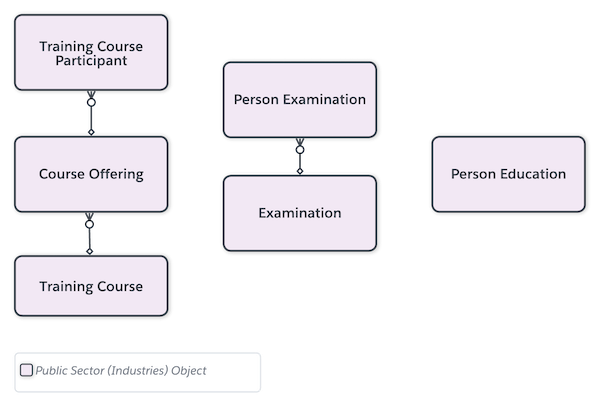
Here's how to create training course, course offering, and examination records in Public Sector.

Create a Training Course
Define the training courses that are required for professional and occupational licenses and permits.
- From the App Launcher, find and select Training Courses.
- Click New.
- Enter a name and, optionally, a description for the course. For example, for Name, enter Dental Anatomy. For Description, enter Overview of dental anatomy, including the primary and permanent dentitions, normal facial and intraoral anatomy, and the anatomy of the periodontium.
- For Status, select Active.
- Enter the total credits and hours for the course.
- Save your changes.
Create a Training Course Offering
Create an instance of a training course with a specific location and dates.
- From the App Launcher, find and select Course Offerings.
- Click New.
- Enter a name and, optionally, a description for the course. For example, for Name, enter Dental Anatomy Spring 2023.
- Select a location, or create one.
- Enter the start and end dates and times for the course offering.
- For Course Name, select the training course related to the offering. For example, select Dental Anatomy.
- Save your changes, or save them and create another course offering.
Create an Examination
Define the exams that are required for professional and occupational licenses and permits.
- From the App Launcher, find and select Examinations.
- Click New.
- Enter a name and, optionally, a description for the examination. For example, for Name, enter Registered Dental Hygienist Clinical Examination.
- For Status, select Active.
- Save your changes.
To fully enable licensing training functionality in Public Sector, tie the objects to applications on your Experience Cloud site. Customize the Omniscript individual license application template or create an Omniscript form that requires applicants to provide training course, course offering, and examination details. Use an Omnistudio Data Mapper to create training course participant and person examination records, or person education records, upon submission. See Create and Update Data from Omniscripts.
