
You are here:
Create Business Regulatory Authorization Type Dependencies
Establish relationships between business regulatory authorization types in Public Sector Solutions.
Required Editions
| View supported product editions. |
| User Permissions Needed | |
|---|---|
| To create business regulatory authorization type dependencies: | Public Sector Access |
Many businesses require multiple licenses and permits to operate. Create business regulatory authorization type dependencies to define relationships and dependencies among required licenses and permits. Parent licenses or permits are issued before child licenses or permits.
For example, after a salon receives a business license, then it applies for a fire permit. A salon also needs a sign permit, but the sign permit is independent of the business license and fire permit, and the constituent can apply for it at any time.
To create a business regulatory authorization type dependency:
- From the App Launcher, find and select Business Regulatory Authorization Type Dependencies.
- Click New.
- Enter the name of the dependency record. Use a colon or other syntax to show the relationship. For example, enter Salon Establishment License: Fire Permit.
-
For Parent Business Regulatory Authorization Type, search for and then select the first
required business regulatory authorization type. For example, select
Salon,Salon Establishment License.
 Tip By default, the fields on the New Business Regulatory Authorization Type Dependency page search for the record name, which is BAT- followed by a 10-digit numeric string, such as
BAT-0000000001. To see a descriptive business regulatory authorization type name in the search field, create a custom text formula field on the Business Regulatory Authorization Type object. For the formula, enterBusinessTypeIdentifier.Name & "," & RegAuthTypeIdentifier.Name. Save the field, and then add it to the object's default search layout list of selected fields.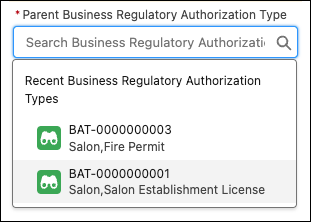
- For Dependent Business Regulatory Authorization Type, select the second business regulatory authorization type to apply for. For example, select Salon,Fire Permit.
- Save your changes, or save them and create another business regulatory authorization type dependency.
