
You are here:
Give Reviewers a Unified View of a Business or Applicant’s Records
Give users a complete view into the records that are related to a license or permit application, a public complaint, or an account by using the Hierarchical View component.
Required Editions
| View supported product editions. |
| User Permissions Needed | |
|---|---|
| To edit Lightning record pages: | Customize Application |
| To access business license applications: | Public Sector Access |
Hierarchical View is a Lightning web component that provides a structured, cascading view of related records. Add the component to a record page to save users from having to successively click through related records and navigate multiple tabs to gain context for a constituent and their license and permit applications. You can also use Hierarchical View to show caseworkers all of the investigations, violations, and enforcement actions for a complaint or account so that they can more easily make decisions about case proceedings and benefits. With the Hierarchical View component, you can show up to four levels of related records in a single, unified view.
The Hierarchical View component supports these objects.
- Account
- Assessment Indicator Value
- Assessment Task
- Authorization Application Place
- Authorization Location Access Schedule
- Business License Application
- Individual Application
- Inspection Assessment Indicator
- Public Complaint
- Regulatory Code Violation
- Regulatory Transaction Fee
- Regulatory Transaction Fee Item
- Violation Enforcement Action
- Visit
- Custom objects, except custom objects that contain polymorphic lookup fields
Say, for example, that you want application reviewers to see a unified view of records related to business license applications. Business license applications typically require an inspection visit to ensure regulatory code compliance. At the visit, the inspector records regulatory code violations, which result in violation enforcement actions such as regulatory transaction fees. For this scenario, create a hierarchical view on business license applications that shows these ordered, nested related lists:
- the application’s related visits
- each visit's related code violations
- each code violation’s related enforcement actions
- each enforcement action’s related fees
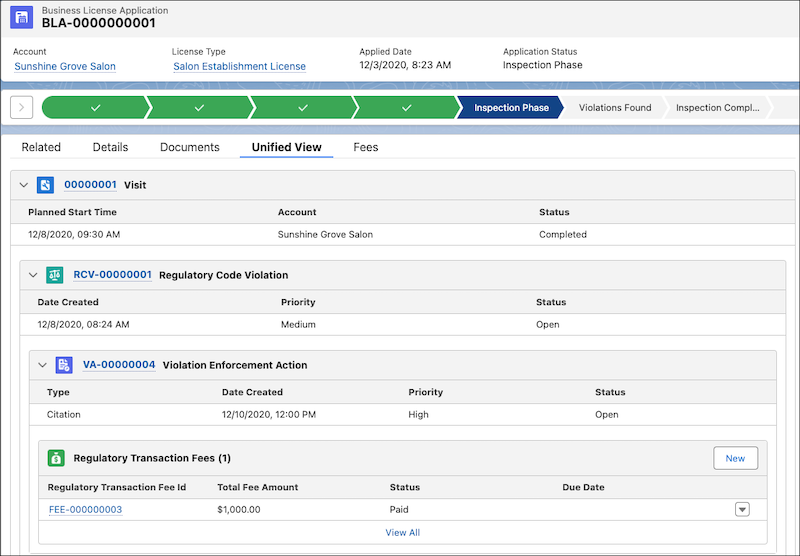
First, make sure that each object has the necessary related list on its record pages, and that each related list shows the fields that you want in the hierarchical view. For example, make sure that business license application pages have a Visits related list, and that visit pages have a Regulatory Code Violations related list. For instructions, see Customize Page Layouts with the Enhanced Page Layout Editor and Customize Related Lists.
Then, add the Hierarchical View component to a Lightning record page and define the levels of the hierarchy. Here’s how to create a unified hierarchical view on business license applications.
- In the License and Permit Management app, from the app navigation menu, select Business License Applications.
- Select a record.
-
Click
 , and then
select Edit Page.
, and then
select Edit Page.
- Select a tabbed component such as the component with the Related and Details tabs, and in the properties panel, click Add Tab.
- Make it a custom tab and, for Custom Label, enter a name. For example, enter Unified View.
- Select the tab and drag the Hierarchical View component to it.
-
Define up to four levels of related lists to show in the component.
 Important For each level, you can select only related lists that are on the page layout of the object on the next-highest level.
- Select an object for the first level of the hierarchy. For a business license application, for example, select Visits.
- Select an object for the second level of the hierarchy. For a business license application, for example, select Regulatory Code Violations.
- Select objects for the third level of the hierarchy. For a business license application, for example, select Violation Enforcement Actions or Regulatory Transaction Fees.
- Enter the number of records to show for the first three levels of the hierarchy.
- Save your changes and activate the page.
-
For regulatory inspections, configure these additional hierarchical views.
Object First-Level Related List Second-Level Related List Third-Level Related List Fourth-Level Related List Account - Unified View tab Business License Applications Visits Regulatory Code Violations Violation Enforcement Actions Account - Fees tab Regulatory Transaction Fees Regulatory Transaction Fee Items Business License Application - Fees tab Regulatory Transaction Fees Regulatory Transaction Fee Items Individual Application - Unified View tab Visits Regulatory Code Violations Violation Enforcement Actions Individual Application - Fees tab Regulatory Transaction Fees Regulatory Transaction Fee Items Public Complaint Visits Regulatory Code Violations Violation Enforcement Actions
