
You are here:
Create an Email Template with a QR Code for a Business License or Permit
Create an email template that includes a QR Code that someone can scan to see their business license or permit.
Required Editions
| View supported product editions. |
| User Permissions Needed | |
|---|---|
| To create email templates: | Lightning Experience User |
When a business license application or an individual application is approved, enable approvers to use the Send Email action to email a QR code to the applicant that confirms the authorization. Use a QR Code generator to create the code image, and then create an email template with a QR code that opens a business license record.

Note The email recipient who scans the QR code must have Read access to business license records
to open the record detail page.
- From the App Launcher, find and select Email Templates.
- Click New Email Template.
- Enter a name for the template, and select the folder where you want to save it.
-
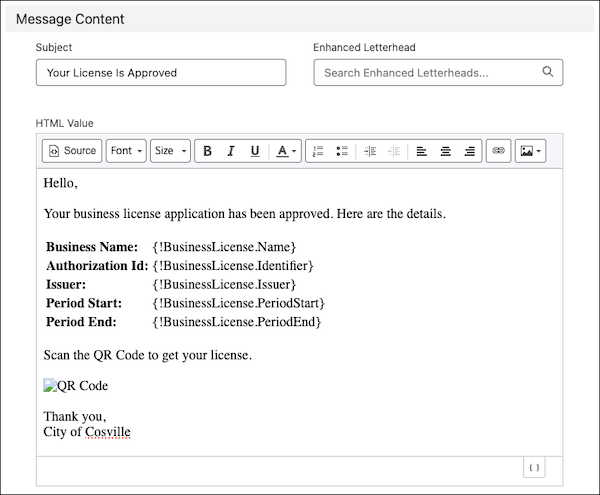
Compose the message.
- Enter a descriptive subject.
-
In HTML Value, write the body of the email.
- To insert merge fields, click
 , and then
select fields.
, and then
select fields. - To add a QR code, add an image and then, to add a URL to the image tag, click
Source. The URL includes the business license record ID. The HTML
for the image tag looks like this:
<img src=
          "https://[domain]/qrcode/{{{BusinessLicense.Id}}}" alt="QRCode"/>
- To insert merge fields, click
- Save your work.
The HTML for this sample email template looks like this.
<html style="overflow-y: hidden;">
<head>
<title></title>
</head>
<body style="height: auto; min-height: auto;"><br />
Hello, <br />
<br />
Your business license application has been approved. Here are the details.<br />
<br />
<table><tbody>
<tr><td><b>Name:</b></td><td> {!BusinessLicense.Name}</td>
<tr><td><b>Authorization Id:</b></td><td> {!BusinessLicense.Identifier}</td>
<tr><td><b>Issuer:</b></td><td> {!BusinessLicense.Issuer}</td>
<tr><td><b>Period Start:</b></td><td> {!BusinessLicense.PeriodStart}</td>
<tr><td><b>Period End:</b></td><td> {!BusinessLicense.PeriodEnd}</td>
<tbody></table>
<br />
Scan the QR Code to get your license.<br />
<br />
<img src="https://<your domain name>/qrcode/{{{BusinessLicense.Id}}}" alt="QR Code" />
<br />
Thank you,<br />
City of Cosville</div>
</body>
</html>
Did this article solve your issue?
Let us know so we can improve!
