
You are here:
Investigative Case Management Workflow
Explore how various personas can use Public Sector (formerly Public Sector Solutions) through the lifecycle of an investigative case to file a complaint, assess the complaint, create a case, investigate the case, manage evidence, initiate case proceedings, and finally record the resolution of the case.
Required Editions
| View supported product editions. |
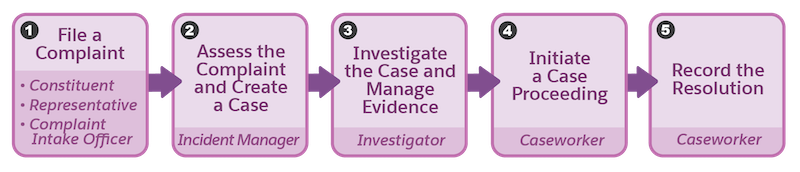
- 1. File a Complaint
- Constituents or their representatives can directly file complaints from the Benefit Assistance site or through the agency’s complaint intake officer.
- Work with the Salesforce admin to set up the complaint intake form on the Benefit Assistance Experience Cloud site. Configure the Omniscript guided flows to assist complaint intake officers to document constituent concerns.
- See Complaint Intake and Social Well-Being Concerns.
- 2. Assess the Complaint and Create a Case
- Incident managers conduct a preliminary assessment of the complaints and create a case record for further investigation. A single case can involve multiple related complaints. If a relevant case exists, the incident manager can link the new complaint to it.
- Work with the Salesforce admin to streamline and automate the assessment process by configuring Dynamic Assessments. Use Business Rules Engine to evaluate risks and determine the next steps based on the information gathered during the dynamic assessment. See Dynamic Assessments for Complaint Cases, Create a Case for a Complaint, and Business Rules Engine.
- 3. Investigate the Case and Manage Evidence
- Investigators use Casework Overview to review and manage critical case data. Get a quick glimpse of all the case participants. Organize and track relationships among people, between cases and complaints, or cases and other related entities, such as case proceedings, evidence, or violations. Easily record the investigative findings. For example, add a witness as a case participant. Collect, maintain, and share evidence details, track the chain of custody, and link to relevant regulatory code violations.
- Work with the Salesforce admin to set up Casework Overview. See Investigative Case Management Prerequisites.
- Use Salesforce and Public Sector capabilities to perform other key activities, as
listed in the table.
Activity Documentation Reference Review a snapshot of constituent details Plan and conduct visits Inspections Interview stakeholders Interaction Summaries Assess a case to identify any risks involved and the severity of violations Dynamic Assessments Make decisions based on assessments that were conducted Business Rules Engine Create task plans and checklists Action Plans - 4. Initiate a Case Proceeding
- Based on the investigator's findings, the caseworker creates a case proceeding, such as a court proceeding, an appeal, a mediation, or an arbitration. A proceeding session or hearing can include some or all case participants and some or all custody items. Constituents or their legal representatives can request case proceeding deferrals.
- Work with the Salesforce admin to set up a quick action to add case proceeding participants and configure the case proceeding deferral workflow. See Set Up Add Case Proceeding Participants Quick Action and Capture and Fulfil a Service Request.
- 5. Record the Resolution
- The caseworker records the resolution of the investigative case in case proceeding result and case episode records. See Create a Case Proceeding Result and Create a Case Episode.
- An investigative case resolution can be through a case proceeding result, internal closure that’s outside the judicial system, discontinuance, or referral to another agency.
Did this article solve your issue?
Let us know so we can improve!
