
You are here:
Provider Service Delivery Workflow
Understand how caseworkers and providers collaborate to deliver services to constituents in Public Sector (formerly Public Sector Solutions).
Required Editions
| View supported product editions. |
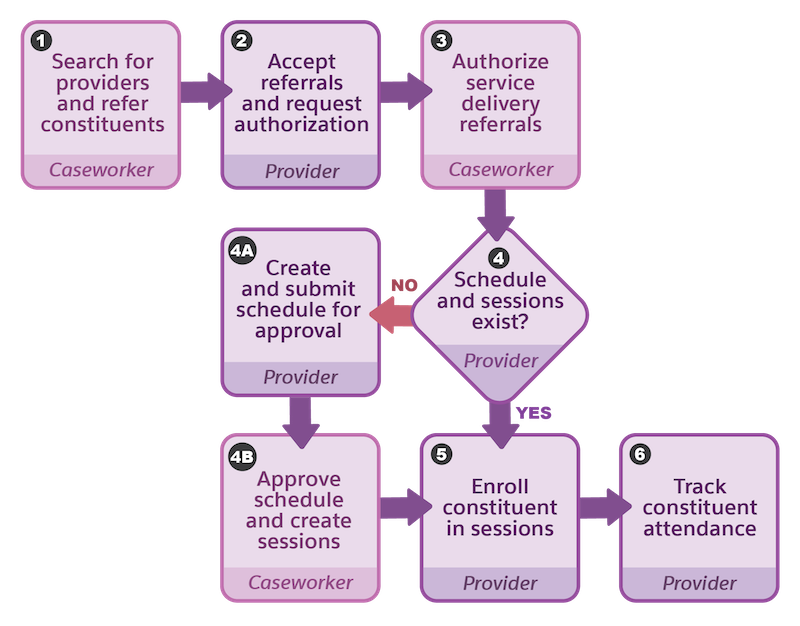
- 1. Search for Providers and Refer Constituents
- After the caseworker creates care plans, goal assignments, and benefits for the constituents, and determines the services that a constituent needs, they use provider search to find suitable providers who offer those services. Then, they use the provider referral guided flow to refer the constituent to the providers. The flow creates a referral record per provider that’s related to the case, constituent account, and the provider.
- See Provider Search and Provider Referral Guided Flow.
- 2. Accept Referrals and Request Authorization
- Providers review incoming referrals on the Home page of the provider site. They determine which referrals they can service, and then ask the caseworker to authorize them. See Build a Provider Site.
- 3. Authorize Service Delivery Referrals
- Caseworkers review the referral authorization requests and select one of them to serve the
constituent. On the referral record, they click Authorize Referral.

- See Authorize Referrals for Providers in Public Sector.
- Providers review the authorized referrals on the Clients page of the provider site.
- 4. Schedule and Sessions Exist?
- When they receive an authorized referral, the provider determines the benefit sessions that the constituent requires and check whether the sessions are scheduled.
- 4a. Create and Submit a Schedule for Approval
- If sessions are unavailable, the provider creates a schedule from the Schedules page in the provider site. The provider submits the schedule to the caseworker for approval.
- 4b. Approve Schedule and Create Sessions
- The caseworker reviews the benefit schedule from the provider. If it’s acceptable, on the
benefit schedule to be approved, they click Approve & Create
Sessions.

- See Approve Schedules from Providers in Public Sector.
- The approval flow creates the benefit schedule and benefit sessions.
- Providers review the approved benefit schedules on the Schedules page of the provider site.
- 5. Enroll Constituent in Sessions
- To enroll the constituent in sessions, the provider goes to the Clients page of the provider site and selects a benefit assignment. Then, from the Benefit Disbursement tab, they enroll the constituent in one or more benefit sessions. The flow creates a benefit disbursement record for every session enrollment.
- 6. Track Constituent Attendance
- Providers use the Attendance page of the site to track the constituent’s attendance at every session. The related benefit disbursement records are updated with the attendance status and disbursed quantity of the benefit.
- Caseworkers review the constituent’s attendance and disbursement quantities on the benefit assignment record. See Add Benefit Disbursements to a Page
Did this article solve your issue?
Let us know so we can improve!
