
You are here:
Conduct an Inspection by Using the Mobile App
Use the Public Sector (formerly Public Sector Solutions) Inspection Management app on a mobile device to conduct an inspection visit.
Required Editions
| View supported product editions. |
| User Permissions Needed | |
|---|---|
| To access visits and complete assessment tasks: | Industries Visit OR Public Sector Access OR Public Sector Field Access |
To use the Public Sector: Inspection Management mobile app, make sure that your device meets the Technical Requirements for Phones or the Technical Requirements for Tablets.
Start an Inspection Visit
Start your visit on the mobile app.
- In the Salesforce mobile app, tap Menu | App Launcher | Public Sector: Licensing, Permitting, and Inspection | Public Sector: Inspection Management.
-
Review the inspections that are scheduled for you for the current day.
- To filter the visits, tap
 , and then filter by priority, status, or date.
 - To sort the visits, tap , and then sort by date and time or priority.
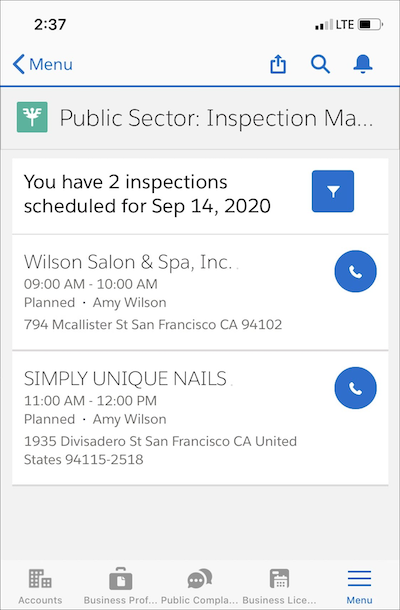
- To filter the visits, tap
- Tap a visit.
-
Take any of these actions.
- To see the tasks to complete for the inspection, tap Tasks.
- To see visit and task notes, tap Notes.
- To see special instructions, details related to the inspection, and account information for the applicant, tap Details.
- To begin the inspection, tap Start Visit.
Complete Inspection Tasks
Complete the tasks in the checklist on the mobile app.
- On the visit page, tap Tasks.
-
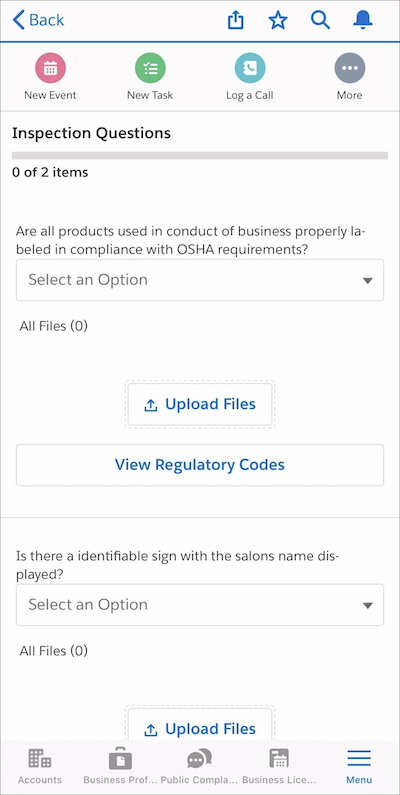
Complete the checklist.
- Enter or select values for inspection questions and results. Depending on how your administrator has configured assessment indicator statuses, some results, such as Fail, automatically create a regulatory code violation. Or, on the Regulatory Code Violations related list, tap New.
- To read the applicable regulatory code, tap View Regulatory Codes.
- To add images to support your observations, tap Upload Files.
- To take notes, tap More and then tap Add Notes. You can take notes for a visit and for a task.
- If required, record your signature or the signature of the appropriate contact.
Did this article solve your issue?
Let us know so we can improve!
