Use Lot-Based Renewals to Preserve Original Prices
To honor existing prices at renewal time, use lot-based or As-Is renewals to renew asset
lot quantities at their original purchase prices. For example, if a sales rep sells an asset
across multiple transactions, a lot-based renewal includes both the initial sale and subsequent
amendments. The system applies a price uplift individually to each lot based on the renewal
uplift.
Required Editions
Available in: Lightning Experience
Available in: Enterprise, Unlimited, and Developer Editions of
Revenue Cloud where Transaction Management is enabled
User Permissions Needed
To create as-is renewals:
InitiateRenewal API permission set
AND
Sales Rep persona permissions
Important You use lot-based renewals only when you turn on the As-Is Renewals
setting. See Enable Revenue Settings.
In the App Launcher, search for and select Assets.
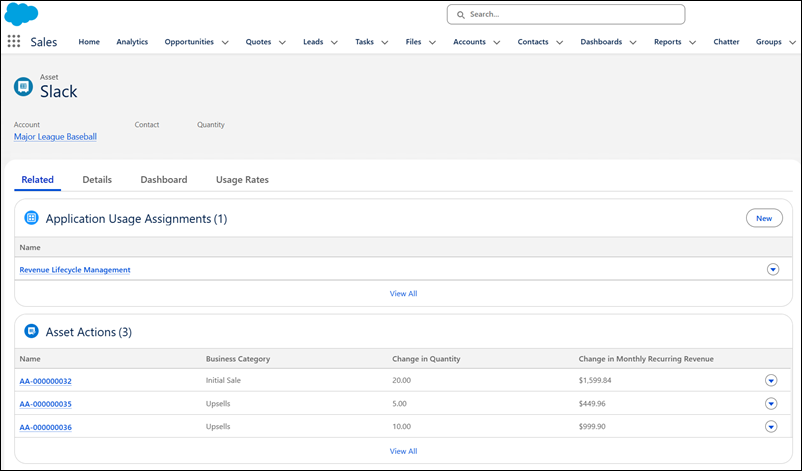
To view all sales transactions for an asset, select an asset and select the Related tab.
Review Asset Actions to see prior sales transactions.
Asset Record
In App Launcher, search for and select Accounts. On the Account page
under the Assets tab, select the asset that you want to renew.
To generate a new quote, in the Managed Assets viewer, select
Renew.
Under the Quote Line Items tab, on the renewal quote, select View on
the product's line.
To review the quote line detail records, under the Related tab, select View
All.
The quote line details show the breakdown of the prices honored for lot-based
pricing.
Did this article solve your issue?
Let us know so we can improve!

Loading
Salesforce Help | Article
Cookie Consent Manager
General Information
Required Cookies
Functional Cookies
Advertising Cookies
General Information
We use three kinds of cookies on our websites: required, functional, and advertising. You can choose whether functional and advertising cookies apply. Click on the different cookie categories to find out more about each category and to change the default settings.
Privacy Statement
Required Cookies
Always Active
Required cookies are necessary for basic website functionality. Some examples include: session cookies needed to transmit the website, authentication cookies, and security cookies.
Functional Cookies
Functional cookies enhance functions, performance, and services on the website. Some examples include: cookies used to analyze site traffic, cookies used for market research, and cookies used to display advertising that is not directed to a particular individual.
Advertising Cookies
Advertising cookies track activity across websites in order to understand a viewer’s interests, and direct them specific marketing. Some examples include: cookies used for remarketing, or interest-based advertising.