
You are here:
Anchor Product with Packs
An anchor product represents the primary usage-based product, such as QuantumBit Database Service. A pack is an add-on product that provides additional quantities of resources or offers different rates for the resources, such as a top-up or booster pack. For a pack to function as a top-up for the anchor, you must either bind the pack to an anchor or bind both the anchor and the pack to the same binding target, such as the same account.
Required Editions
| Available in: Lightning Experience |
| Available in: Enterprise, Unlimited, and Developer Editions with the Revenue Cloud Advanced license or the Revenue Cloud Billing license |
Usage Entitlement Buckets
After the pack is bought and assetized, Consumption Management creates a parent usage entitlement bucket for the resource, such as SMS. This bucket represents the total available balance. The anchor creates the first child bucket containing the base grant, for example, 100 SMS. The pack creates a second child bucket containing the add-on grant, for example, 50 SMS. The parent bucket shows the total age of balance, which is the sum of all active child buckets (100 + 50 = 150 SMS).
Drawdown Logic
When consumption occurs, the system looks at the usage entitlement buckets. It draws down based on the drawdown order, for example, by drawing the grants that are expiring sooner. If the pack expires sooner than the anchor, the system uses the pack's grants first.

- The wallet shows a total balance of 6,000 SMS messages.
- Consumption Management creates two child buckets—one with 4,000 messages that are valid for 30 days and one with 2,000 messages, which are valid for 15 days.
- Consumption Management deducts usage from the 2,000 SMS bucket first because it expires sooner.
Rate Applicability on Pack Products
When a pack product is bound to an anchor product, to ensure the most favorable pricing throughout the contract period, Usage Management determines the applicable rate by using certain rules.
- Latest—assigns priority to the rate from the most recently purchased started asset that's currently active.
- Cheapest—selects the lowest rate if multiple assets share the same start date.
Imagine a streaming service, Streamverse, that offers a base subscription and various promotional packs. A customer, Alex, buys a Standard subscription for the entire year (Jan 1 - Dec 31) at the rate of $10 per month. Over the year, the sales rep adds several new promotional packs to Alex's subscription.
| Pack Name | Start Date | Expiry Date | Rate |
|---|---|---|---|
| Welcome Pack | Jan 15 | Mar 15 | $8 |
| New Year Promo | Jan 15 | Mar 31 | $9 |
| Spring Fling Promo | Feb 1 | Apr 30 | $7 |
| Summer Blockbuster Pack | Jun 1 | Aug 31 | $6 |
Here's a breakdown of Alex's monthly bill based on the latest and cheapest rules:
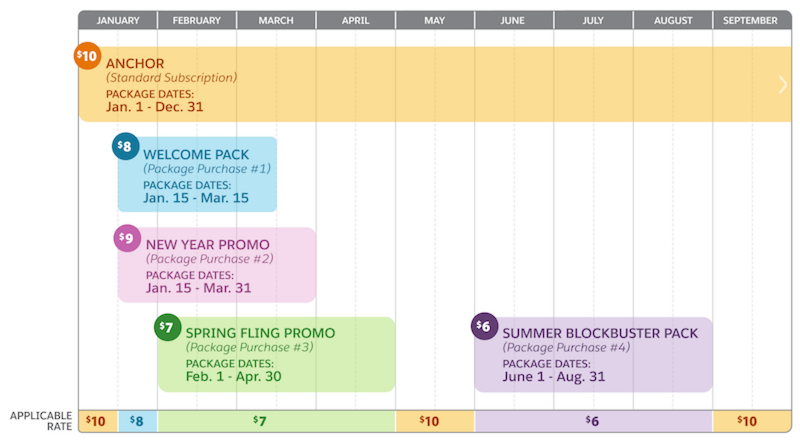
| DATE RANGE | APPLICABLE RATE | REASON |
|---|---|---|
| Jan 1 - Jan 14 | $10 | Standard subscription is the only active anchor. |
| Jan 15 - Jan 31 | $8 | Welcome Pack and New Year Promo both start on Jan 15. Welcome Pack has the cheapest rate ($8). |
| Feb 1 - Mar 15 | $7 | Spring Fling Promo starts on Feb 1. Its rate of $7 is the latest and cheapest among all active packs. |
| Mar 16 - Mar 31 | $7 | Welcome Pack expires. Spring Fling Promo is still the latest and cheapest of the remaining active packs. |
| Apr 1 - Apr 30 | $7 | New Year Promo expires. Spring Fling Promo is still the latest and cheapest. |
| May 1 - May 31 | $10 | Spring Fling Promo expires. The rate reverts to the Standard Subscription rate. |
| Jun 1 - Aug 31 | $6 | Summer Blockbuster Pack starts on Jun 1. Its rate is the latest and cheapest. |
| Sep 1 - Dec 31 | $10 | Summer Blockbuster Pack expires. The rate returns to the Standard Subscription rate. |
